How to use puppeteer with AWS Lambda
In this tutorial, we're going to learn about how to use puppeteer with AWS Lambda. As you may know, Puppeteer is a Node.js library that provides a high-level API to control Chrome/Chromium.
We'll be using AWS CDK in this guide. It's an open-source software development framework that lets you define cloud infrastructure. AWS CDK supports many languages including TypeScript, Python, C#, Java, and others.
You can learn more about AWS CDK from a beginner's guide here.
Puppeteer packages
Before discussing how to use puppeteer with AWS Lambda, we need to discuss how puppeteer works at a high level.
Puppeteer is available in 2 packages - puppeteer and puppeteer-core . The difference between puppeteer and puppeteer-core is that when you install puppeteer package, it will install the latest version of chromium by default whereas when you install puppeteer-core package, it will just install puppeteer without any chrome installation. You need to install chrome/chromium separately.
The size of the latest chromium would be around ~282 MB in Linux. The maximum deployment size of Lambda is 250 MB. As we would like to use this in AWS Lambda, we need to find a trimmed version that takes less space and is suitable for serverless environments.
We're going to use @sparticuz/chromium npm package for chromium along with puppeteer-core
One important point to note here is that you need to install compatible versions of these packages. You can find the compatible version on this support page
npm install puppeteer-core@$PUPPETEER_VERSION
npm install @sparticuz/chromium@$CHROMIUM_VERSION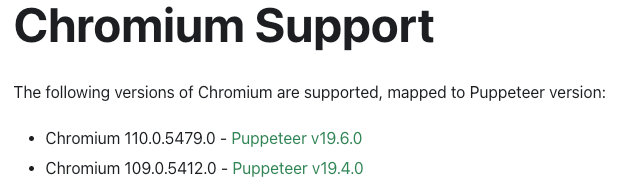
For example, I've installed the second latest version as shown below
npm install puppeteer-core@$19.4
npm install @sparticuz/chromium@109.0.5
Puppeteer Configuration
Below is the puppeteer configuration. You need to set the executablePath which got from executablePath method of chromium (which comes from @sparticuz/chromium package )
    const browser = await puppeteer.launch({
      executablePath: await chromium.executablePath(),
      headless: chromium.headless,
      ignoreHTTPSErrors: true,
      defaultViewport: chromium.defaultViewport,
      args: [...chromium.args, "--hide-scrollbars", "--disable-web-security"],
    });
Lambda function
Below is the sample lambda function code which takes a screenshot from a webpage and saves it to the /tmp directory. If you want, you can copy this image file to an S3 bucket and send it to the user.
import puppeteer from "puppeteer-core";
const chromium = require("@sparticuz/chromium");

export const handler = async (
  event: any = {},
  context: any = {}
): Promise<any> => {
  try {

    const browser = await puppeteer.launch({
      executablePath: await chromium.executablePath(),
      headless: chromium.headless,
      ignoreHTTPSErrors: true,
      defaultViewport: chromium.defaultViewport,
      args: [...chromium.args, "--hide-scrollbars", "--disable-web-security"],
    });
    const page = await browser.newPage();

    await page.goto("https://developers.google.com/web/");

    await page.screenshot({
      path: "/tmp/screenshot.jpg",
      fullPage: true,
    });
    await browser.close();
 } catch(err) {
     console.log("Some error happended: ", err);
 }
Lambda function properties
When you're creating a lambda function, you need to make sure that you pass @sparticuz/chromium package to nodeModules property as shown below
const nodeJsFunctionProps: NodejsFunctionProps = {
      bundling: {
        externalModules: [
          "aws-sdk", // Use the 'aws-sdk' available in the Lambda runtime
        ],
        nodeModules: ["@sparticuz/chromium"],
      },
      runtime: Runtime.NODEJS_18_X,
      timeout: Duration.minutes(3), // Default is 3 seconds
      memorySize: 1024,
    };
As aws-sdk v3 is available in NodeJS 18 runtime, we don't need to include and so we're mentioning that in externalModules property
It is better to have sufficient memory configured for your lambda function.
Below code snippet shows how to configure the lambda function
 const screenshotFn = new NodejsFunction(this, "screenshotFn", {
      entry: path.join(__dirname, "../src/lambdas", "screenshot.ts"),
      ...nodeJsFunctionProps,
      functionName: "screenshotFn",
    });
Please let me know your thoughts in the comments