Connect an AI Agent to Tools with Amazon Bedrock AgentCore Gateway
Our MCP server works, but every agent still has to know how to reach it. We put Amazon Bedrock AgentCore Gateway in front, register the server as a target with Terraform, and write a tiny agent that discovers its tools over MCP.
In Part 2 we built a small MCP server with two tools and hosted it on Amazon Bedrock AgentCore Runtime. It works: a client connects, calls tools/list, and gets back get_order_status and get_delivery_estimate.
Today we put AgentCore Gateway in front of it and connect an actual AI agent to the Gateway, so the model can find those tools and decide to use them.
What we're building
An agent you can ask:
Where is order ORD-1001?
It has no idea what tools exist when it starts. It asks the Gateway, gets a list, hands that list to a Bedrock model, and the model picks one:
Nothing in the agent names a tool. It discovers them on every run.
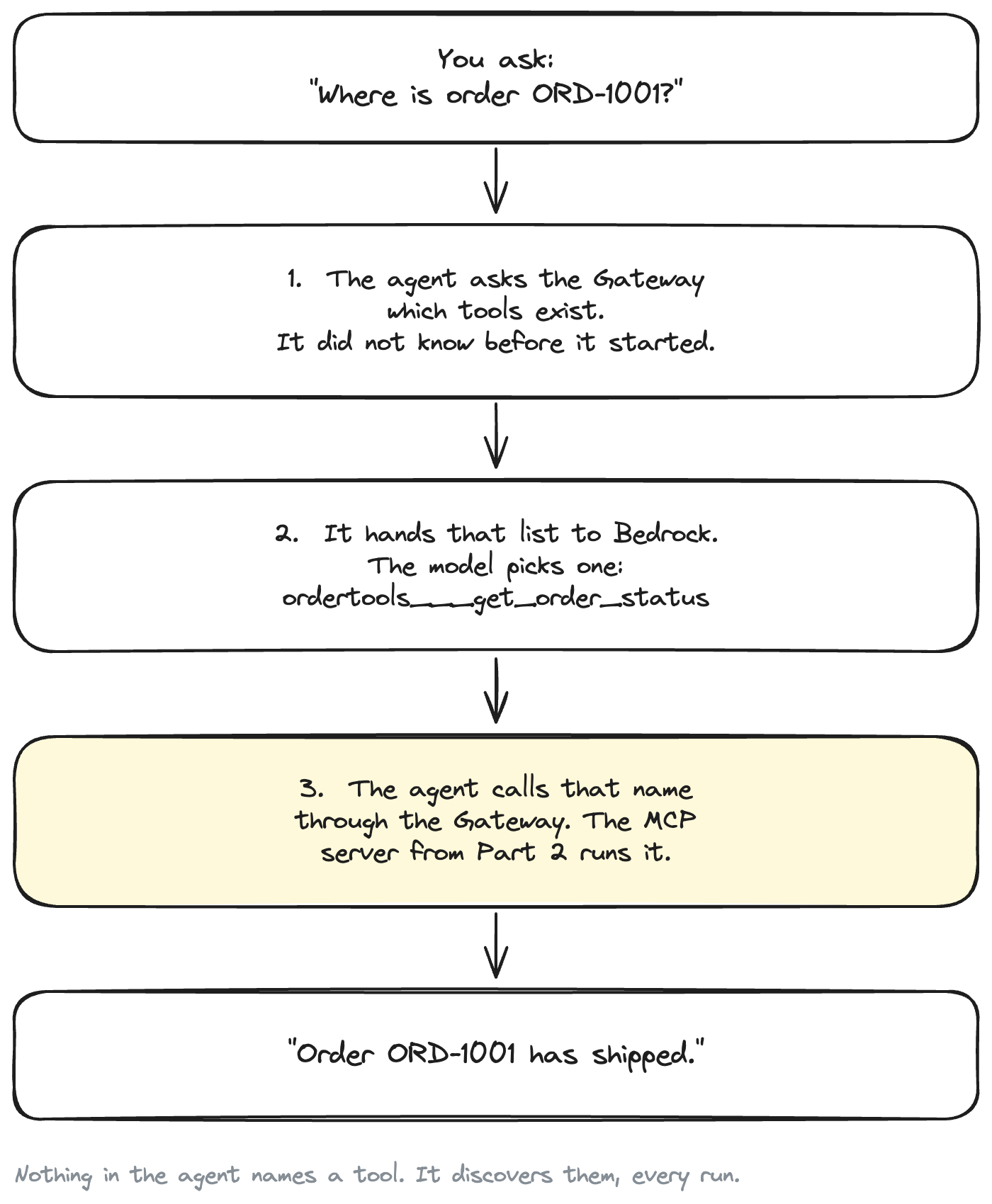
No agent framework. The loop is about forty lines, and you can read every one of them.
Where we left off
Part 2 ended here:
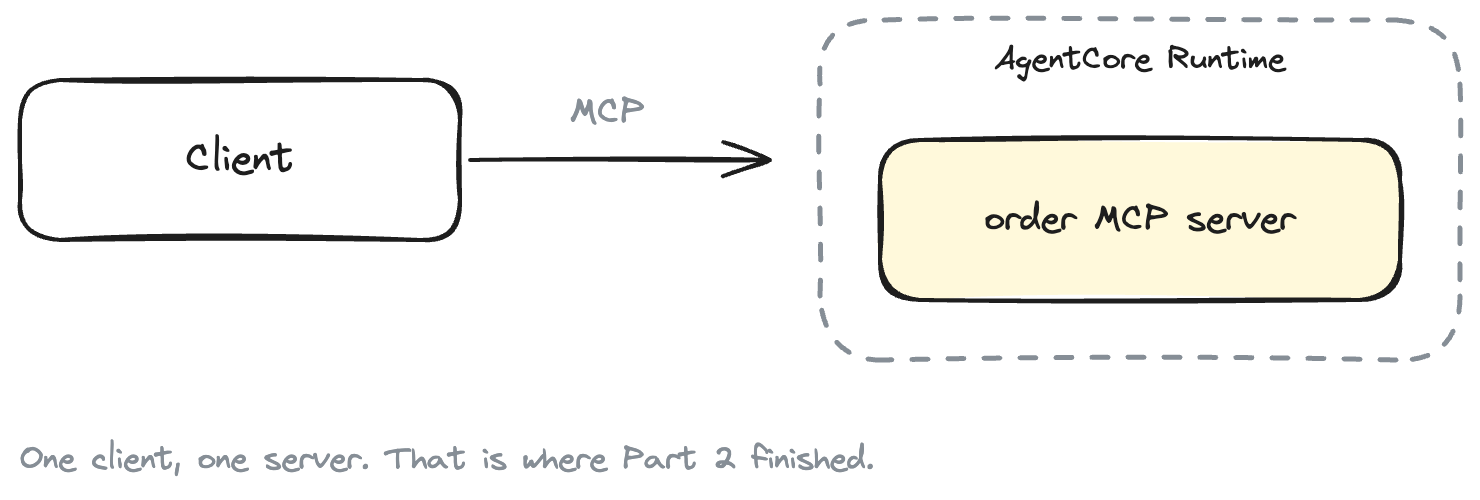
Now imagine the shape a real system takes. Orders live in an MCP server, the customer record is in a CRM behind a REST API, product search is a third service, and someone else's team has their own MCP server you are supposed to use.
One endpoint instead of four, and the credentials move off your agent.
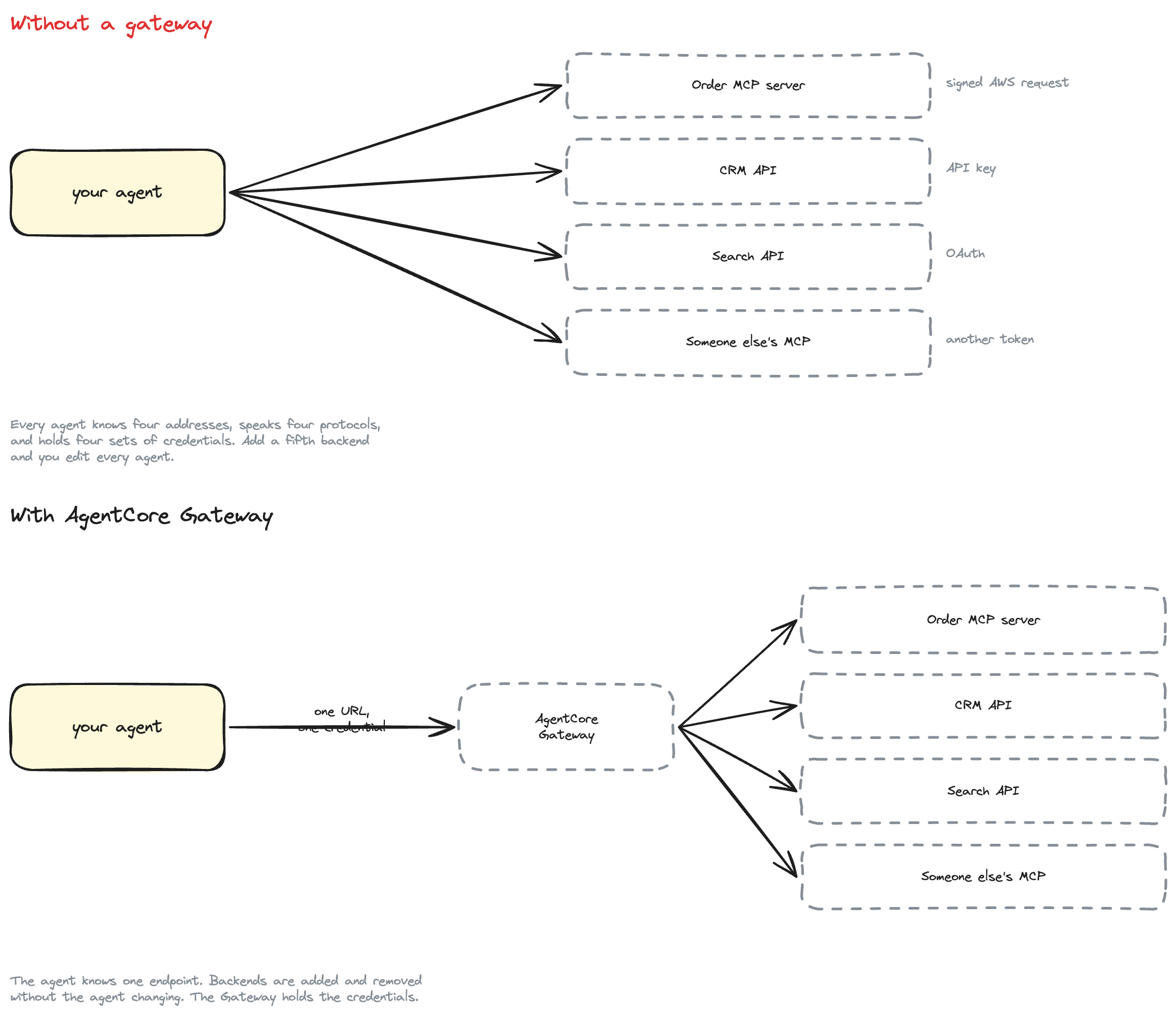
Without a gateway, every agent you write has to know all four addresses, speak whatever each one speaks, and hold four sets of credentials — and adding a fifth backend means editing every agent you have. Put a gateway in front and the agent knows one endpoint. Backends get added and removed without the agent changing at all.
Why use AgentCore Gateway if we already have MCP?
Fair question. Our MCP server already speaks MCP — what does another hop buy?
Four things, and they are worth being precise about:
It is one MCP endpoint for many backends. Gateway aggregates. Attach five targets and a client still sees a single tools/list containing all of their tools. That is what AWS calls aggregation mode, and it is the whole point.
It translates non-MCP things into MCP. Our target already speaks MCP, so there is nothing to translate today. But a Lambda function, an OpenAPI spec, a Smithy model (AWS's own way of describing an API) or an API Gateway REST stage can also be a target, and Gateway turns each of them into MCP tools. Your agent cannot tell the difference.
It holds the credentials. Each backend wants to be authenticated differently — one wants a signed AWS request, another an API key, a third an OAuth token. The Gateway keeps all of those. Your agent presents one credential to the Gateway and never sees the others.
(Signing an AWS request is what AWS calls SigV4: the caller attaches a signature computed from their AWS credentials, proving who they are. The CLI and every AWS SDK do it invisibly on every call. We met it in Part 2.)
It can search tools instead of listing them. Once you have hundreds of tools, sending all of them in every prompt gets expensive. Gateway can expose a semantic search tool instead. We do not need it for two tools, but it is the reason the aggregation matters at scale.
What Gateway is not: it does not host your code. Something else has to be running the MCP server. In our case that is still AgentCore Runtime, from Part 2.
AgentCore Gateway in plain English
Five terms, and you have seen most of them already:
Gateway — the managed MCP endpoint your agent connects to. It has a URL, an inbound authorizer, and a service role.
Target — one backend attached to a gateway. A target has a type: mcpServer, lambda, openApiSchema, smithyModel, apiGateway, and a few more. Ours is mcpServer.
Tool — one callable thing. Gateway namespaces tools by the target they came from, using three underscores:
${target_name}___${tool_name}
So get_order_status on a target called ordertools is exposed to the agent as ordertools___get_order_status. This trips people up, so it is worth remembering now.
Inbound authorization — how the gateway decides whether you may call it. Either IAM (AWS_IAM, SigV4 with your AWS credentials) or a JWT from an OAuth provider (CUSTOM_JWT). We use IAM.
Outbound authorization — how the gateway authenticates to a target. For us, the gateway signs its call to AgentCore Runtime with SigV4 using its own service role.
Architecture
This is what we actually build, and it is exactly what the code does:
You sign your call to the Gateway. The Gateway signs its own call to the Runtime.
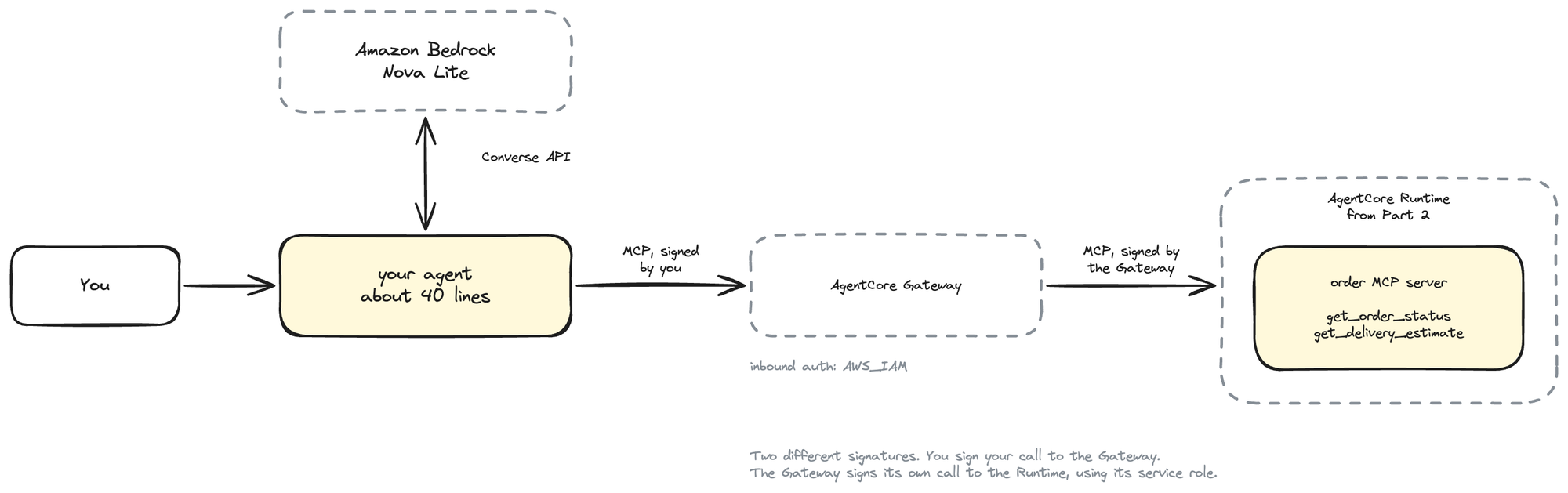
Two things are worth calling out, because a reasonable person would guess otherwise.
An AgentCore Runtime MCP server can be a Gateway target — directly. There is an mcpServer target type whose endpoint is any HTTPS URL that speaks MCP, and AWS explicitly lists AgentCore Runtime as compatible with IAM outbound authorization. So the architecture you would sketch on a napkin is the one AWS supports. No Lambda shim, no rewrite.
Gateway does not host the MCP server. It calls it. If you delete the Part 2 runtime, the Gateway stays up and the target starts failing. They are separate responsibilities, which we come back to at the end.
Prerequisites
- Part 2 deployed. We reference its runtime; we do not deploy a second copy.
- uv, Terraform 1.9+, AWS CLI v2 configured
- A region where AgentCore is available — we use
us-east-1, and it must be the same region as Part 2 - Bedrock model access for Amazon Nova Lite (Bedrock console → Model access). It is cheap, it supports tool use, and unlike the Anthropic models on Bedrock it needs no use-case form
Four identities, not one
This is where AgentCore tutorials usually go blurry, so let us be explicit. Four different things need permissions, and they are not the same thing:
| Identity | Needs to | Where it lives |
|---|---|---|
| You, running Terraform | create gateways, targets, IAM roles | your AWS profile |
| The gateway service role | call the Part 2 runtime | terraform/iam.tf |
| You, running the agent | bedrock-agentcore:InvokeGateway, bedrock:InvokeModel |
your AWS profile |
| The runtime execution role | run the container, write logs | Part 2, unchanged |
Terraform creates the second one and scopes it to a single action on a single runtime. It also writes the third as a customer-managed policy you can read and attach, though while you are learning your own credentials probably already cover it.
Nobody needs AdministratorAccess.
Part 2 checkpoint: the MCP server still works
Before adding anything, confirm what we already have. From the Part 2 project:
cd agentcore-mcp-runtime
uv run python scripts/invoke.py ORD-1001
tools/list:
  - get_order_status: Look up the current status of a customer order.
  - get_delivery_estimate: Get the delivery estimate and carrier details for a customer order.

Result:
{
  "order_id": "ORD-1001",
  "status": "shipped"
}
Two tools, deterministic data (ORD-1001 shipped, ORD-1002 processing, ORD-1003 delivered). We are not going to touch this server again. Everything below is new code in a new project.
Create the Gateway with Terraform
New project, agentcore-gateway-mcp, alongside the Part 2 one.
mkdir -p agentcore-gateway-mcp/{src/order_agent,scripts,tests,terraform}
cd agentcore-gateway-mcp
Good news on tooling: as of AWS provider 6.58, both resources we need are first-class in hashicorp/aws. No awscc, no boto3 helper script, no "unfortunately you have to run this bit by hand". The whole thing is Terraform.
terraform/versions.tf:
terraform {
  required_version = ">= 1.9"

  required_providers {
    aws = {
      source  = "hashicorp/aws"
      version = ">= 6.58"
    }
  }
}
The gateway
terraform/gateway.tf:
resource "aws_bedrockagentcore_gateway" "order" {
  name        = var.gateway_name
  description = "Order tools for the Cloud Tech Simplified AgentCore series"
  role_arn    = aws_iam_role.gateway.arn

  protocol_type   = "MCP"
  authorizer_type = "AWS_IAM"

  protocol_configuration {
    mcp {
      instructions = "Tools for checking the status and delivery estimate of a customer order. Order ids look like ORD-1001."
    }
  }

  depends_on = [aws_iam_role_policy.gateway]
}
Two lines decide what kind of gateway this is.
protocol_type = "MCP" puts the gateway in aggregation mode: it becomes an MCP server whose tools are the union of its MCP targets' tools. (Omit it and you get a gateway that can also do plain HTTP passthrough, which we do not want.)
authorizer_type = "AWS_IAM" is the reason this tutorial has no Cognito, no OAuth client, and no login screen. Callers sign requests with SigV4 using the AWS credentials they already have, and the gateway checks they hold bedrock-agentcore:InvokeGateway. That is the entire inbound auth story, and there is no authorizer_configuration block to write. We will come back to why that is not a production answer.
The gateway service role
terraform/iam.tf, the interesting half:
data "aws_iam_policy_document" "gateway_assume_role" {
  statement {
    sid     = "GatewayAssumeRolePolicy"
    effect  = "Allow"
    actions = ["sts:AssumeRole"]

    principals {
      type        = "Service"
      identifiers = ["bedrock-agentcore.amazonaws.com"]
    }

    condition {
      test     = "StringEquals"
      variable = "aws:SourceAccount"
      values   = [local.account_id]
    }

    condition {
      test     = "ArnLike"
      variable = "aws:SourceArn"
      values   = ["arn:aws:bedrock-agentcore:${local.region}:${local.account_id}:gateway/${var.gateway_name}-*"]
    }
  }
}

data "aws_iam_policy_document" "gateway" {
  statement {
    sid       = "InvokeOrderMcpRuntime"
    effect    = "Allow"
    actions   = ["bedrock-agentcore:InvokeAgentRuntime"]
    resources = [var.agent_runtime_arn, "${var.agent_runtime_arn}/*"]
  }

  statement {
    sid     = "GatewayWorkloadIdentity"
    effect  = "Allow"
    actions = ["bedrock-agentcore:GetWorkloadAccessToken"]
    resources = [
      "arn:aws:bedrock-agentcore:${local.region}:${local.account_id}:workload-identity-directory/default",
      "arn:aws:bedrock-agentcore:${local.region}:${local.account_id}:workload-identity-directory/default/workload-identity/${var.gateway_name}-*",
    ]
  }
}
One action, on one runtime. When the Gateway calls our MCP server it is doing InvokeAgentRuntime against the runtime's endpoint, so that is what it needs and nothing else. The two conditions on the trust policy stop another AWS account tricking AgentCore into using this role on their behalf: only AgentCore may assume it, only for our account, only for a gateway named like ours.
No "Action": "*" anywhere in this project.
Referencing Part 2 instead of duplicating it
The runtime comes in as a variable rather than being rebuilt:
variable "agent_runtime_arn" {
  description = "ARN of the AgentCore runtime hosting the order MCP server from Part 2."
  type        = string

  validation {
    condition     = can(regex("^arn:aws[a-zA-Z-]*:bedrock-agentcore:[a-z0-9-]+:[0-9]{12}:runtime/", var.agent_runtime_arn))
    error_message = "agent_runtime_arn must be an AgentCore runtime ARN."
  }
}
We could have copied Part 2's ECR repository, Dockerfile and runtime into this project so it stands alone. We deliberately did not: you would be paying for two identical runtimes, rebuilding an ARM container to learn about Gateway, and terraform destroy here would delete the thing Part 2 built. Referencing it keeps this project about the Gateway, and makes the cleanup story honest.
Get the value like this:
terraform -chdir=../agentcore-mcp-runtime/terraform output -raw agent_runtime_arn
Connect our existing tools to the Gateway
Now the target. terraform/targets.tf:
locals {
  runtime_mcp_endpoint = format(
    "https://bedrock-agentcore.%s.amazonaws.com/runtimes/%s/invocations?qualifier=DEFAULT",
    local.region,
    urlencode(var.agent_runtime_arn),
  )
}

resource "aws_bedrockagentcore_gateway_target" "order_tools" {
  gateway_identifier = aws_bedrockagentcore_gateway.order.gateway_id
  name               = var.target_name
  description        = "Order MCP server hosted on AgentCore Runtime (Part 2)"

  target_configuration {
    mcp {
      mcp_server {
        endpoint     = local.runtime_mcp_endpoint
        listing_mode = "DEFAULT"
      }
    }
  }

  credential_provider_configuration {
    gateway_iam_role {
      service = "bedrock-agentcore"
    }
  }

  metadata_configuration {
    allowed_request_headers  = ["Mcp-Session-Id"]
    allowed_response_headers = ["Mcp-Session-Id"]
  }
}
Four things happening here.
The endpoint is the URL from Part 2. Literally the same one scripts/invoke.py called directly, ARN-encoded into the path. Before, our laptop called it; now the Gateway does.
listing_mode = "DEFAULT" means Gateway connects to the server when the target is created, calls tools/list, and caches the result. That is why the tools show up instantly at query time. The alternative, DYNAMIC, forwards tools/list to the backend on every request — more current, more latency, and not compatible with semantic search. If you change the server's tools later, DEFAULT means you have to tell Gateway to re-read them:
aws bedrock-agentcore-control synchronize-gateway-targets \
  --gateway-identifier "$(terraform output -raw gateway_id)" \
  --target-id-list "$(terraform output -raw target_id)"
gateway_iam_role { service = "bedrock-agentcore" } is the outbound auth. The Gateway signs its request to the runtime with SigV4 using its service role, and service tells it which AWS service name to sign for. This is required for MCP server targets specifically — Lambda and API Gateway targets take a bare gateway_iam_role {} with no service.
This only works because AgentCore Runtime natively verifies SigV4. AWS is explicit that IAM outbound auth needs a target that does — AgentCore Runtime, API Gateway, Lambda function URLs, another Gateway. An MCP server behind a plain load balancer would need OAuth or an API key instead.
The Mcp-Session-Id header passthrough lets Gateway reuse one MCP session across tool calls rather than re-initialising every time. Pure latency optimisation; remove it and everything still works.
Deploy it
cd terraform
cp terraform.tfvars.example terraform.tfvars   # fill in agent_runtime_arn
terraform init
terraform plan
terraform apply
Plan: 5 to add, 0 to change, 0 to destroy.
Five: the gateway, the target, the gateway role, its policy, and the caller policy. Then:
terraform output gateway_url
terraform output tool_name_prefix
gateway_url      = "https://order-gateway-XXXXXXXXXX.gateway.bedrock-agentcore.us-east-1.amazonaws.com/mcp"
tool_name_prefix = "ordertools___"
That URL is the only thing the agent needs.
Test the Gateway without an AI model
Resist the urge to write the agent now. If you add a model and it does not work, you will not know whether the model, the Gateway, the target, or the runtime is at fault.
So test the Gateway on its own first. scripts/test_gateway.py:
async def main() -> None:
    order_id = sys.argv[1] if len(sys.argv) > 1 else DEFAULT_ORDER_ID
    settings = Settings.from_env()

    async with gateway.connect(settings.gateway_url, settings.region) as session:
        print("Connected to AgentCore Gateway.\n")

        tools = await gateway.list_tools(session)
        print(f"Available tools ({len(tools)}):")
        for tool in tools:
            print(f"  - {tool.name}")

        target = next(
            (t for t in tools if gateway.short_name(t.name) == "get_order_status"), None
        )

        print(f'\nCalling:\n{target.name}(order_id="{order_id}")\n')
        result = await session.call_tool(target.name, {"order_id": order_id})

        print("Result:")
        print(json.dumps(gateway.result_to_json(result), indent=2))
That is an ordinary MCP client. connect, list_tools, call_tool — nothing AgentCore-specific in the protocol at all, because the Gateway is an MCP server.
The one AgentCore-specific part is authentication, and it lives in src/order_agent/gateway.py:
class SigV4HttpxAuth(httpx2.Auth):
    """Sign every outgoing HTTP request with AWS SigV4."""

    def __init__(self, credentials: Credentials, region: str) -> None:
        self._signer = SigV4Auth(credentials, AWS_SERVICE, region)

    def auth_flow(self, request):
        headers = dict(request.headers)
        headers.pop("connection", None)
        headers["content-length"] = str(len(request.content))

        aws_request = AWSRequest(
            method=request.method,
            url=str(request.url),
            data=request.content,
            headers=headers,
        )
        self._signer.add_auth(aws_request)

        request.headers.update(dict(aws_request.headers))
        yield request
The MCP SDK owns the HTTP requests, so rather than building them ourselves we hook into the client's auth layer. This is the same class Part 2 used to reach the Runtime directly — the URL changed, the signing did not.
Run it:
export AGENTCORE_GATEWAY_URL="$(terraform -chdir=terraform output -raw gateway_url)"
uv run python scripts/test_gateway.py
Connecting to AgentCore Gateway at https://order-gateway-XXXXXXXXXX.gateway.bedrock-agentcore.us-east-1.amazonaws.com/mcp

Connected to AgentCore Gateway.

Available tools (2):
  - ordertools___get_order_status
      Look up the current status of a customer order.
  - ordertools___get_delivery_estimate
      Get the delivery estimate and carrier details for a customer order.

Calling:
ordertools___get_order_status(order_id="ORD-1001")

Result:
{
  "order_id": "ORD-1001",
  "status": "shipped"
}
There they are — our Part 2 tools, arriving through the Gateway, with the ordertools___ prefix Gateway added.
Checkpoint reached:
MCP server works            ✓   (Part 2)
Gateway exposes its tools   ✓   (just now)
Now add an AI agent
Build a tiny Bedrock agent
We use the Converse API. That is simply Bedrock's one-size-fits-all way of talking to a model: you describe your tools once, in one format, and the same code works whether you are calling Nova, Claude or anything else Bedrock hosts. Without it you would write a different request shape per model family.
No LangChain, no Strands, no framework. The point is to see the loop.
src/order_agent/agent.py:
async def run(question: str, settings: Settings, verbose: bool = True) -> str:
    client = bedrock.bedrock_client(settings.region)

    async with gateway.connect(settings.gateway_url, settings.region) as session:
        # 1. Ask the Gateway what tools exist.
        tools = await gateway.list_tools(session)
        tool_config = bedrock.to_bedrock_tools(tools)

        messages = [{"role": "user", "content": [{"text": question}]}]

        for turn in range(MAX_TURNS):
            response = bedrock.converse(
                client, settings.model_id, SYSTEM_PROMPT, messages, tool_config
            )
            message = response["output"]["message"]
            messages.append(message)

            if response["stopReason"] != "tool_use":
                return bedrock.answer_text(message)

            # 2. The model asked for tools. Run each through the Gateway.
            for use in bedrock.tool_uses(message):
                result = await call_through_gateway(session, use, verbose)
                messages.append(bedrock.tool_result_message(use["toolUseId"], result))

        return "Gave up after too many tool-calling turns."
That is the whole agent.
The part worth pausing on:
The model does not execute anything. It cannot. It reads the tool list and replies "I would like to callordertools___get_order_statuswith{"order_id": "ORD-1001"}". Our loop is what actually sends that to AgentCore Gateway, gets a result, and puts the result back into the conversation. Then the model writes the sentence.
stopReason == "tool_use" is how the model says it wants a tool. stopReason == "end_turn" is how it says it is done. Everything else in the loop is bookkeeping.
And the call itself:
async def call_through_gateway(session, use, verbose):
    name, arguments = use["name"], use["input"]

    # The name goes back exactly as the Gateway advertised it, prefix included.
    result = await session.call_tool(name, arguments)
    return gateway.result_to_json(result)
No string matching on the question. No if "where" in question.lower(). No lookup table mapping model output to Python functions. The model names a tool, we send that name to the Gateway.
Let the model discover our MCP tools
Here is the bit that makes the Gateway worth having.
We never write a tool schema. Not in Terraform, not in the agent. The schemas live in the Part 2 MCP server's Python docstrings, Gateway reads them from the server, and the agent reads them from Gateway:
One docstring, read the whole way down. You never write a tool schema.
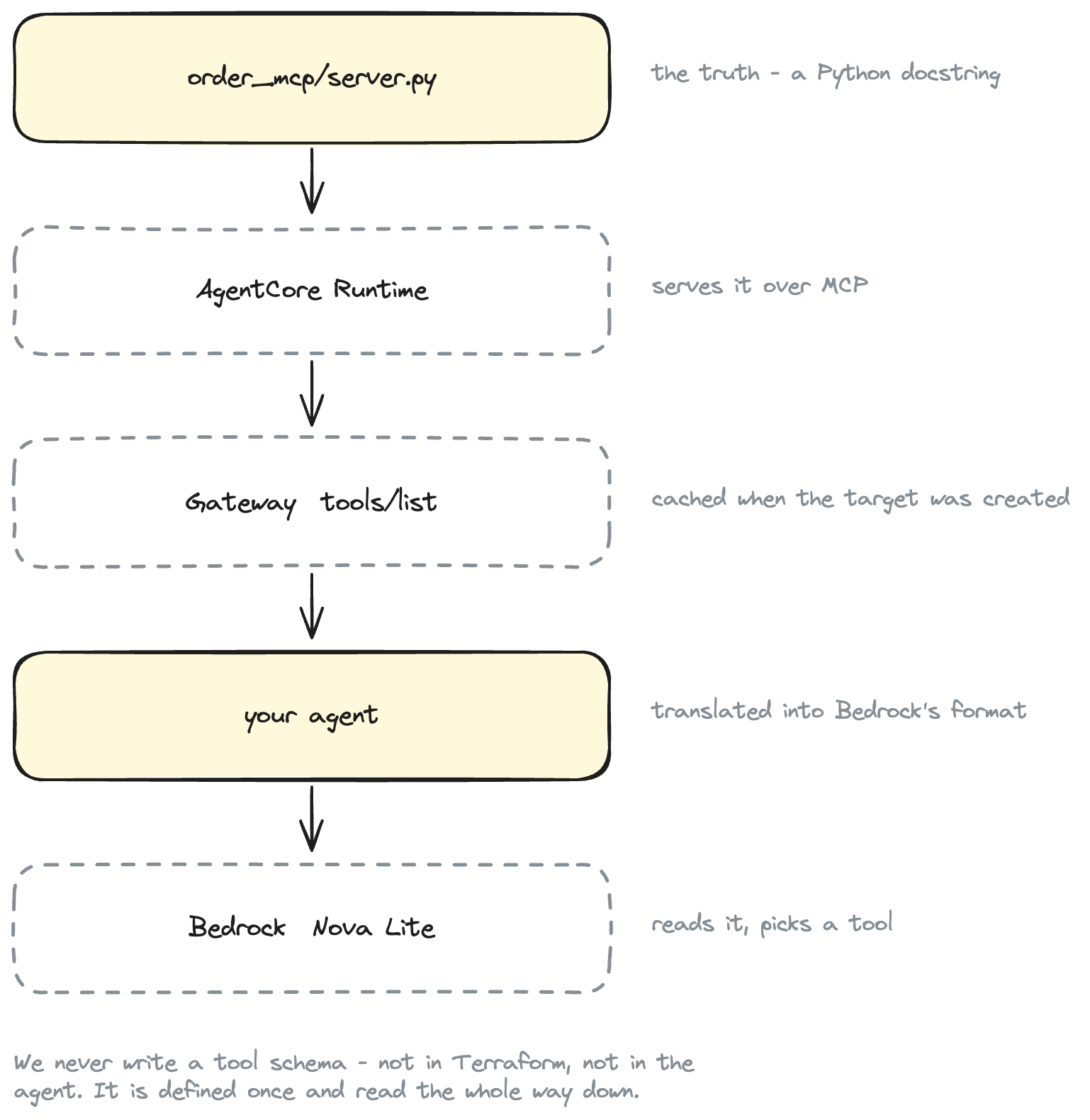
The only thing standing between them is a format change, because MCP and Bedrock describe the same tool differently:
MCP       {"name": ..., "description": ..., "inputSchema": {...}}
Bedrock   {"toolSpec": {"name": ..., "description": ..., "inputSchema": {"json": {...}}}}
So we have one small function, src/order_agent/bedrock.py:
_ALLOWED_SCHEMA_KEYS = ("type", "properties", "required", "description")


def to_bedrock_tools(tools: list[Tool]) -> dict[str, Any]:
    """Build the Converse API `toolConfig` from the Gateway's tool list."""
    return {
        "tools": [
            {
                "toolSpec": {
                    "name": tool.name,
                    "description": (tool.description or tool.name).strip(),
                    "inputSchema": {"json": clean_schema(tool.input_schema)},
                }
            }
            for tool in tools
        ]
    }


def clean_schema(schema: dict[str, Any]) -> dict[str, Any]:
    """Keep only the JSON Schema keywords Bedrock needs, at the top level."""
    cleaned = {key: schema[key] for key in _ALLOWED_SCHEMA_KEYS if key in schema}
    cleaned.setdefault("type", "object")
    cleaned.setdefault("properties", {})
    return cleaned
Two notes on why clean_schema exists rather than passing the schema straight through. MCP servers routinely emit extra JSON Schema keywords — $schema, additionalProperties, $defs for return types — and some models reject a toolSpec containing them. Stripping to the four keywords the model actually needs to fill in arguments is the safest thing to do, and it is one function you can point at when something breaks.
The name is passed through untouched, prefix and all. Bedrock's tool-name rule is [a-zA-Z0-9_-]{1,64}, and ordertools___get_order_status satisfies it, so the name the model picks is exactly the name we send back to the Gateway. No mapping table, no schema maintained in two places.
A trap worth knowing about
That last paragraph has a catch we hit while writing this, and it cost real time.
Bedrock's tool-name pattern allows hyphens. Amazon Nova models, in practice, do not: give Nova a tool called order-tools___get_order_status and the Converse call fails with
ModelErrorException: Model produced invalid sequence as part of ToolUse.
We verified this on both Nova Lite and Nova Pro. Underscores are fine; hyphens are not.
And the tool name comes from your Gateway target name — where the AgentCore API allows hyphens and forbids underscores. So the obvious name, order-tools, is legal everywhere except in the model.
The fix is to keep the target name alphanumeric, which is why the default is ordertools and why variables.tf refuses anything else:
validation {
  condition     = can(regex("^[0-9a-zA-Z]{1,100}$", var.target_name))
  error_message = "target_name must be letters and digits only. Hyphens are legal for the Gateway API but break tool use on Amazon Nova models, and the API rejects underscores."
}
Better a clear Terraform error than an opaque model error an hour later.
Run the agent
uv run order-agent "Where is order ORD-1001?"
gateway : https://order-gateway-XXXXXXXXXX.gateway.bedrock-agentcore.us-east-1.amazonaws.com/mcp
model   : us.amazon.nova-lite-v1:0
region  : us-east-1
question: Where is order ORD-1001?

tools discovered from Gateway (2):
  - ordertools___get_order_status
  - ordertools___get_delivery_estimate

--- turn 1: calling us.amazon.nova-lite-v1:0 ---
stopReason: tool_use
model wants  : ordertools___get_order_status
arguments    : {"order_id": "ORD-1001"}
calling AgentCore Gateway...
tool result  : {"order_id": "ORD-1001", "status": "shipped"}

--- turn 2: calling us.amazon.nova-lite-v1:0 ---
stopReason: end_turn

answer: Order ORD-1001 has been shipped.
And a second question, to show the model actually choosing between tools rather than always reaching for the first one:
uv run order-agent "When should ORD-1002 arrive?"
--- turn 1: calling us.amazon.nova-lite-v1:0 ---
stopReason: tool_use
model wants  : ordertools___get_delivery_estimate
arguments    : {"order_id": "ORD-1002"}
calling AgentCore Gateway...
tool result  : {"order_id": "ORD-1002", "status": "processing", "estimated_delivery": "2026-03-17", "carrier": "UPS", "tracking_number": "", "message": "Not shipped yet. Expected to ship 2026-03-13."}

--- turn 2: calling us.amazon.nova-lite-v1:0 ---
stopReason: end_turn

answer: The estimated delivery date for order ORD-1002 is March 17, 2026. It is currently being processed and expected to ship on March 13, 2026.
Different question, different tool, and nothing in our code made that decision. Models are also not deterministic here — ask about ORD-1001 a few times and you may see it call get_order_status and then get_delivery_estimate before answering. The loop handles that; it just goes round again.
Follow one request end to end
For Where is order ORD-1001?, here is every hop:
- You run
uv run order-agent "Where is order ORD-1001?". - The agent connects to AgentCore Gateway over MCP, signing the HTTPS request with SigV4 from your local AWS credentials, and calls
tools/list. - Gateway returns its cached tool catalogue — the tools it read from our MCP server when the target was created, each prefixed with
ordertools___. - The agent converts those MCP schemas into Bedrock
toolSpecentries and sends them, with your question, to Nova Lite via the Converse API. - The model replies with
stopReason: tool_useand atoolUseblock namingordertools___get_order_statuswith{"order_id": "ORD-1001"}. It has run nothing. - The agent sends that as an MCP
tools/callto the Gateway, using the name unchanged. - Gateway routes it to the target. It strips the
ordertools___prefix, signs a request to the AgentCore Runtime endpoint with SigV4 using its own service role, and forwards the MCP call. - AgentCore Runtime runs the container, the MCP server executes
get_order_status("ORD-1001"), and returns{"order_id": "ORD-1001", "status": "shipped"}. - The result travels back through Gateway to the agent as an MCP tool result.
- The agent appends it to the conversation as a
toolResultblock and
calls Converse again. - The model now has the fact and writes "Order ORD-1001 has been
shipped." withstopReason: end_turn. The loop returns it.
Two round trips to the model, one tool call, four processes involved. And the only thing the agent was configured with was a URL.
Gateway vs Runtime
These get confused constantly, so:
| AgentCore Runtime | AgentCore Gateway | |
|---|---|---|
| What it is | somewhere to run your code | an MCP endpoint in front of things |
| You give it | a container image | targets and credentials |
| It runs your code | yes | no |
| In this project | hosts the order MCP server | exposes that server's tools to the agent |
| Scales | your container | itself, managed |
| Remove it and | there is no MCP server | the server still works, agents just address it directly |
The short version:
Runtime  →  runs our MCP workload
Gateway  →  is the agent-facing tool access layer in front of it
Gateway is not a host. Our MCP server is running on Runtime in both parts of this series; Part 3 changed who calls it, not where it lives. If you had no Runtime at all you could still have a Gateway — pointed at Lambda functions, an OpenAPI spec, or someone else's MCP server.
Testing
The parts worth testing locally are the ones we wrote: schema translation and the loop's message construction. AWS itself is not our job to unit-test.
uv run pytest
........................                                                 [100%]
24 passed in 0.39s
The loop tests swap in a fake MCP session and a fake Converse client, which lets us assert the thing that actually matters:
async def test_a_requested_tool_is_called_through_the_gateway(patched) -> None:
    session, _ = patched(
        [tool_use_response("ORD-1001"), final_response("Order ORD-1001 has shipped.")]
    )

    answer = await agent.run("Where is order ORD-1001?", SETTINGS, verbose=False)

    # The full prefixed name went to the Gateway, unmodified.
    assert session.calls == [("ordertools___get_order_status", {"order_id": "ORD-1001"})]
    assert answer == "Order ORD-1001 has shipped."
Troubleshooting
| Symptom | Cause and fix |
|---|---|
AccessDeniedException when connecting |
Your identity lacks bedrock-agentcore:InvokeGateway on the gateway. See the agent_caller_policy_arn output. |
| Signature mismatch / 403 | The signing region must match the gateway's region. Check AWS_REGION. |
tools/list comes back empty |
The target has not finished synchronising. Run aws bedrock-agentcore-control get-gateway-target --gateway-identifier ... --target-id ... and read status and statusReasons. |
Target stuck in FAILED |
Usually the gateway service role cannot reach the runtime. It needs bedrock-agentcore:InvokeAgentRuntime on the runtime ARN, and agent_runtime_arn must be in the same region as the gateway. |
| Tools changed but Gateway shows the old ones | listing_mode = "DEFAULT" caches. Run synchronize-gateway-targets. |
Model produced invalid sequence as part of ToolUse |
A hyphen in the tool name, inherited from target_name. Use an alphanumeric target name. |
ValidationException naming the model |
Use the cross-region inference profile id — the one with the us. prefix — not the bare model id. |
AccessDeniedException from Bedrock |
Model access is not enabled for that model in that region. |
Set exception_level = "DEBUG" on the gateway resource to get more detail out of Gateway errors while you are debugging.
Clean up
terraform -chdir=terraform destroy
This removes only the Part 2 resources: the gateway, its target, and the two IAM policies. It does not touch the AgentCore Runtime, the ECR repository or the container image — those belong to Part 2, and we only referenced them by ARN.
If you are finished with the whole series, destroy Part 2 separately:
terraform -chdir=../agentcore-mcp-runtime/terraform destroy
Order matters if you do both: destroy the Gateway first. A gateway target pointing at a deleted runtime is not harmful, just broken.
What did we learn?
Concretely, in this small project:
- The agent holds one URL and one credential, not one per backend.
- The tool catalogue is discovered, not configured. Nothing in the agent names a tool.
- Adding a second backend — a Lambda, a CRM's OpenAPI spec — is a new
aws_bedrockagentcore_gateway_targetresource. The agent code does not change at all; it just sees more tools intools/list. - Credentials for each backend stay on the Gateway, per target.
The thing to notice is what did not change when we added the Gateway: the MCP server, the container, and the runtime are all exactly as Part 2 left them.