Build an MCP Server on Amazon Bedrock AgentCore Runtime
In Part 1 our tools were functions inside the agent. Here we move them out into a standalone MCP server, host it on AgentCore Runtime, and call it over the wire - so any agent can discover them.
In Part 1 we built an agent whose tools were four functions sitting in the same project:
return Agent(
    model=model,
    system_prompt=SYSTEM_PROMPT,
    tools=[add, subtract, multiply, divide],
)
That is fine while the tools are yours. Now think about the tools you would actually want an agent to have at work: looking up an order, checking stock, reading a customer record. Those live in someone else's system. A different team owns them, deploys them on their own schedule, and would quite reasonably object to you pasting their business logic into your agent's repository.
So the tools need to move out — into their own service, with their own deployment, that any agent can call.
The moment you do that, you need to agree on a format. How does an agent ask "what can you do?" How does it call one of your functions? What does an error look like? That agreement is MCP, and today we build a server that speaks it.
What we're building
An order-status service with two tools:
get_order_status("ORD-1001")→{"status": "shipped"}get_delivery_estimate("ORD-1002")→ carrier, tracking number, dates
It runs as an MCP server, hosted on AgentCore Runtime, and we call it over the internet from a laptop.
There is no AI in this post. No model, no prompt, no agent loop, not one Bedrock call. We are building the thing an agent will use, and it is easier to get right on its own. The agent comes back in Part 3.
Same box as Part 1. Different thing inside it.
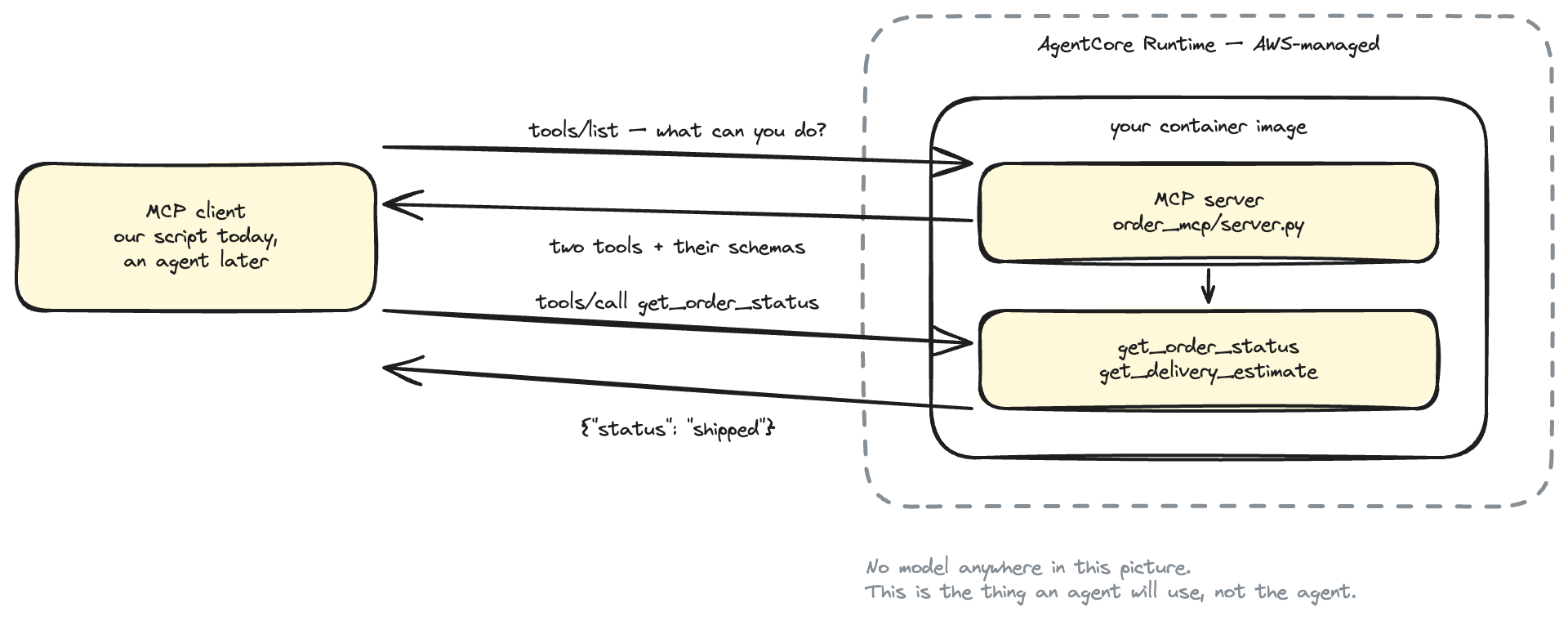
Same box-inside-a-box as Part 1: AgentCore Runtime is the infrastructure, your container is what runs inside it. The only thing that changed is what the container serves.
What is MCP?
Model Context Protocol is an agreed way for one program to offer tools to another over a network.
That is genuinely all it is. Strip away the branding and a server that speaks MCP has to answer two questions:
The whole protocol, in two questions.
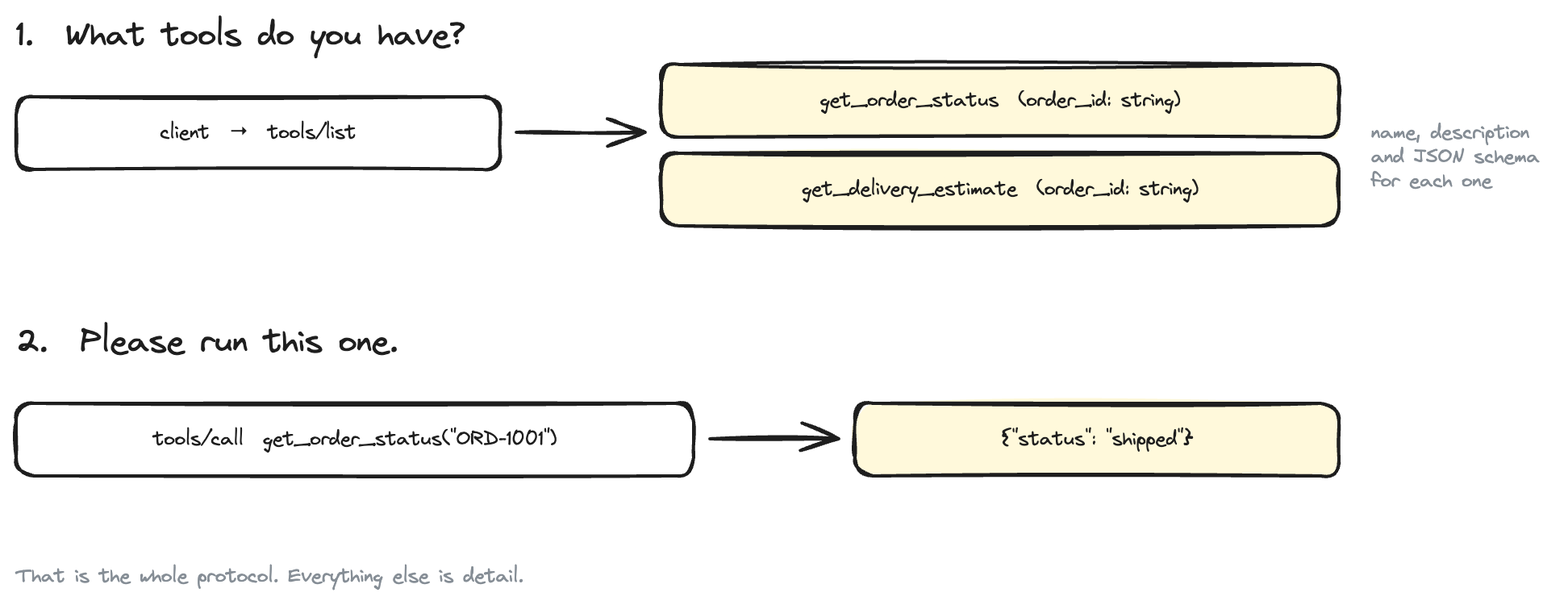
Those two messages travel as JSON-RPC. That name sounds heavier than it is: it just means "send a small piece of JSON naming the thing you want and its arguments, get a small piece of JSON back". You never write it by hand — the SDK does — but it is worth seeing once.
Here is a real tools/list reply from the server we are about to build, exactly as it comes off the wire:
{
  "name": "get_order_status",
  "description": "Look up the current status of a customer order.\n\nArgs:\n    order_id: The order id, for example \"ORD-1001\".\n",
  "inputSchema": {
    "type": "object",
    "properties": {"order_id": {"title": "Order Id", "type": "string"}},
    "required": ["order_id"]
  }
}
If that shape looks familiar, it should. In Part 1 we watched Strands turn a Python docstring and type hints into a tool schema for Bedrock. This is the same idea, one hop further out: the schema now travels over the network, so the caller does not need your source code to know how to call you.
Is MCP an AWS thing?
No — and this matters. MCP is an open standard, originally from Anthropic, now implemented across the industry. Your MCP server is not tied to AWS, not tied to Bedrock, and not tied to any particular model.
AWS's involvement is narrow and useful: AgentCore Runtime knows how to host an MCP server, and AgentCore Gateway (Part 3) knows how to put one in front of an agent. The protocol itself is nobody's property.
Practically, that means the server you write today also works with Claude Desktop, with an IDE that speaks MCP, or with an agent running on another cloud. You are not writing an AWS integration. You are writing a tool server that happens to be hosted on AWS.
Why not just a REST API?
You could. A REST endpoint returning {"status": "shipped"} would be less work, and you probably already know how to build one.
The difference is discovery. A REST API describes itself to humans, in documentation, and someone then writes code against it. An MCP server describes itself to callers at runtime, in a machine-readable format — so a client that has never seen your service can connect, ask what it offers, and use it immediately.
| REST API | MCP server | |
|---|---|---|
| How a caller learns the operations | reads your docs | calls tools/list |
| Who writes the integration | a developer, per client | nobody — it is discovered |
| Argument schema | in OpenAPI, if you maintain it | returned with every tool, always current |
| Adding a tool | clients must be updated | clients see it on the next tools/list |
That last row is the whole point. Later in this series we add a tool to this server and the agent picks it up without a single line of agent code changing.
None of this makes REST wrong. It makes MCP a better fit when the caller is a language model deciding for itself what to use.
Where this fits with Part 1
Part 1 and Part 2 are two halves of the same picture, and it is worth being precise about which half is which.
| Part 1 | Part 2 (this post) | |
|---|---|---|
| What we built | an agent | a tool server |
| Calls a model? | yes, Nova Lite via Bedrock | no, never |
| Where the tools live | imported into the agent's process | a separate service, called over HTTPS |
| Who calls it | you, with a prompt | any MCP client — a script today, an agent tomorrow |
Both run on AgentCore Runtime. Both are containers. Everything you learned about ECR, ARM64, Terraform, execution roles and CloudWatch carries over untouched.
Two protocols, one Runtime
This is the one genuinely new AgentCore detail in this post, and it is a common source of confusion.
AgentCore Runtime can host containers that speak different protocols. Part 1 used HTTP. This post uses MCP. You choose with a single Terraform setting, and the choice changes what your container must serve:
One Terraform word, two different contracts.
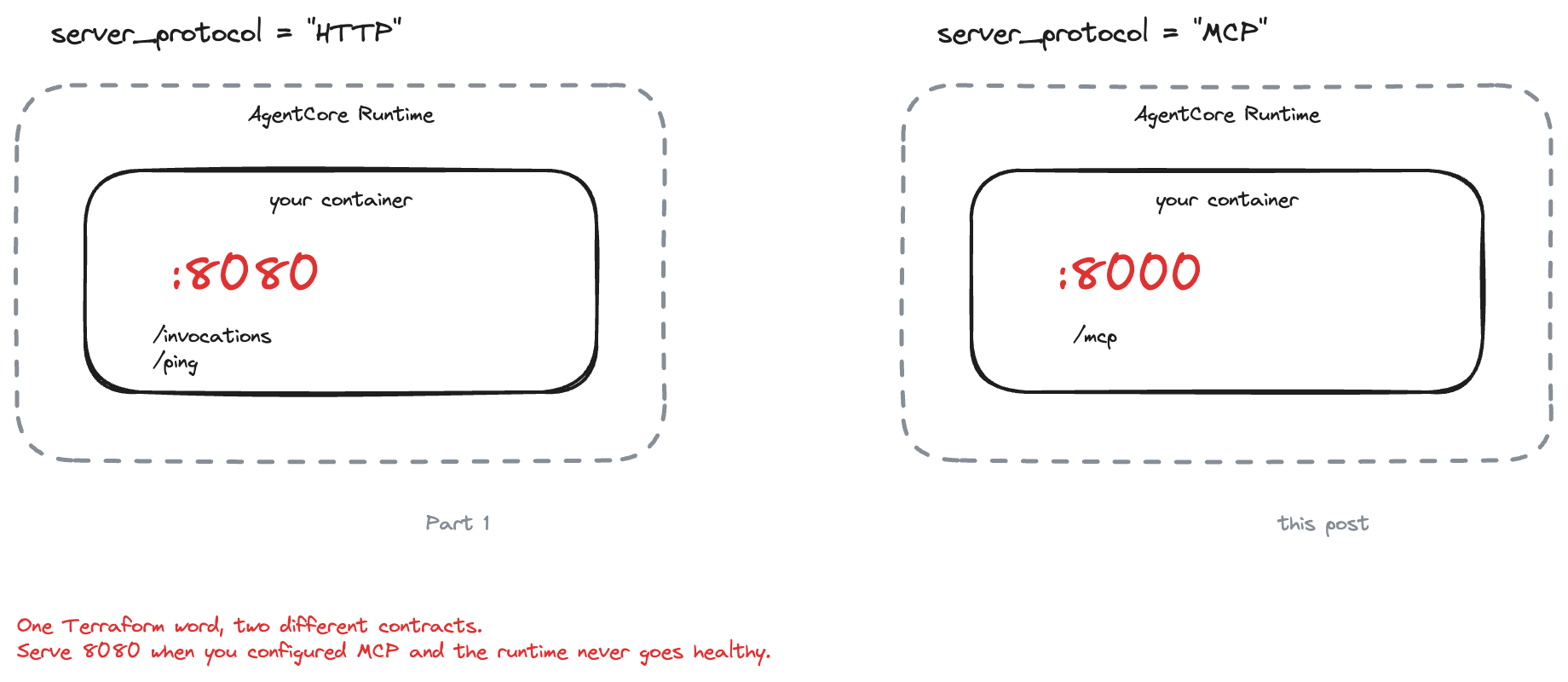
| HTTP protocol (Part 1) | MCP protocol (this post) | |
|---|---|---|
| Terraform | server_protocol = "HTTP" |
server_protocol = "MCP" |
| Port | 8080 | 8000 |
| Path | /invocations and /ping |
/mcp |
| Message format | whatever JSON you like | JSON-RPC, defined by MCP |
| Who implements it | BedrockAgentCoreApp |
the MCP Python SDK |
Note the port change. 8080 for HTTP, 8000 for MCP. Getting this wrong is a container that builds, pushes and deploys perfectly and then never becomes healthy. Everything else in the deployment is identical to Part 1.
That is the concept. The rest of this post is implementation: write the tools, serve them over MCP, run it locally, containerise it, deploy it, and call it from outside AWS.
Before we start
You need:
- An AWS account
- uv for Python
- AWS CLI v2, configured (
aws sts get-caller-identityshould work) - Terraform 1.9+ and Docker (only for the deploy section)
- A region where AgentCore is available. We use us-east-1.
You do not need Bedrock model access for this post. There is no model. That is one fewer thing to have configured, and one fewer thing to go wrong.
About IAM
Same two identities as Part 1, and mixing them up is still the most common confusion:
- Your identity — creates the resources.
BedrockAgentCoreFullAccessplus ECR and IAM permissions is the quick path while learning. - The execution role — what the running MCP server is allowed to do. Terraform creates it, scoped tightly.
The execution role is worth a second look here, because our server reads a Python dictionary. It talks to no database, no API, nothing. So it needs no data permissions at all — every statement in its policy exists so AgentCore can pull the image and so the container can write its own logs and traces.
That is a good habit to notice early. The execution role should describe what the code actually does, and when the code does very little, the role should say so.
Create the project
mkdir -p agentcore-mcp-runtime/{src/order_mcp,scripts,tests,terraform}
cd agentcore-mcp-runtime
pyproject.toml:
[project]
name = "agentcore-mcp-runtime"
version = "0.1.0"
requires-python = ">=3.12"

# The MCP Python SDK is the only runtime dependency. The server does not call
# a model, so there is no AI SDK here at all.
dependencies = [
    "mcp>=2.0.0",
]

[project.scripts]
order-mcp-serve = "order_mcp.server:main"
One dependency. Compare that with Part 1, which needed bedrock-agentcore and strands-agents. A tool server does not think, so it needs nothing that thinks.
uv sync --extra dev
The data
src/order_mcp/data.py is a dictionary pretending to be a database:
ORDERS: dict[str, Order] = {
    "ORD-1001": {
        "status": "shipped",
        "carrier": "UPS",
        "tracking_number": "1Z999AA10123456784",
        "estimated_delivery": "2026-03-14",
        "delivery_note": "Left our warehouse on 2026-03-11. Arriving 2026-03-14.",
    },
    "ORD-1002": {...},   # processing
    "ORD-1003": {...},   # delivered
}
Three orders, one in each state. No database, no clock, no randomness — every reader gets the same answers and the tests never flake. The dates are fixed values rather than "today plus three days" for exactly that reason.
One helper earns its place:
def normalise_order_id(order_id: str) -> str:
    """Tidy up whatever the caller sent us.

    An MCP tool's arguments usually come from a language model, so `ord-1001 `
    is just as likely as `ORD-1001`.
    """
    return order_id.strip().upper()
That comment is the important part. Your caller is not a careful programmer reading your docs — it is a model producing plausible-looking arguments. Be generous about what you accept.
Write the tools
src/order_mcp/server.py:
from mcp.server import MCPServer

INSTRUCTIONS = """Tools for checking the status and delivery estimate of a
customer order. Order ids look like ORD-1001."""

mcp = MCPServer(name="order-status", version="0.1.0", instructions=INSTRUCTIONS)


@mcp.tool()
def get_order_status(order_id: str) -> dict[str, str]:
    """Look up the current status of a customer order.

    Args:
        order_id: The order id, for example "ORD-1001".

    Returns:
        The order id and its status ("processing", "shipped" or "delivered"),
        or an "error" key if no such order exists.
    """
    order = find_order(order_id)
    if order is None:
        return {
            "order_id": normalise_order_id(order_id),
            "error": "Order not found. Order ids look like ORD-1001.",
        }

    return {"order_id": normalise_order_id(order_id), "status": order["status"]}
If you did Part 1, this is deeply familiar: a decorated Python function whose docstring and type hints become the schema. @mcp.tool() here, @tool there. The idea has not changed at all — only who reads the schema.
Two details worth pausing on.
instructions describes the server, not a tool. It is a sentence the client can show the model about the service as a whole. "Order ids look like ORD-1001" saves the model from inventing 12345.
A missing order returns an error dict, not an exception. Same lesson as Part 1's divide-by-zero: tool failures should arrive as data the caller can read. A model that receives {"error": "Order not found..."} can tell the user what went wrong. A model whose tool call crashed the server learns nothing.
Serve it over MCP
Three settings turn this into something AgentCore Runtime can host:
HOST = "0.0.0.0"
PORT = 8000


def main() -> None:
    """Serve MCP over streamable HTTP - the transport AgentCore Runtime speaks."""
    mcp.run(transport="streamable-http", host=HOST, port=PORT, stateless_http=True)
0.0.0.0:8000— the MCP contract, as in the table above./mcpis the SDK's default path, so we do not set it.streamable-http— how the messages travel. MCP can also run over a program's standard input and output, which is what desktop apps use when they start a tool server themselves. Ours is reached over the network, so it speaks HTTP.stateless_http=True— this one is AgentCore-specific and worth understanding.
In plain terms: your server must not remember anything between requests.
Here is why. Normally an MCP server keeps a session - the client says hello, gets a session id, and later calls continue that conversation. But AgentCore may run several copies of your container at once and send each request to whichever copy is free. The request that calls a tool might land on a different copy than the one that said hello. Anything you remembered is on the wrong machine.
So every request has to carry everything needed to answer it. That is what stateless_http=True promises, and AWS recommends it for MCP servers on Runtime.
Run it locally
Nothing is deployed yet, and nothing needs to be. Terminal one:
uv run order-mcp-serve
INFO:     Started server process [73805]
StreamableHTTP session manager started
INFO:     Uvicorn running on http://0.0.0.0:8000 (Press CTRL+C to quit)
Terminal two runs an ordinary MCP client — scripts/local_client.py — which lists the tools and calls three of them:
uv run python scripts/local_client.py
Real output:
Connecting to http://localhost:8000/mcp

tools/list:
  - get_order_status: Look up the current status of a customer order.
  - get_delivery_estimate: Get the delivery estimate and carrier details for a customer order.

tools/call: get_order_status('ORD-1001')
{
  "order_id": "ORD-1001",
  "status": "shipped"
}

tools/call: get_delivery_estimate('ORD-1002')
{
  "order_id": "ORD-1002",
  "status": "processing",
  "estimated_delivery": "2026-03-17",
  "carrier": "UPS",
  "tracking_number": "",
  "message": "Not shipped yet. Expected to ship 2026-03-13."
}

tools/call: get_order_status('ORD-9999')
{
  "order_id": "ORD-9999",
  "error": "Order not found. Order ids look like ORD-1001."
}
The whole client is about twenty lines:
async with Client(LOCAL_URL) as client:
    listed = await client.list_tools()
    result = await client.call_tool("get_order_status", {"order_id": "ORD-1001"})
list_tools, call_tool. That is the protocol. Notice there is no import of anything AWS-shaped, and no mention of a model — this is just a client talking to a server.
Notice too that the unknown order came back as a normal result, not a stack trace. That is the error-as-data rule paying off.
The tests
uv run pytest -q
11 passed in 0.49s
Offline — no network, no AWS, no container. They cover the lookups and id normalisation, and then the MCP layer itself:
async def test_tools_are_discoverable() -> None:
    async with Client(mcp) as client:
        listed = await client.list_tools()

    names = {tool.name for tool in listed.tools}
    assert names == {"get_order_status", "get_delivery_estimate"}
Client(mcp) connects to the server object in-process, so a real MCP conversation happens with no HTTP server involved. There is also a test that pins the bind settings:
def test_bind_settings_match_the_agentcore_mcp_contract() -> None:
    """AgentCore Runtime expects MCP on 0.0.0.0:8000 (path /mcp is the default)."""
    assert (HOST, PORT) == ("0.0.0.0", 8000)
That looks like a silly test until you remember 8080 is the number burned into your memory from Part 1. It fails in half a second, instead of after a build, a push, an apply and a health-check timeout.
Package it as a container
FROM --platform=linux/arm64 public.ecr.aws/docker/library/python:3.13-slim

COPY --from=ghcr.io/astral-sh/uv:0.5.10 /uv /uvx /bin/
WORKDIR /app

COPY pyproject.toml uv.lock README.md ./
RUN uv sync --frozen --no-install-project --no-dev

COPY src/ ./src/
RUN uv sync --frozen --no-dev

ENV PATH="/app/.venv/bin:$PATH"

# The AgentCore Runtime MCP contract: 0.0.0.0:8000, path /mcp.
# Note 8000, not the 8080 used by the HTTP protocol.
EXPOSE 8000

CMD ["order-mcp-serve"]
This is Part 1's Dockerfile with two characters changed. ARM64 is still a hard requirement — an amd64 image builds and pushes happily, then fails to run.
Deploy with Terraform
Same three-step dance as Part 1, for the same reason: AgentCore validates that the image exists when the runtime is created, so the repository and the image have to come first.
Step 1 — the ECR repository
cd terraform
terraform init
terraform apply -target=aws_ecr_repository.mcp_server
Step 2 — build and push the ARM64 image
cd ..
./scripts/build_and_push.sh v1
Step 3 — the execution role and the runtime
cd terraform
terraform apply -var="image_tag=v1"
Plan: 3 to add — the role, its policy, and the runtime.
The runtime resource is Part 1's, with one line different:
resource "aws_bedrockagentcore_agent_runtime" "mcp_server" {
  agent_runtime_name = var.runtime_name
  role_arn           = aws_iam_role.runtime_execution.arn

  agent_runtime_artifact {
    container_configuration {
      container_uri = "${aws_ecr_repository.mcp_server.repository_url}:${var.image_tag}"
    }
  }

  network_configuration {
    network_mode = "PUBLIC"
  }

  protocol_configuration {
    server_protocol = "MCP"      # <- Part 1 said "HTTP"
  }

  depends_on = [aws_iam_role_policy.runtime_execution]
}
One word. That is the entire difference between hosting an agent and hosting an MCP server, as far as AWS is concerned. Everything else — the ECR repository, the execution role, the conditions that stop another AWS account tricking AgentCore into using your role, the CloudWatch statements — is copied from Part 1 unchanged.
There is no authorizer_configuration block, so the runtime falls back to its default: only AWS identities may call it.
Concretely, every request has to be signed — the caller proves who they are by attaching a signature computed from their AWS credentials. AWS calls this SigV4. You have used it a thousand times without noticing, because the AWS CLI and every SDK do it for you on every call they make. Here we have to do it ourselves, because the MCP client library does not know about AWS.
That becomes important immediately.
Call the deployed server
Here is where hosting an MCP server on AgentCore differs from hosting one anywhere else, and it surprises people.
You cannot curl it. The endpoint is not an ordinary public URL. It belongs to AWS, not to you, and AWS checks the signature on every request before deciding whether to pass it along. An unsigned request — a plain curl — is rejected before your container ever sees it.
The URL itself is unusual too. Your MCP server is addressed through the runtime, with the runtime's ARN URL-encoded into the path:
https://bedrock-agentcore.us-east-1.amazonaws.com
  /runtimes/<url-encoded runtime ARN>/invocations?qualifier=DEFAULT
scripts/invoke.py is the same MCP client as before with one addition — an httpx auth hook that signs each request:
class SigV4HttpxAuth(httpx2.Auth):
    """Sign every outgoing HTTP request with AWS SigV4."""

    def __init__(self, credentials: Credentials, region: str) -> None:
        self._signer = SigV4Auth(credentials, AWS_SERVICE, region)

    def auth_flow(self, request):
        headers = dict(request.headers)
        # `connection: keep-alive` is added by the client but is not part of
        # what AWS verifies, and signing it causes a signature mismatch.
        headers.pop("connection", None)
        headers["content-length"] = str(len(request.content))

        aws_request = AWSRequest(
            method=request.method,
            url=str(request.url),
            data=request.content,
            headers=headers,
        )
        self._signer.add_auth(aws_request)

        request.headers.update(dict(aws_request.headers))
        yield request
The MCP SDK owns the HTTP requests, so rather than constructing them ourselves we hook into the client's auth layer. Dropping the connection header is not optional — leave it in and you get a signature mismatch that tells you nothing useful.
Run it:
uv run python scripts/invoke.py ORD-1001
Calling MCP server hosted on AgentCore Runtime...

runtime : arn:aws:bedrock-agentcore:us-east-1:<account>:runtime/order_mcp-XXXXXXXX
endpoint: https://bedrock-agentcore.us-east-1.amazonaws.com/runtimes/arn%3Aaws%3A.../invocations?qualifier=DEFAULT

tools/list:
  - get_order_status: Look up the current status of a customer order.
  - get_delivery_estimate: Get the delivery estimate and carrier details for a customer order.

Result:
{
  "order_id": "ORD-1001",
  "status": "shipped"
}
Identical results to the local run, which is the point. The server did not change; only its address did.
Confirm it really ran in AgentCore
Same as Part 1. CloudWatch → Log groups →
/aws/bedrock-agentcore/runtimes/order_mcp-XXXXXXXX-DEFAULT
One stream per container instance, not per request, plus a spans stream holding X-Ray trace data. If you are hunting for one specific call, use Search all log streams or Logs Insights rather than opening streams one by one.
The runtime page — Amazon Bedrock AgentCore → Agent Runtime → order_mcp — should show status READY and protocol MCP.
Things that will bite you
| Symptom | Cause and fix |
|---|---|
| Runtime never becomes healthy | Serving 8080 instead of 8000. The MCP protocol uses 8000. |
exec format error in the logs |
amd64 image. Rebuild with --platform linux/arm64. |
| Signature mismatch / 403 | The signing region must match the runtime's region, and the connection header must be stripped before signing. |
AccessDeniedException on invoke |
Your identity needs bedrock-agentcore:InvokeAgentRuntime on the runtime ARN. |
| Works locally, odd behaviour when deployed | stateless_http=True missing. Requests are load-balanced across instances. |
| Tool arguments arrive lowercase or padded | Expected — a model wrote them. Normalise on the way in. |
Clean up
cd terraform
terraform destroy
This removes the runtime, the execution role and policy, and the ECR repository including its image. CloudWatch log groups under /aws/bedrock-agentcore/runtimes/ are created by the runtime rather than by Terraform, so delete those by hand if you want a spotless account.
If you plan to continue to Part 3, leave this deployed. The next post puts AgentCore Gateway in front of this exact runtime and references it by ARN.
What did we learn?
- MCP is an agreement, not a product. Two questions —
tools/listandtools/call— over JSON-RPC. It is an open standard, so this server is not locked to AWS or to any model. - A tool server has no intelligence in it. No model, no prompt, no loop, one dependency. All the deciding happens in the agent that calls it.
- The schema comes from your code. Docstring and type hints become the contract, exactly as in Part 1 — but now it travels over the network, so callers need nothing but your URL.
- Discovery is the reason to prefer MCP over REST when the caller is a model. Add a tool and clients see it; nobody edits an integration.
- One Terraform word switches protocol.
server_protocol = "MCP"instead of"HTTP", and the port moves from 8080 to 8000. Everything else about deploying to AgentCore Runtime is unchanged from Part 1. - Stateless is required, not preferred. AgentCore load-balances across instances, so the server must not remember anything between requests.
- Write tools for a careless caller. Normalise sloppy input, and return errors as data the model can read instead of raising.