Build Your First AI Agent with Amazon Bedrock AgentCore
You have probably called a large language model from Python before. You send text, you get text back:
You   : "What is the capital of America?"
Model : "The capital of the United States is Washington, D.C."
One request, one response, and you are done. The model already knew the answer, so it simply wrote it out. Nothing else ran. That is an LLM call.
Now ask it something it cannot look up:
You   : "What is 15% of 240?"
Model : "15% of 240 is 36."
Same shape, and the answer happens to be right — but the model did not calculate anything. It predicted the most likely text, the way it predicted "Washington". For 15% of 240 that usually works. For 17% of 8,432.55 it may not, and it will sound just as confident either way.
An agent is different. Along with your question, you hand the model a list of tools.
A tool is nothing exotic. It is an ordinary function you have already written, plus a plain-English note saying what it does and what arguments it takes:
def multiply(a, b):
    """Multiply two numbers."""
    return a * b
That is a tool. The function is the boring half. The description is the half that matters, because it is all the model gets — that is how it learns this function exists and when it might be worth using.
Now the part that trips everyone up: the model cannot run your function. It has no computer and no way to execute anything. All it can do is reply with a request — "please call multiply with 240 and 0.15" — and wait. Your program reads that request, runs the real Python function, and sends the number back. Only then does the model write the final sentence.
You   : "What is 15% of 240?"        (plus: you may ask for add, subtract, multiply, divide)
Model : "call multiply(240, 0.15)"   <- not an answer. a request.
        your code runs multiply(240, 0.15)  ->  36.0
Model : "15% of 240 is 36."          <- now it is reading a real number
That exchange is what makes it an agent. Look at how the work is split:
- The model decides. It works out that the question needs a multiplication, picks the right tool, and chooses the numbers
240and0.15. It does not do the multiplication. - Your code does the work. It runs the real
multiplyfunction and gets36.0. - The model writes the answer, using the number your code gave it.
Now compare that with the same question earlier in this post. The first time, "36" came out of the model's own pattern matching — it might have been wrong, and you would have had no way to tell. This time, 36 is the return value of a Python function. Nothing was guessed.
That is the whole idea, and it does not get more complicated than this. The model never calculates; it works out what needs calculating and asks your code to do it.
In this tutorial we build the smallest agent that genuinely shows this, then run it on AWS using Amazon Bedrock AgentCore.
What we're building
An agent that answers arithmetic questions. Ask it "What is 15% of 240?" and it will not try to do the maths in its head. It calls a multiply tool and answers with the number the tool returned.
AgentCore Runtime is the box. Your container is what runs inside it.
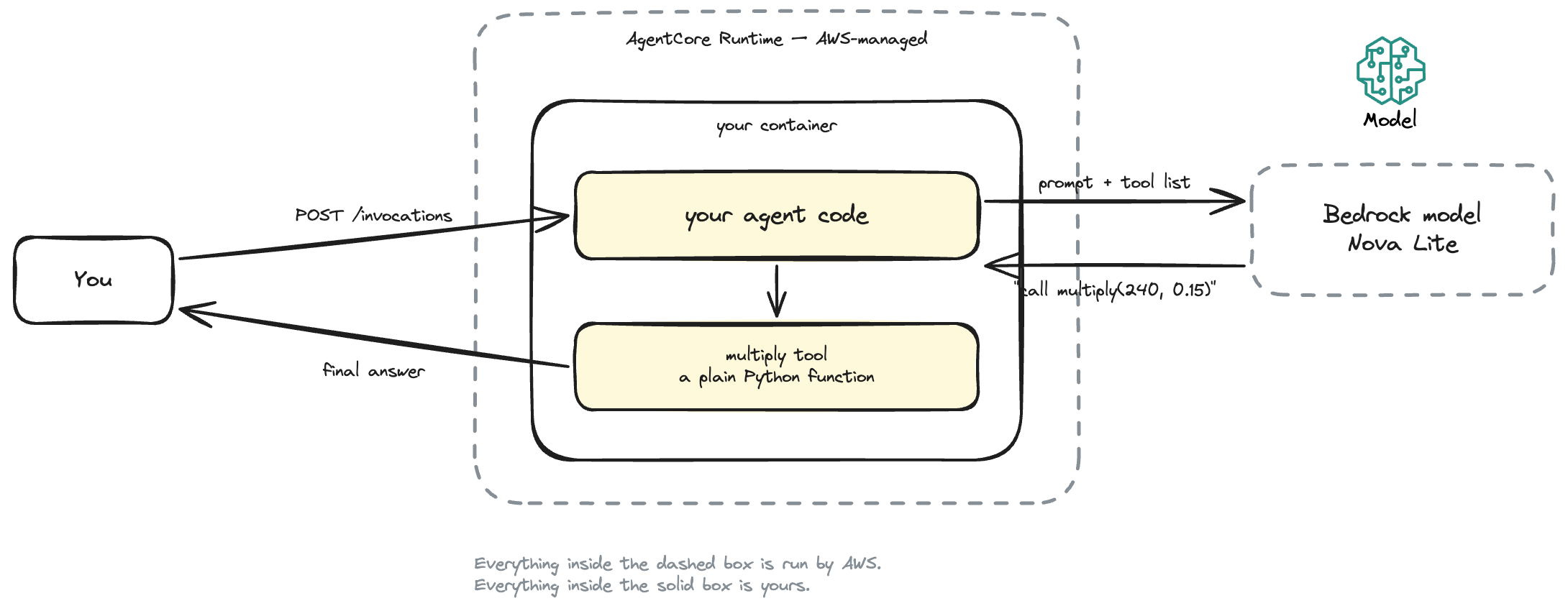
Small on purpose. Once you can see the loop, everything else in AgentCore is a variation on it.
Here is the whole thing:
Read that as a box inside a box. "Your agent code" is not a separate service that AgentCore calls over a network — it is what AgentCore runs. Same for the multiply tool: it is a Python function in the same process, not a microservice.
The only thing genuinely outside the box is the Bedrock model, which is a separate AWS service your code calls over the network.
What is Amazon Bedrock AgentCore?
AgentCore is a set of AWS-managed pieces for running agents. You write the agent logic; AgentCore runs it, keeps sessions isolated, and handles logging and scaling.
The piece we use today is AgentCore Runtime: managed infrastructure that runs your agent as a container and puts an HTTPS endpoint with session support in front of it.
The important thing to understand up front — three separate things, and only one of them is yours:
- Amazon Bedrock is the model. A separate AWS service, called over the network.
- AgentCore Runtime is the infrastructure your agent runs on. Hosting, and nothing more — it never talks to the model itself.
- Your code is the loop in between. It is the only part that decides anything.
So it is hosting, like Lambda?
Yes — that is the right mental model, and it is worth being blunt about it because the name makes AgentCore Runtime sound cleverer than it is.
AgentCore Runtime does not think. It does not call the model. It does not decide anything. It is infrastructure: you give AWS your code, AWS runs it, there is no server for you to manage. In the ways that matter it behaves like Lambda — you supply code rather than servers, AWS handles scaling and patching, it scales to zero, and you pay for what you use.
Where the analogy breaks is worth knowing up front:
| AWS Lambda | AgentCore Runtime | |
|---|---|---|
| What you hand it | a zip or image plus a handler function | a linux/arm64 container that serves HTTP |
| How your code is entered | AWS invokes your handler | AWS forwards HTTP to your server on port 8080 |
| Maximum duration | 15 minutes | 8 hours per session |
| State between calls | none you can rely on | same runtimeSessionId reaches the same live microVM, context intact |
| Isolation boundary | per concurrent execution | per user session, in a dedicated microVM |
The last two rows are the reason AgentCore exists. Agent conversations are long, stateful and per-user, and Lambda is built for short stateless invocations.
So when you read "deploy to AgentCore Runtime", read it as "put my container on AWS-managed hosting that understands sessions". The intelligence is entirely in the Bedrock model and your own code.
AgentCore also offers Memory, Gateway, Identity, Browser and Code Interpreter. We use none of them today. You do not need them for a first agent, and adding them now would hide the part you are trying to learn.
How an agent actually works
Before we write a line of code, let's be precise about what happens when you ask that question. Almost everything people find confusing about agents disappears once you have seen this sequence.
How do you build an agent?
So you need a loop that talks to the model, runs a tool when asked, and talks to the model again. Where does that loop come from?
Option one: write it yourself. There is no magic in it. Call Bedrock with boto3, check whether the reply asks for a tool, run the function, call again with the result. Fifty lines, give or take.
Option two: use an agent framework, which is what most people do. Those fifty lines grow fast once you add several tools, retries, streaming and error handling — and every agent needs the same thing, so somebody has already written it.
There are plenty to pick from: LangGraph, Pydantic AI, CrewAI, LlamaIndex, the OpenAI Agents SDK. They differ in style and extras, but the core job is the same in all of them.
Strands Agents is one more on that list, and it happens to be AWS's own. We use it here for three reasons:
- it is the smallest of the bunch, so the loop stays visible instead of disappearing behind abstractions
- a tool is just a Python function with a decorator — no new concepts
- it is what the AgentCore docs and CLI scaffold with, so the examples you find later will match
Does AgentCore require it? No. AgentCore Runtime has no idea what is inside your container. Its whole contract is HTTP: serve POST /invocations and GET /ping on port 8080. Any of the frameworks above can do that, and so can a while loop you write yourself.
So Strands is a convenience, not a requirement. Swapping it later touches one file, agent.py, and the two Bedrock calls below would look exactly the same — the loop is how tool use works, not something Strands invented.
The sequence
It is two HTTPS calls to AWS with one Python function call in between. Nothing else is running — no orchestrator, no state machine, no background process.
Two calls to Bedrock, one Python call in between.
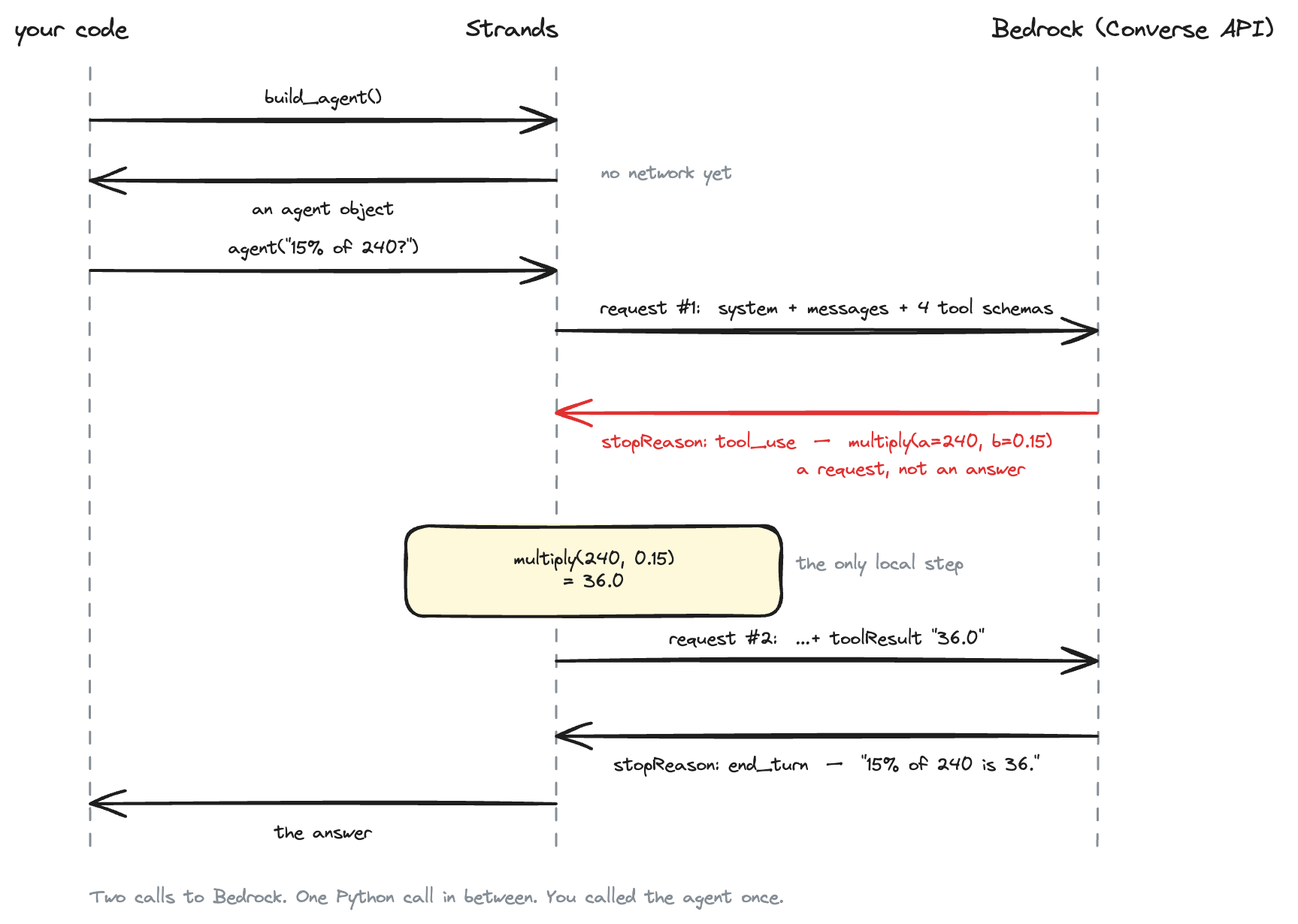
Two things to notice before we walk through it.
build_agent() hands you back an agent object — a model id, a system prompt and a list of tools, assembled in memory. Nothing has touched the network at that point. The network only wakes up when you call that object with a question.
And the whole exchange is one call from your side. You call the agent once; Strands does two round trips before returning. That is the loop, hidden inside a single line of your code.
Request #1 carries three things: the system prompt, the message list ([user: "What is 15% of 240?"]), and all four tool schemas under toolConfig.
Response #1 is not an answer. It comes back with stopReason: "tool_use" and a toolUse block:
{"toolUse": {
  "toolUseId": "tooluse_a1b2...",
  "name": "multiply",
  "input": {"a": 240, "b": 0.15}
}}
The model has picked the tool and filled in the arguments. It cannot run anything — it is a text predictor. It is asking you to run it.
Local execution. Strands matches the name to your function, validates the input against the schema, and calls multiply(a=240, b=0.15). Your code returns 36.0, which is serialised and wrapped in a toolResult carrying the same toolUseId. That id is how calls and results stay paired when several tools run at once.
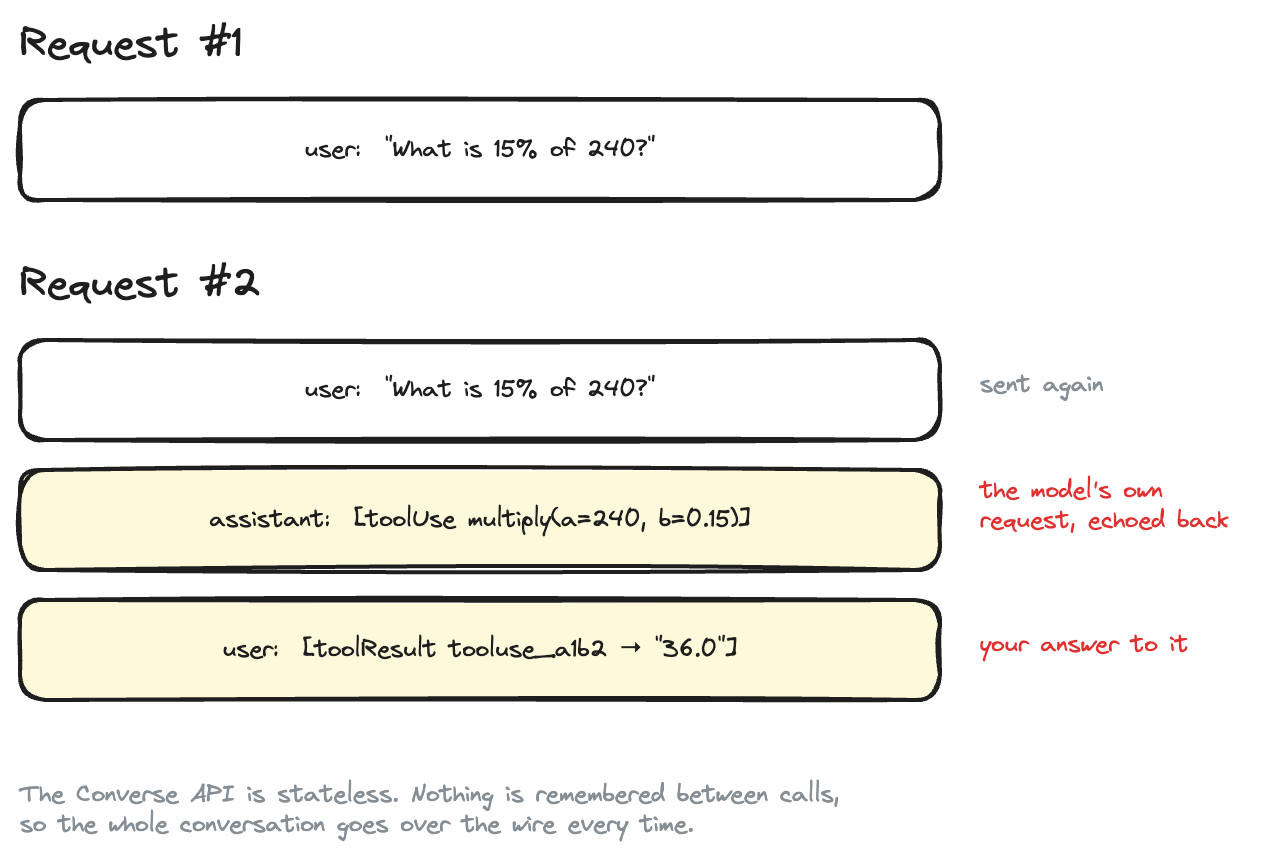
Request #2 is the same conversation with two messages appended:
The Converse API is stateless. Every call resends everything.
The whole history goes again. The Converse API is stateless — every call resends everything. The model now sees a number it did not invent.
Response #2 comes back with stopReason: "end_turn" and plain text. No tool block, so the loop exits.
The loop, in four lines
Strip away the framework and Strands is doing this:
send conversation to model
while the reply asks for tools:
    run them, append the results, send it all again
return the final text
That is why "15% of 240, then add 12" needs no new code. The same loop simply spins one extra time — multiply, then add, then the answer.
So, plainly:
LLM   = text in, text out. One call.

Agent = LLM + instructions + tools + a loop that keeps calling the model
        until it stops asking for tools.
An LLM that "does maths" is guessing from patterns in its training data. Our agent will not be guessing — the number 36 comes from Python.
Where does AgentCore fit?
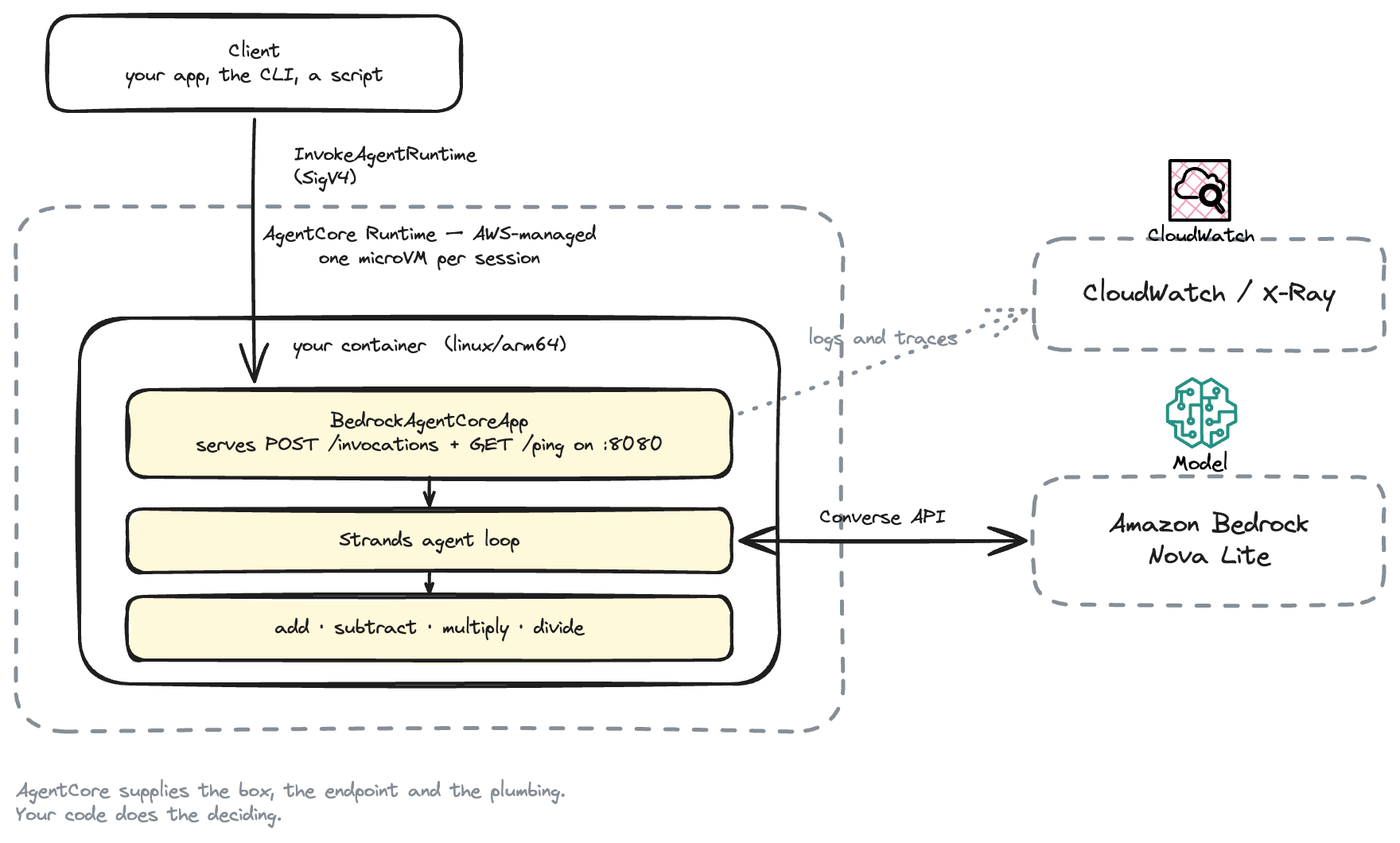
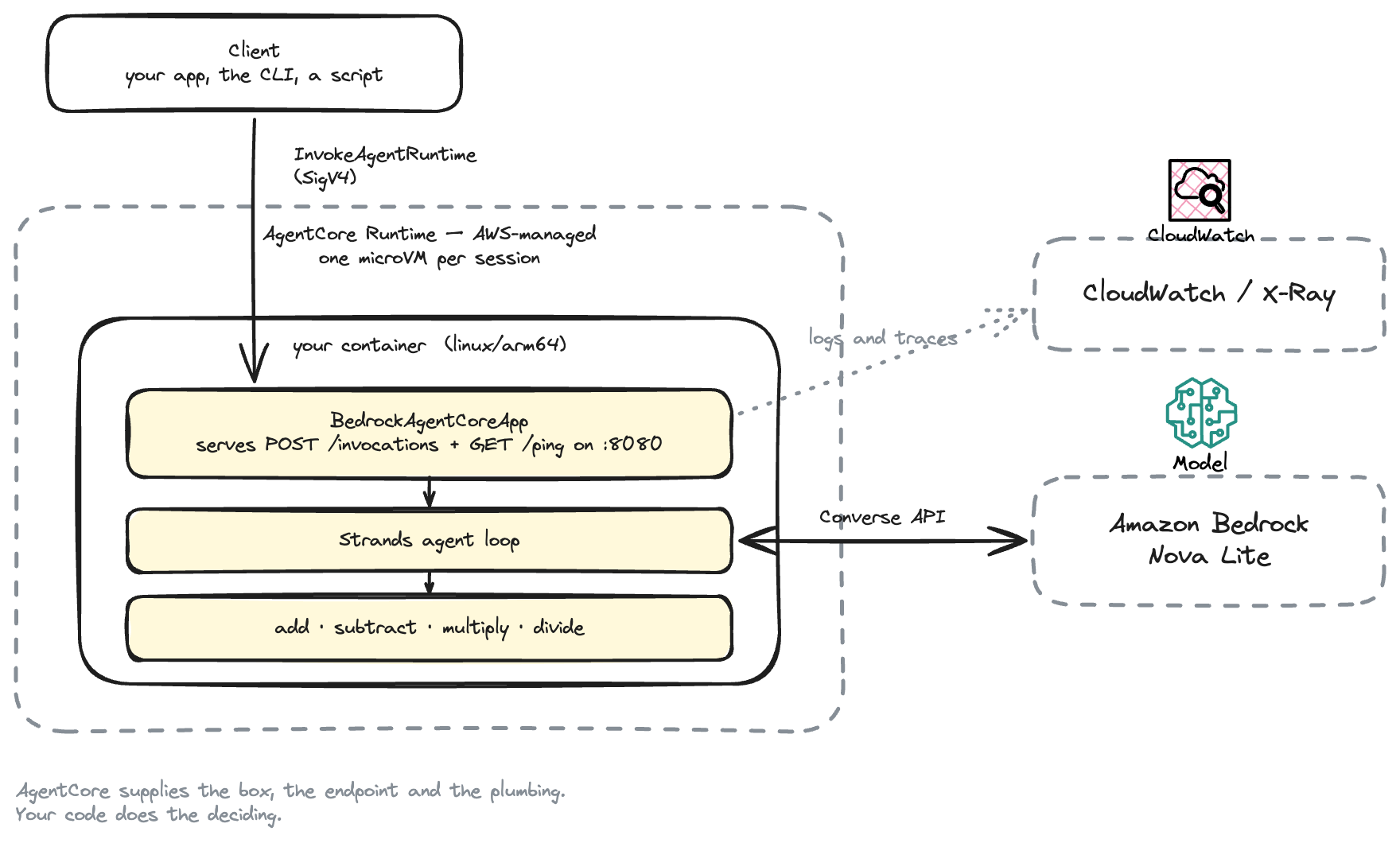
AgentCore supplies the box, the endpoint and the plumbing. Your code does the deciding.
Everything inside the outer box is yours, running in one process. AgentCore Runtime supplies the box, the HTTPS endpoint in front of it, the session isolation, and the pipe to CloudWatch. It does not think for you.
Why AgentCore and not just Fargate?
Fair question, and worth answering before you build anything. What we are about to deploy is a container serving HTTP on port 8080. You could absolutely run that on ECS Fargate, and if you already operate ECS you may well should. So what is AgentCore actually giving you?
Session isolation, per user. Each runtimeSessionId gets its own microVM with isolated CPU, memory and filesystem. When the session ends, the microVM is destroyed and its memory sanitised. On Fargate, one task process serves every user; keeping conversations from bleeding into each other is your problem. That matters more than usual with agents, because they are non-deterministic and they execute things.
Idle costs nothing. A Fargate task bills while it exists, whether or not anyone is talking to it. AgentCore bills per second: CPU only while your code is actually running — an agent waiting on a model response burns no CPU — plus memory for the session's lifetime, with a 128 MB minimum. Agent traffic is bursty and mostly idle, which is exactly the shape this pricing suits.
Long requests are normal. Sessions can run up to 8 hours, and idle for 15 minutes between turns before termination. An ALB in front of Fargate defaults to a 60-second idle timeout. Lambda caps out at 15 minutes and has no session affinity at all. Long agent runs are awkward on both.
No networking to build. The entire deploy in this tutorial is three resources: a repository, a role, a runtime. The Fargate equivalent needs a VPC, subnets, security groups, a load balancer, target groups, health checks, a cluster, a task definition and a service — and then you still have to add authentication.
Auth on the endpoint, for free. Invocation is SigV4-authenticated out of the box, and you can switch to OAuth 2.0 with an identity provider by changing configuration. On Fargate that is yours to build.
The rest of AgentCore plugs in. Memory, Gateway, Identity, Browser, Code Interpreter and agent-aware observability are designed against this runtime. That is the real argument, and the real trade-off: it is also coupling.
When Fargate is the better answer
- You already run ECS or EKS, with sidecars, service mesh and pipelines in place.
- Traffic is steady and high — constant load is cheaper on always-on compute than on per-second billing.
- You need VPC-only egress, unusual networking, GPUs, or a non-HTTP protocol.
- You want to stay portable and avoid coupling to one vendor's agent platform.
A fair summary: AgentCore Runtime is Lambda-shaped hosting specialised for agents — session isolation, long timeouts, scale to zero, and an IAM-authenticated endpoint, none of which you have to assemble. If your requirements are just "run a container", Fargate is simpler. If they include "per-user isolation, long-running, bursty, authenticated", you would end up building a worse AgentCore.
That is the whole concept. The rest of this post is implementation: set up the account, write the tools, run the agent locally, then deploy it and prove it ran in AWS.
Before we start
You need:
- An AWS account
- uv for Python
- AWS CLI v2, configured (
aws sts get-caller-identityshould work) - Terraform 1.9+ and Docker (only for the deploy section)
Pick a region where AgentCore is available. At the time of writing: us-east-1, us-east-2, us-west-2, eu-central-1, eu-west-1, ap-south-1, ap-southeast-1, ap-southeast-2, ap-northeast-1. We use us-east-1.
Then enable model access. Open the Bedrock console → Model access → enable Amazon Nova Lite.
We use Nova Lite because it is cheap, it supports tool use, and it needs no extra paperwork. Anthropic Claude models on Bedrock also require a one-time use case form, which is an annoying thing to hit in your first ten minutes.
About IAM
Two roles are involved, and mixing them up is the most common source of confusion.
- Your identity — creates the resources. While learning, the AWS managed policy
BedrockAgentCoreFullAccessplus ECR and IAM permissions is the quick path. It is deliberately broad. - The agent's execution role — what the running agent is allowed to do. Terraform creates this one and scopes it tightly: pull one ECR repository, write its own logs, emit traces, call Bedrock.
Nobody needs AdministratorAccess. And the role that matters in production — the execution role — is already minimal in this project.
Create the project
mkdir bedrock-agentcore-first-agent && cd bedrock-agentcore-first-agent
mkdir -p src/first_agent tests terraform scripts
pyproject.toml:
[project]
name = "bedrock-agentcore-first-agent"
version = "0.1.0"
requires-python = ">=3.12"

dependencies = [
    "bedrock-agentcore>=1.21.0",
    "strands-agents>=1.51.0",
]

[project.scripts]
agent-serve = "first_agent.app:main"
agent-ask = "first_agent.cli:main"
Two dependencies:
bedrock-agentcore— the AWS SDK that makes your agent speak the AgentCore Runtime protocol.strands-agents— the agent framework that runs the model-and-tools loop, as covered above. Optional in principle; AgentCore is happy with LangGraph, Google ADK, OpenAI Agents or your own loop.
Install the dependencies
uv sync --extra dev
Build our first tools
A tool is just a Python function the model is allowed to call.
We give the agent four: add, subtract, multiply and divide. Each takes two numbers and returns a number. Here are two of them; the other two are the same shape.
# src/first_agent/tools.py
@tool
def multiply(a: float, b: float) -> float:
    """Multiply two numbers and return the result.

    Use this for percentages too: 15% of 240 is multiply(240, 0.15).

    Args:
        a: The first number.
        b: The second number.
    """
    return a * b


@tool
def divide(a: float, b: float) -> float:
    """Divide a by b and return the result.

    Args:
        a: The number to divide.
        b: The number to divide by. Must not be zero.

    Raises:
        ValueError: If b is zero. Strands turns this into an "Error: ..." tool
            result, so the model reports the problem instead of inventing an
            answer.
    """
    if b == 0:
        raise ValueError("Cannot divide by zero")
    return a / b
That is the whole file. No parsing, no validation, no sandbox.
Why four small tools instead of one calculator?
The tempting design is a single calculate(expression) tool that takes "240 * 0.15" and evaluates it. It looks tidier, and it handles any sum in one call.
Do not do it. The moment your tool accepts a string of code written by a language model, you have to decide how to execute that string — and the obvious answer, eval(), will happily run __import__('os').system(...) if the model can be talked into producing it. The safe version means parsing the expression yourself and walking the syntax tree to reject anything that is not arithmetic. That is around ninety lines of security code in a tutorial that is supposed to be about agents.
Taking two numbers sidesteps the entire problem. There is no code to execute, so there is nothing to sandbox.
It also teaches the mechanic better. With an expression tool, the model invents a string and you cannot see what the model was actually asked for. With typed parameters, the model fills in a schema you defined — and you can read exactly what it chose.
Generalise this. When you design a tool, prefer narrow, typed parameters over free-form strings. search(query: str, limit: int) is safer and more reliable than run(command: str). The narrower the tool, the less the model can get wrong and the less damage a bad call can do.
The docstring is the interface
That docstring is not decoration. Strands reads your type hints and docstring and turns them into the JSON schema that gets sent to the model. This is literally what multiply produces:
{
  "name": "multiply",
  "description": "Multiply two numbers and return the result.\n\nUse this for percentages too: 15% of 240 is multiply(240, 0.15).",
  "inputSchema": {"json": {
    "properties": {
      "a": {"description": "The first number.", "type": "number"},
      "b": {"description": "The second number.", "type": "number"}
    },
    "required": ["a", "b"],
    "type": "object"
  }}
}
The model never sees your Python. It sees that JSON. The description, the argument names, the hint about percentages — that is the entire instruction manual it gets. Vague docstring, unreliable agent.
Build the agent
An agent here is three things: a model, instructions, and tools.
# src/first_agent/agent.py
def build_agent(settings: Settings | None = None) -> Agent:
    """Create the agent. This is the whole thing."""
    settings = settings or Settings.from_env()

    model = BedrockModel(
        model_id=settings.model_id,
        region_name=settings.region,
        temperature=0.2,
    )

    return Agent(
        model=model,
        system_prompt=SYSTEM_PROMPT,
        tools=[add, subtract, multiply, divide],
        callback_handler=None,
    )
That is the entire agent. No orchestration code, no loop written by hand — Strands runs the loop.
The system prompt does the real work:
SYSTEM_PROMPT = """You are a careful assistant that answers questions involving arithmetic.

You have four tools: `add`, `subtract`, `multiply` and `divide`. Each one takes
two numbers and returns the result.

Rules:
- For ANY arithmetic, call a tool. Never do the arithmetic in your head, even
  when it looks easy.
- Translate word problems into numbers first. "15% of 240" becomes
  multiply(240, 0.15).
- For a calculation with several steps, call the tools one at a time and feed
  each result into the next call.
- Never invent or guess a tool result. Only report numbers the tools returned.
- If the tool returns a value starting with "Error:", tell the user what went
  wrong instead of making up an answer.
- For questions that involve no arithmetic, just answer directly. Do not call
  the tool when there is nothing to calculate.
- Keep answers to one or two short sentences.
"""
Four rules are doing heavy lifting: always use a tool for maths, chain the tools for multi-step sums, never invent a tool result, and do not call a tool when there is nothing to calculate. The last one stops the agent reaching for a calculator to answer "what is the capital of France".
The model id is configurable, with a comment explaining a real gotcha:
# src/first_agent/config.py
DEFAULT_MODEL_ID = "us.amazon.nova-lite-v1:0"
The us. prefix is not cosmetic. It selects a cross-region inference profile. Most current Bedrock models cannot be called by their bare id at all. Use amazon.nova-lite-v1:0 and you get a ValidationException.
Run it locally
uv run agent-ask "What is 15% of 240?"
Real output:
model  : us.amazon.nova-lite-v1:0
region : us-east-1
prompt : What is 15% of 240?

tool call   : multiply({'a': 240, 'b': 0.15})
tool result : 36.0

final answer: 15% of 240 is 36.
Look at the middle two lines. Nobody told the model to call multiply with 240 and 0.15. It was told four tools exist, and it worked out which one it needed, that a percentage is a multiplication, and what to pass in.
That is the loop from How an agent actually works running for real: request one came back asking for multiply, your Python returned 36.0, request two turned it into a sentence. Two calls to Bedrock, one function call in between.
Run it with AgentCore
So far we have run the agent as a plain Python function. To run it on AgentCore Runtime, it has to speak the runtime's HTTP contract:
- listen on
0.0.0.0:8080 - accept
POST /invocations - answer
GET /pingwith a health status - be a linux/arm64 container
The bedrock-agentcore SDK does all of that for us:
# src/first_agent/app.py
app = BedrockAgentCoreApp()

_agent = build_agent()


@app.entrypoint
def invoke(payload: dict[str, Any]) -> dict[str, Any]:
    prompt = payload.get("prompt")
    if not isinstance(prompt, str) or not prompt.strip():
        return {"error": "Request body must contain a non-empty 'prompt' string."}

    _agent.messages = []
    result = _agent(prompt)

    return {
        "response": clean_response(str(result)),
        "tool_calls": tool_calls_from(_agent.messages),
    }
BedrockAgentCoreApp plus one decorator — that is the entire AgentCore integration on the code side.
That isinstance(prompt, str) check is not padding. AWS calls it out as a security best practice: the payload is parsed JSON, so prompt could arrive as an object containing a toolUse block, which some frameworks would execute directly — skipping the model and any guardrails.
You can run the exact same server on your laptop:
uv run agent-serve
$ curl localhost:8080/ping
{"status":"Healthy","time_of_last_update":1786349663}

$ curl -X POST localhost:8080/invocations \
    -H 'Content-Type: application/json' \
    -d '{"prompt":"What is 15% of 240?"}'
{"response": "15% of 240 is 36.", "tool_calls": [{"tool": "multiply", "input": {"a": 240, "b": 0.15}, "output": "36.0"}]}
Note we never wrote a web server, a /ping handler, or a route. The SDK did.
The container
FROM --platform=linux/arm64 public.ecr.aws/docker/library/python:3.12-slim

COPY --from=ghcr.io/astral-sh/uv:0.5.10 /uv /uvx /bin/
WORKDIR /app

COPY pyproject.toml uv.lock README.md ./
RUN uv sync --frozen --no-install-project --no-dev

COPY src/ ./src/
RUN uv sync --frozen --no-dev

ENV PATH="/app/.venv/bin:$PATH"
EXPOSE 8080
CMD ["agent-serve"]
ARM64 is a hard requirement, not a preference. An amd64 image will build, push, and then fail at runtime.
Why not the AgentCore CLI?
AWS ships its own tool, @aws/agentcore, and it is genuinely good:
npm install -g @aws/agentcore
agentcore create      # scaffolds the project
agentcore dev         # local server + a browser agent inspector with traces
agentcore deploy      # provisions everything
agentcore invoke --prompt "What is 15% of 240?"
Four commands. It also gives you a nice local inspector for stepping through tool calls.
Underneath, agentcore deploy generates AWS CDK and deploys a CloudFormation stack — and it will bootstrap CDK in your account first, which creates an S3 bucket and IAM roles of its own.
We use Terraform here for one reason: every AWS resource this tutorial creates is written down in terraform/, in four files you can read end to end, and a single terraform destroy removes all of it. For a first tutorial, seeing the ECR repository, the execution role and the runtime spelled out teaches you more than a generated stack does.
Two things worth being clear about:
- The agent code is identical either way.
BedrockAgentCoreApp, the tool, the system prompt — none of it changes. Only the provisioning differs. - This is not the deprecated path. The older
bedrock-agentcore-starter-toolkitCLI is legacy, but thebedrock-agentcoreSDK we import is current, and it is the same SDK the AgentCore CLI puts in the projects it generates.
If your team already runs on CDK, use the CLI. If you run on Terraform, read on.
Deploying with Terraform
Three resources, that is all:
resource "aws_bedrockagentcore_agent_runtime" "agent" {
  agent_runtime_name = var.agent_name
  role_arn           = aws_iam_role.agent_execution.arn

  agent_runtime_artifact {
    container_configuration {
      container_uri = "${aws_ecr_repository.agent.repository_url}:${var.image_tag}"
    }
  }

  network_configuration {
    network_mode = "PUBLIC"
  }

  protocol_configuration {
    server_protocol = "HTTP"
  }

  environment_variables = {
    BEDROCK_MODEL_ID = var.model_id
  }

  depends_on = [aws_iam_role_policy.agent_execution]
}
There is one ordering wrinkle worth knowing: the runtime cannot be created until an image already exists in ECR. So the repository comes first, then the image, then the runtime.
Repository, then image, then runtime — in that order.
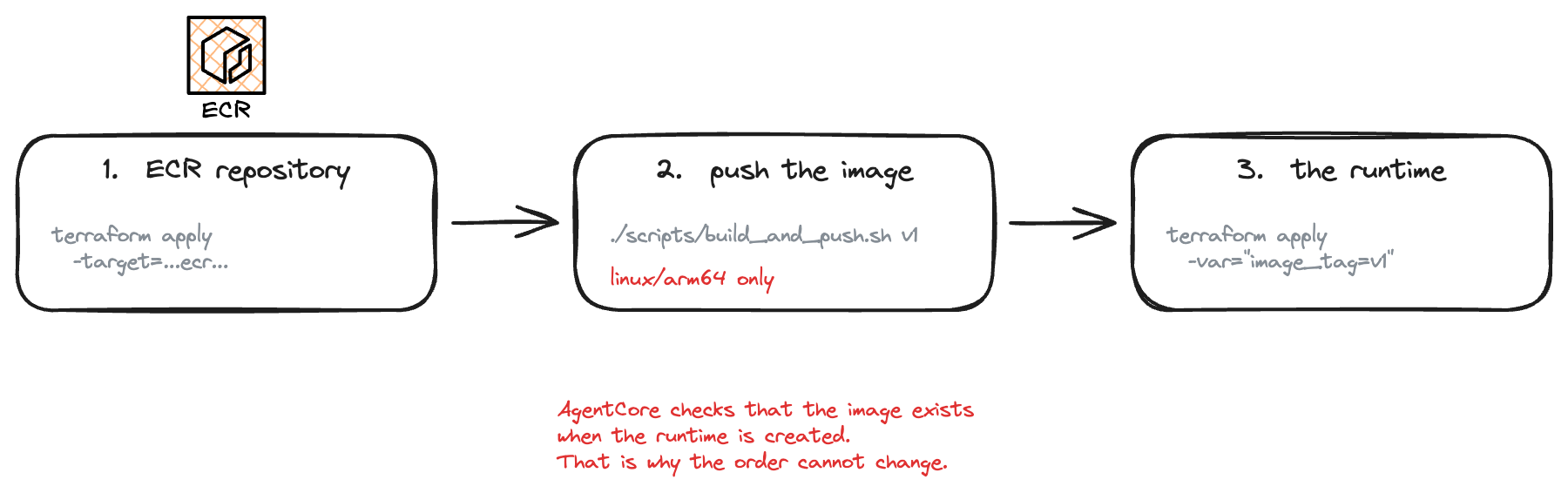
Step 1 — the ECR repository
cd terraform
terraform init
terraform apply -target=aws_ecr_repository.agent
Step 2 — build and push the ARM64 image
cd ..
./scripts/build_and_push.sh v1
Step 3 — the execution role and the runtime
cd terraform
terraform apply -var="image_tag=v1"
Output:
agent_runtime_arn  = "arn:aws:bedrock-agentcore:us-east-1:<account>:runtime/first_agent-XXXXXXXX"
agent_runtime_id   = "first_agent-XXXXXXXX"
ecr_repository_url = "<account>.dkr.ecr.us-east-1.amazonaws.com/bedrock-agentcore-first-agent"
Invoking it
uv run scripts/invoke.py "What is 15% of 240?"
runtime : arn:aws:bedrock-agentcore:us-east-1:<account>:runtime/first_agent-XXXXXXXX
session : afda7861-5370-41af-80d5-ecd5966d2e30
prompt  : What is 15% of 240?

{
  "response": "15% of 240 is 36.",
  "tool_calls": [
    {"tool": "multiply", "input": {"a": 240, "b": 0.15}, "output": "36.0"}
  ]
}
Nothing on your machine ran the agent this time. docker ps is empty. The script sent a prompt to an ARN and printed what came back — the loop ran inside a container in AWS, using the execution role's credentials rather than yours.
The call underneath is small:
response = client.invoke_agent_runtime(
    agentRuntimeArn=agent_arn,
    runtimeSessionId=session_id,
    payload=json.dumps({"prompt": prompt}).encode(),
)
runtimeSessionId is how AgentCore does sessions. Reuse the same id and your calls land on the same isolated runtime session with its context intact. Use a new one and you start fresh.
One constraint that will bite you: it must be 33 to 256 characters. A sensible-looking "test-session" is rejected. Use a UUID.
To ship a change:
./scripts/build_and_push.sh v2
cd terraform && terraform apply -var="image_tag=v2"
Confirm it really ran in AgentCore
A JSON response proves something answered. It does not prove where. Here is how to check.
The runtime page
Console → Amazon Bedrock AgentCore → Agent Runtime → first_agent.
You should see status READY, version 1, your container URI, the execution role, network mode PUBLIC, protocol HTTP, and the BEDROCK_MODEL_ID environment variable. Version 1 was created automatically when the runtime was; every update you push creates a new immutable version, and the DEFAULT endpoint moves to it.
The logs
AgentCore writes to a CloudWatch log group named after the runtime and endpoint:
/aws/bedrock-agentcore/runtimes/first_agent-XXXXXXXX-DEFAULT
Console → CloudWatch → Logs → Log groups → filter for bedrock-agentcore.
Inside you will find several streams called [runtime-logs]<uuid>, plus one called spans. One stream per container instance, not per request — health checks and your invocation may land on different instances, which is why the newest stream is not always the one you want. spans is X-Ray trace data, not log output; ignore it when hunting for a message.
The line that proves it:
{"timestamp": "2026-08-12T00:20:20.700Z", "level": "INFO",
 "message": "Invocation completed successfully (1.201s)",
 "logger": "bedrock_agentcore.app",
 "requestId": "f5c8db7a-796b-4458-b89a-c7b6e87e16b9",
 "sessionId": "afda7861-5370-41af-80d5-ecd5966d2e30"}
That sessionId is the exact UUID the invoke script printed. 1.2 seconds, including both Bedrock round trips.
Finding your own line
Do not scroll the streams. In the console, use Search all log streams on the log group and paste your session id. Or use Logs Insights, which searches the whole group at once:
fields @timestamp, @logStream, message, sessionId
| filter @message like "afda7861"
| sort @timestamp asc
From the CLI:
aws logs filter-log-events --region us-east-1 \
  --log-group-name /aws/bedrock-agentcore/runtimes/first_agent-XXXXXXXX-DEFAULT \
  --filter-pattern '"afda7861"' \
  --query 'events[].logStreamName' --output text
The quotes inside '"..."' matter. Without them CloudWatch reads the UUID as a pattern expression and returns nothing.
One warning you can ignore
WARNING: Invalid HTTP request received.
Something on the AWS side opened a TCP connection without sending a valid HTTP request — a health probe. Your server logged it and carried on. Worth knowing so you do not go hunting.
Try a few prompts
These are real, unedited runs. Use uv run agent-ask "..." locally, or uv run scripts/invoke.py "..." against the deployed agent — the behaviour is identical, because it is the same code.
1. It picks the right tool
prompt : What is 17% of 850?

tool call   : multiply({'a': 850, 'b': 0.17})
tool result : 144.5

final answer: 17% of 850 is 144.5.
Nothing in the prompt says "multiply". The model worked out that a percentage is a multiplication.
2. It chains tools on its own
prompt : What is 15% of 240, then add 12?

tool call   : multiply({'a': 240, 'b': 0.15})
tool result : 36.0

tool call   : add({'a': 12, 'b': 36})
tool result : 48.0

final answer: 15% of 240 is 36, and adding 12 to that gives 48.
This is the loop running three times instead of two. We wrote no orchestration code for this — the model asked for multiply, saw 36.0, then asked for add. Splitting one calculator into four small tools is what makes the multi-step behaviour visible.
3. It knows when not to use a tool
prompt : What is the capital of France?

tool call   : (none — the model answered directly)

final answer: The capital of France is Paris.
An agent that reaches for its tools every time is not a good agent.
4. It reports errors instead of inventing answers
prompt : What is 10 divided by 0?

tool call   : divide({'a': 10, 'b': 0})
tool result : Error: Cannot divide by zero

final answer: Division by zero is undefined in mathematics. The result is an error.
Follow that path through the code. Your divide raised a plain ValueError. Strands caught it and turned it into an Error: ... tool result rather than crashing the request. The model read the error and told the user. That is the "never invent a tool result" rule in the system prompt doing its job — and it is why tool failures should come back as data the model can read, not exceptions that kill the invocation.
How much does this cost?
Two things are billed:
- Bedrock model tokens. Every question is at least two model calls. Nova Lite is one of the cheapest tool-capable models. See Bedrock pricing.
- AgentCore Runtime compute. Billed per vCPU-hour and GB-hour with a one-second minimum, so an idle runtime is not costing you anything. See AgentCore pricing.
ECR storage for one small image is negligible. New AWS accounts also get Free Tier credits. Working through this lab a few times costs cents.
Check the pricing pages rather than trusting numbers in any blog post, including this one — they change.
Clean everything up
cd terraform
terraform destroy
That removes the runtime, the execution role and policy, and the ECR repository including its images.
CloudWatch log groups are created by the runtime, not by Terraform, so they survive. Find them with:
aws logs describe-log-groups --region us-east-1 \
  --log-group-name-prefix /aws/bedrock-agentcore/runtimes \
  --query 'logGroups[].logGroupName' --output text
Confirm the runtime is gone:
aws bedrock-agentcore-control list-agent-runtimes --region us-east-1
What did we learn?
- An agent is an LLM plus instructions, tools, and a loop — the model decides when to call your code, and your code produces the actual answer.
- A tool is an ordinary Python function; its type hints and docstring become the JSON schema the model sees, so write them for the model.
- Prefer narrow, typed parameters over free-form strings. Taking two numbers instead of an expression removed the need for a sandbox entirely.
- Tool failures should be data the model can read, not exceptions. A raised
ValueErrorbecomes anError: ...result the model reports honestly. - Multi-step answers need no orchestration code. The loop just runs again.
- AgentCore Runtime runs your agent as an ARM64 container that serves
POST /invocationsandGET /pingon port 8080, andBedrockAgentCoreAppimplements that contract for you. - Sessions are just
runtimeSessionIdon invoke — same id, same context. - Most Bedrock model ids need the
us.inference profile prefix, and the execution role should be scoped tightly even in a toy project.