Secure Amazon Bedrock AgentCore Gateway with OAuth 2.0 and JWT
AWS_IAM auth means any IAM principal in your account can call every tool. Here we switch the Gateway to OAuth 2.0: a caller presents a signed token, the Gateway checks it, and no token means no tool. Cognito issues the tokens - but the Gateway never learns Cognito exists.
We have a Gateway. We have tools. The agent from Part 3 asks the Gateway what tools exist, picks one, and calls it.
Which leaves the question we skipped:
Who is allowed to call them?
Today we answer it with OAuth 2.0. A caller presents a signed token. The Gateway checks it. No token, no tool.
We'll use Amazon Cognito as the identity provider, because it keeps the whole example inside AWS and reproducible in one terraform apply. But the interesting part of this article is what we don't do: the Gateway module we build never learns that Cognito exists. Swapping in Microsoft Entra ID, Okta, Auth0 or Keycloak later changes the identity module and four values passed to the Gateway — not the Gateway itself.
What we're building
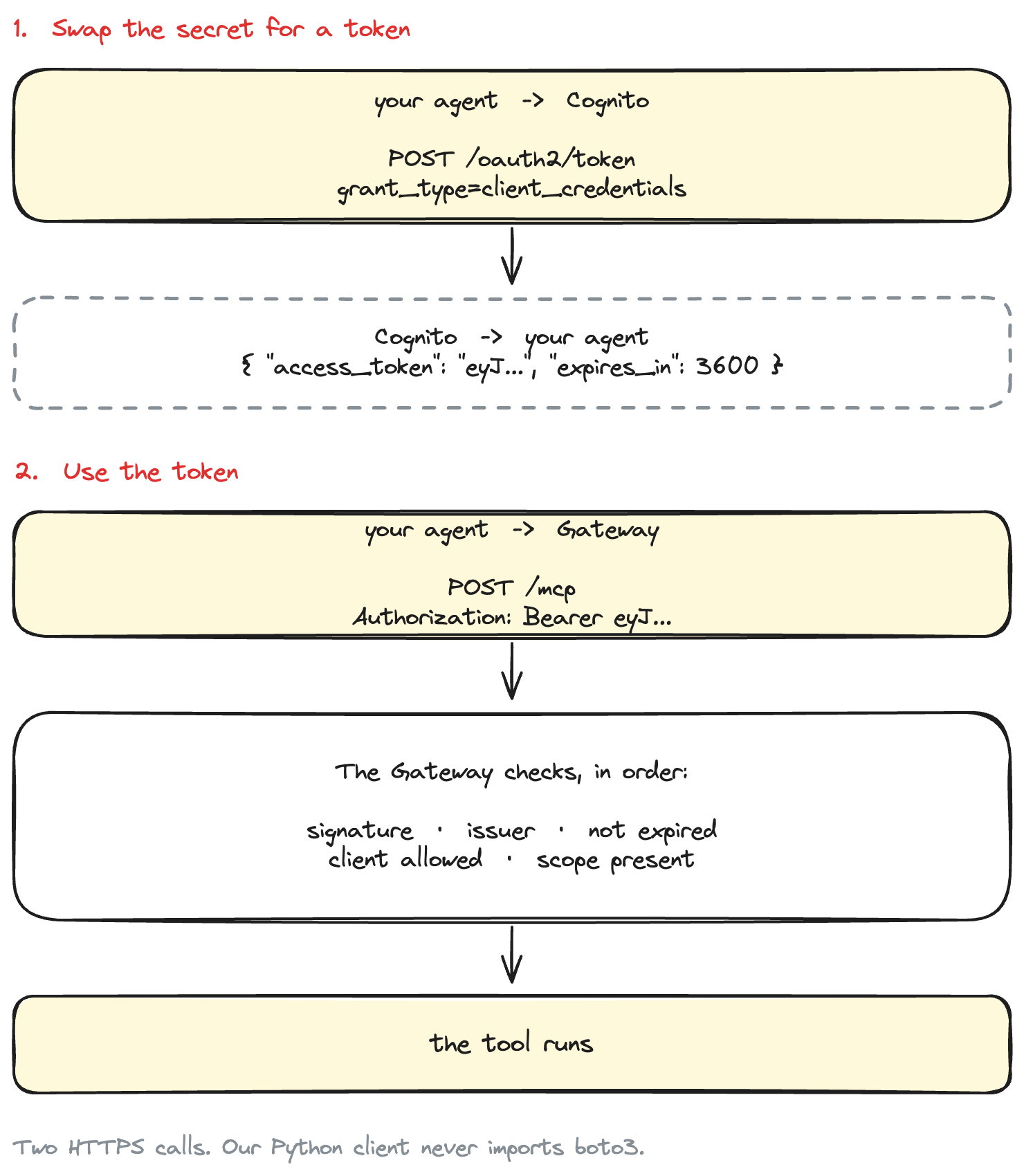
Two HTTPS calls, and five checks in between.
And we'll prove it works by trying to break it:
Five things we try. Only one gets through.
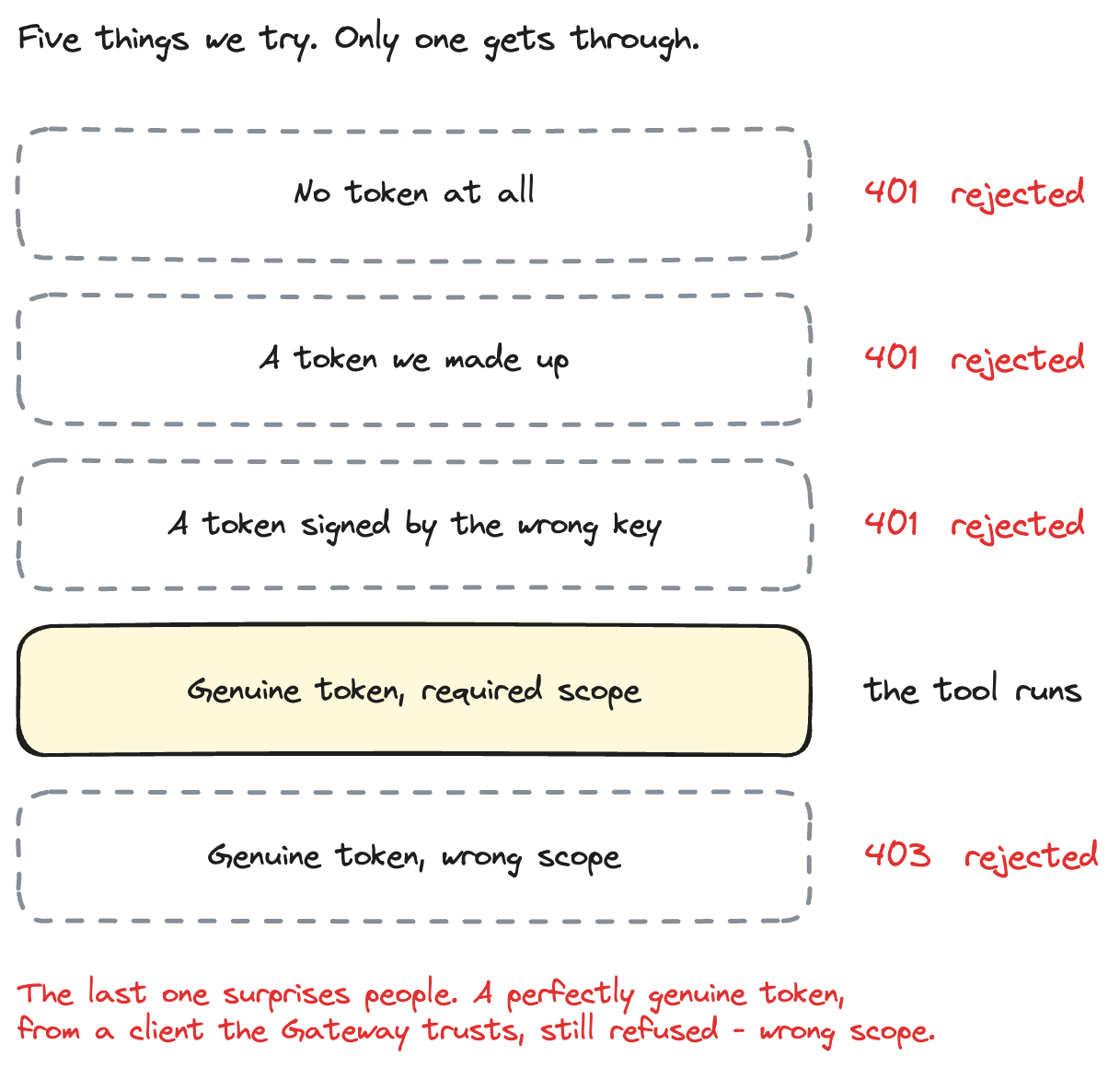
That last line is the one people miss. A perfectly genuine token, from a client the Gateway trusts, still gets refused if it lacks the right scope. More on that shortly.
Where Part 3 left off
Part 3's Gateway used AWS_IAM inbound auth:
authorizer_type = "AWS_IAM"
That is real authentication — the caller SigV4-signs the request, and needs bedrock-agentcore:InvokeGateway. It works well when every caller is an AWS principal in your account.
It stops working when:
- the agent runs outside AWS — a laptop, another cloud, a customer's server
- the caller belongs to a partner, and minting IAM users for them is not on
- your company already has an identity provider, and security want tools protected by the same tokens as everything else
- you want per-caller scopes, not just "may invoke this gateway"
That is what JWT inbound auth is for. Instead of AWS credentials, the caller brings a token from an identity provider you have told the Gateway to trust.
Authentication vs authorization
Two questions that get muddled constantly. For this article:
Authentication — is this request carrying a valid token issued by a trusted identity provider?
Signature checks out against the issuer's public keys, issuer is the one we configured, token has not expired, and the client_id is on the allow-list. Fails with 401 Unauthorized.
Authorization — does this token have the required scope to invoke this Gateway?
The token is genuine, and we still say no, because it lacks the scope this Gateway requires. Fails with 403 Forbidden, with WWW-Authenticate: Bearer error="insufficient_scope".
AgentCore Gateway does both, and the two different status codes are how you tell which one bit you. Our verification script exercises both.
Why we're starting with Cognito
Three reasons, all practical:
- Reproducible.
terraform applyand you have a working OAuth 2.0 authorization server. No tenant to register, no admin to email. - Entirely AWS. No second vendor, no second bill, no second console.
- Beginner-friendly. You can read every resource that gets created.
But let's be precise about what Cognito is here:
Cognito is not part of our Gateway architecture. It is simply today's token issuer.
And the corollary, which drives every design decision below:
The AgentCore Gateway module itself is intentionally independent of Cognito.
AgentCore does not require Cognito. It requires an OIDC identity provider — any of them. Cognito is the one that is quickest to stand up for a tutorial.
OIDC is worth naming plainly: it is a thin agreed layer on top of OAuth 2.0 that says where a provider publishes its details — its issuer name, and the public keys it signs tokens with. That agreement is why the Gateway can be handed one URL and work out the rest for itself, no matter who the provider is.
Architecture
The line in the middle is the thing to remember:
Above the line, provider-specific. Below it, standards-based.
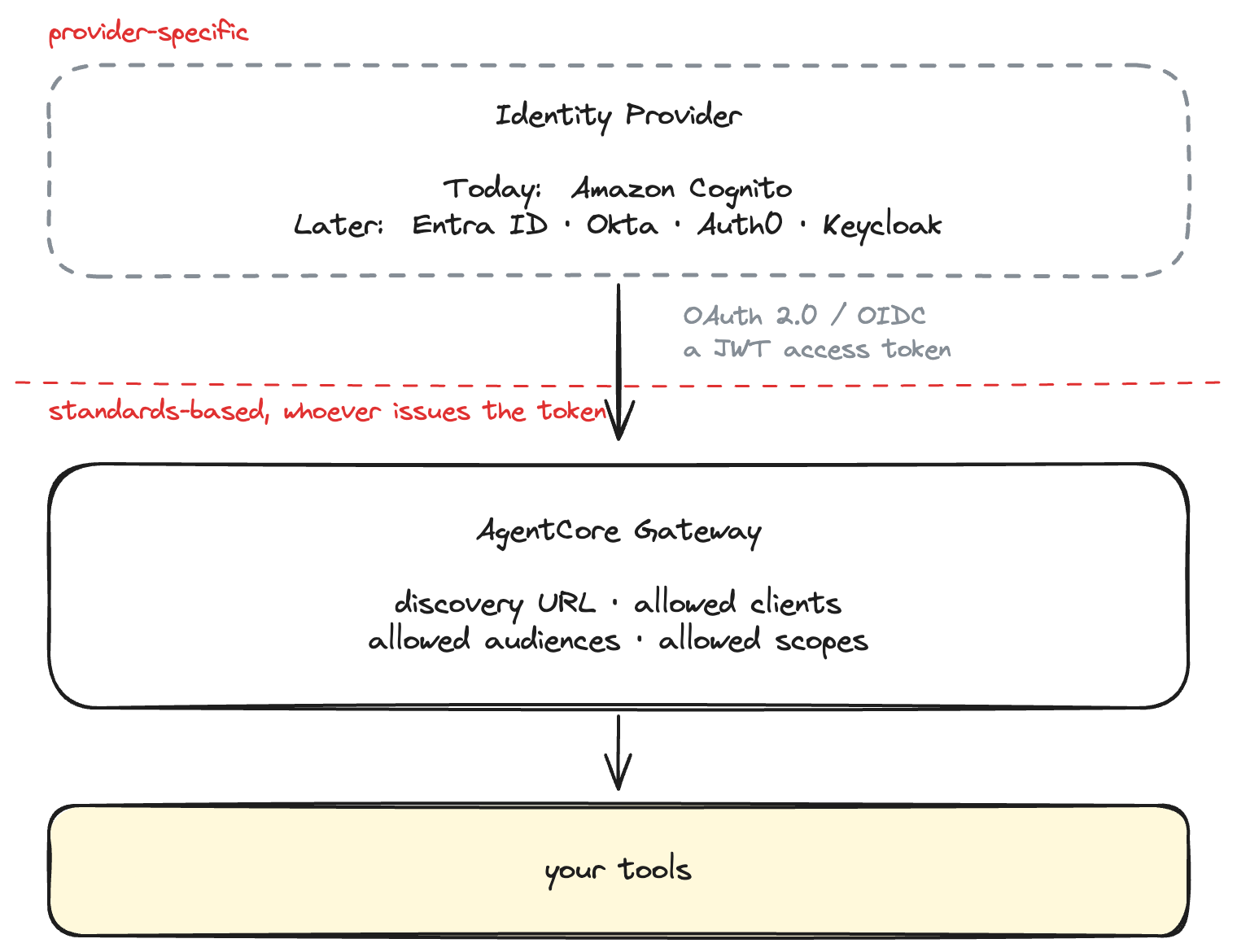
Above the line: provider-specific. Below the line: standards-based, and identical no matter who issues the tokens.
Put plainly:
Cognito
→ issues the token

Agent
→ presents the token

AgentCore Gateway
→ validates the token

Tool
→ runs only after Gateway accepts the caller
How the OAuth flow works
We use the client credentials grant. Why that one:
We are authenticating an application/workload, not a human user.
There is no person to redirect to a login page, no consent screen, no browser. An agent process holds a client id and a secret, and swaps them for a token. That is the whole flow:
That is the diagram at the top of this post, in words: the agent swaps its client id and secret for a token, then presents that token to the Gateway. No browser, no redirect, no human.
Everything above happens over HTTPS with no AWS credentials anywhere. That's the point — our Python client never imports boto3.
Prerequisites
- An AWS account with credentials configured
- Terraform >= 1.9
- uv
- A region where AgentCore Gateway is available (we use
us-east-1)
You need IAM permission to create Cognito, IAM, Lambda and bedrock-agentcore resources. You do not need any AWS permission to call the Gateway. That is the whole idea.
Project structure
agentcore-gateway-oauth/
├── README.md
├── pyproject.toml
├── uv.lock
├── .env.example
│
├── src/agentcore_gateway_auth/
│   ├── config.py          env loading + validation
│   ├── token_provider.py  provider-specific: getting a token
│   └── gateway_client.py  generic: presenting a token
│
├── scripts/
│   ├── get_token.py
│   ├── call_gateway.py
│   ├── inspect_token.py
│   └── verify_auth.py
│
├── tests/
│
└── terraform/
    ├── modules/
    │   ├── identity/cognito/     ← swap this out
    │   └── agentcore-gateway/    ← never mentions Cognito
    └── environments/demo/        ← wires them together
Two modules, one environment. The split is the lesson.
Step 1 — Create a simple tool
Why a Lambda, and not the MCP server from Part 2?
Part 3 pointed the Gateway at the order MCP server running on AgentCore Runtime. This post points it at a one-function Lambda instead, and the swap is deliberate.
This post is about inbound auth — who is allowed to call the Gateway. The thing behind the Gateway is not the subject, so we use the smallest target that exists: a Lambda that returns the time. Nothing competes for attention with the token handling.
It also quietly makes Part 3's point a second time. The Gateway does not care what is behind it. Everything about the OAuth setup below is identical if you point the target at the Part 2 runtime instead — only the target block changes.
So, deliberately boring, so authentication stays the subject:
# terraform/environments/demo/lambda/handler.py
from datetime import datetime, timezone

TOOL_NAME_DELIMITER = "___"


def get_server_time() -> dict:
    now = datetime.now(timezone.utc)
    return {"server_time": now.isoformat(timespec="seconds").replace("+00:00", "Z")}


def lambda_handler(event, context):
    tool = _tool_name(context)

    if tool in ("get_server_time", ""):
        return get_server_time()

    raise ValueError(f"Unknown tool: {tool}")
Returns one thing:
{ "server_time": "2026-08-11T09:30:00Z" }
Notice what is missing: the function performs no authentication. No token parsing, no signature checking, no allow-list. By the time Gateway invokes it, that has already happened. The tool's job is to run only after the Gateway said yes.
The one piece of Gateway-specific plumbing is the tool name. Gateway prefixes every tool with its target name, joined by ___, so get_server_time is advertised as timetools___get_server_time and arrives at Lambda that way:
def _tool_name(context) -> str:
    client_context = getattr(context, "client_context", None)
    custom = getattr(client_context, "custom", None) or {}
    name = custom.get("bedrockAgentCoreToolName", "")
    _, _, suffix = name.partition(TOOL_NAME_DELIMITER)
    return suffix or name
The suffix or name fallback means a plain aws lambda invoke — which carries no Gateway metadata — still works while you're developing.
Step 2 — Create Cognito OAuth resources with Terraform
Four resources make a machine-to-machine OAuth server. Each one earns its place:
# terraform/modules/identity/cognito/main.tf

resource "aws_cognito_user_pool" "this" {
  name = var.name

  # No humans sign in here.
  admin_create_user_config {
    allow_admin_create_user_only = true
  }
}

# The token endpoint lives on the domain, not on the user pool API.
# Without this there is nowhere to POST grant_type=client_credentials.
resource "aws_cognito_user_pool_domain" "this" {
  domain       = local.domain_prefix
  user_pool_id = aws_cognito_user_pool.this.id
}

# The API being protected, plus the custom scopes it defines.
resource "aws_cognito_resource_server" "this" {
  user_pool_id = aws_cognito_user_pool.this.id
  identifier   = var.resource_server_identifier   # "agentcore-tools"
  name         = var.resource_server_name

  dynamic "scope" {
    for_each = var.scopes
    content {
      scope_name        = scope.value.name          # "invoke"
      scope_description = scope.value.description
    }
  }
}
The resource server is where the scope name comes from. Cognito builds scopes as <resource-server-identifier>/<scope-name>, so ours is:
agentcore-tools/invoke
Worth knowing: client credentials grants can only carry custom scopes from a resource server. Built-in scopes like openid are unavailable to them. If you skip the resource server, there is no scope to request.
Then the machine identity itself:
resource "aws_cognito_user_pool_client" "machine" {
  for_each = local.clients_by_name

  name         = "${var.name}-${each.key}"
  user_pool_id = aws_cognito_user_pool.this.id

  generate_secret                      = true
  allowed_oauth_flows_user_pool_client = true
  allowed_oauth_flows                  = ["client_credentials"]
  allowed_oauth_scopes                 = local.client_scopes[each.key]

  # No interactive login, no authorization code flow, no callback URLs.
  # This client can do exactly one thing: swap its secret for a token.
  explicit_auth_flows = []
}
Client credentials requires all three of a client secret, the client_credentials grant, and a user pool domain. Miss any one and the token endpoint refuses you.
We create two clients, which will matter in Step 7:
| Client | Scope it holds |
|---|---|
agent |
agentcore-tools/invoke |
limited |
agentcore-tools/read |
Both are trusted callers. Only one holds the scope the Gateway requires.
The outputs are the abstraction boundary
This is the part that makes the swap possible later:
# terraform/modules/identity/cognito/outputs.tf

output "oidc_discovery_url" {
  value = "https://cognito-idp.${local.region}.amazonaws.com/${aws_cognito_user_pool.this.id}/.well-known/openid-configuration"
}

output "token_url" {
  value = "https://${aws_cognito_user_pool_domain.this.domain}.auth.${local.region}.amazoncognito.com/oauth2/token"
}

output "allowed_clients" {
  value = [for client in aws_cognito_user_pool_client.machine : client.id]
}

output "allowed_audiences" {
  value = []     # see below
}
Every name is OAuth vocabulary. Nothing says user_pool. An Entra ID module would expose the same output names with different values, and everything downstream would be unchanged.
Why allowed_audiences is empty
This surprises people, so it's worth stating clearly.
A Cognito access token from a client credentials grant has no aud claim. Cognito can only populate aud through resource binding (RFC 8707), and the Cognito documentation is explicit:
You can only bind access tokens to resources for users. You can't request a resource binding with client-credentials M2M grants.
So for Cognito M2M, the claim that identifies the caller is client_id, and the Gateway field that checks it is allowed_clients. Not allowed_audiences.
Entra ID, Okta and Auth0 do populate aud for client-credentials tokens, and would use allowed_audiences instead. Our Gateway module accepts either, which is exactly why it can serve both.
Step 3 — Create the AgentCore Gateway
Here is the module interface. Read it as the thesis of this article:
# terraform/environments/demo/main.tf

module "gateway" {
  source = "../../modules/agentcore-gateway"

  name = var.gateway_name

  # ---- The swappable boundary --------------------------------------------
  oidc_discovery_url = module.identity.oidc_discovery_url
  allowed_clients    = module.identity.allowed_clients
  allowed_audiences  = module.identity.allowed_audiences
  allowed_scopes     = [local.invoke_scope]
  # -------------------------------------------------------------------------

  target_name     = var.target_name
  tool_lambda_arn = aws_lambda_function.tool.arn

  tools = [{
    name        = "get_server_time"
    description = "Returns the current server time in UTC as an ISO 8601 string."
    properties  = []
  }]
}
There is no cognito_user_pool_id. No cognito_client_id. The module takes a discovery URL, some client ids, some audiences, and some scopes — all of which are OAuth 2.0 concepts that every OIDC provider has.
Compare with what we deliberately did not write:
# Don't do this.
module "agentcore_gateway" {
  cognito_user_pool_id = ...
  cognito_client_id    = ...
}
The moment a Cognito noun appears in the Gateway module's interface, swapping providers means editing the Gateway module. Which means testing it again. Which means nobody does it.
Step 4 — Configure CUSTOM_JWT authentication
Inside the module, the actual resource:
# terraform/modules/agentcore-gateway/main.tf

resource "aws_bedrockagentcore_gateway" "this" {
  name        = var.name
  description = var.description
  role_arn    = aws_iam_role.gateway.arn

  protocol_type   = "MCP"
  authorizer_type = "CUSTOM_JWT"

  authorizer_configuration {
    custom_jwt_authorizer {
      discovery_url = var.oidc_discovery_url

      allowed_clients  = length(var.allowed_clients) > 0 ? var.allowed_clients : null
      allowed_audience = length(var.allowed_audiences) > 0 ? var.allowed_audiences : null
      allowed_scopes   = length(var.allowed_scopes) > 0 ? var.allowed_scopes : null
    }
  }

  protocol_configuration {
    mcp {
      instructions = var.description
    }
  }
}
Four details worth calling out.
discovery_url does most of the work. From that one URL the Gateway learns two things: the issuer's name, and where to fetch its public keys. (Those keys live at what OAuth calls the JWKS endpoint — just a JSON document listing the provider's public signing keys. The Gateway downloads it and uses it to check the token's signature.) The API enforces the suffix — the value must end in /.well-known/openid-configuration:
Cognito   https://cognito-idp.<region>.amazonaws.com/<pool-id>/.well-known/openid-configuration
Entra ID  https://login.microsoftonline.com/<tenant>/v2.0/.well-known/openid-configuration
Okta      https://<org>.okta.com/oauth2/<server>/.well-known/openid-configuration
Auth0     https://<tenant>.auth0.com/.well-known/openid-configuration
Keycloak  https://<host>/realms/<realm>/.well-known/openid-configuration
"Optional" means absent, not empty. This one will bite you. allowedClients, allowedAudience and allowedScopes are all optional in the API — but passing an empty list is a validation error, not a way to omit them:
ValidationException: 1 validation error detected: Value '[]' at
'authorizerConfiguration.customJWTAuthorizer.allowedAudience' failed to satisfy
constraint: Member must have length greater than or equal to 1
Since allowed_audiences is always empty on Cognito, this is not a hypothetical — it's the first error you hit. Hence the length(...) > 0 ? ... : null on each of the three.
Note the field is singular. The API calls it allowedAudience, and so does the Terraform provider (allowed_audience), even though it takes a list. Our module variable is allowed_audiences because it reads better next to allowed_clients and allowed_scopes; the mapping happens in one place.
An open gateway is one omission away. If you set neither allowed_clients nor allowed_audiences, the Gateway accepts any token that issuer signs — every app client in the pool, or with a multi-tenant provider, potentially every tenant. The API permits this. Our module refuses it:
resource "terraform_data" "require_client_or_audience" {
  lifecycle {
    precondition {
      condition     = length(var.allowed_clients) > 0 || length(var.allowed_audiences) > 0
      error_message = "Set allowed_clients, allowed_audiences, or both. With neither, the gateway accepts every token the issuer signs."
    }
  }
}
A guard rail in a reusable module is worth more than a sentence in a README.
Inbound and outbound auth are different things
The target configuration:
credential_provider_configuration {
  gateway_iam_role {}
}
The caller's JWT is verified by the Gateway and never forwarded to Lambda. The Gateway invokes Lambda using its own service role. Two separate hops, two separate auth mechanisms:
Two different questions, answered two different ways.

Forwarding the caller's token downstream is a different feature (JWT_PASSTHROUGH), with different tradeoffs, and it is not what we want here.
Deploy it
cd terraform/environments/demo
terraform init
terraform apply
Every variable has a working default, so no terraform.tfvars is needed.
Then generate the client config in one command, so nothing is copied by hand:
cd ../../..
terraform -chdir=terraform/environments/demo output -raw dotenv > .env
That writes TOKEN_URL, CLIENT_ID, CLIENT_SECRET, TOKEN_SCOPE, GATEWAY_URL and TOOL_NAME. Note what it does not write: any AWS credential, or even a region. The client doesn't need them.
Step 5 — Get an OAuth access token
uv sync
uv run python scripts/get_token.py
Requesting a token from https://agentcore-oauth-idp-123456789012.auth.us-east-1.amazoncognito.com/oauth2/token
  grant_type    client_credentials
  client_id     4j0or3amr4j1lur7uh9vfng3bu
  scope         agentcore-tools/invoke

Token received.
  fingerprint   eyJraW...5g2A (923 chars)
  granted scope agentcore-tools/invoke
  expires in    3600s
The token itself is never printed. It is a bearer credential: anyone holding it can call the Gateway until it expires. Treat it like a password, and don't paste it into a chat window — including mine.
The code behind that is a plain RFC 6749 §4.4 request:
# src/agentcore_gateway_auth/token_provider.py

def _build_request(self) -> tuple[dict[str, str], dict[str, str]]:
    body = {"grant_type": "client_credentials"}
    if self.scope:
        body["scope"] = self.scope
    body.update(self.extra_params)

    headers = {"Content-Type": "application/x-www-form-urlencoded"}

    if self.auth_style == "basic":
        # client_secret_basic: the secret travels in the Authorization
        # header, not the body.
        raw = f"{self.client_id}:{self._client_secret}".encode()
        headers["Authorization"] = f"Basic {base64.b64encode(raw).decode()}"
    else:
        # client_secret_post: some providers only accept this.
        body["client_id"] = self.client_id
        body["client_secret"] = self._client_secret

    return headers, body
Tokens are cached until shortly before expiry:
def get_token(self, *, force_refresh: bool = False) -> str:
    if force_refresh or self._cached is None or not self._cached.is_fresh():
        self._cached = self.fetch()
    return self._cached.value
That matters beyond latency. Cognito bills machine-to-machine usage partly by token request volume, so fetching a fresh token for every tool call is a real line on a real invoice.
Step 6 — Call the Gateway
uv run python scripts/call_gateway.py
Gateway advertises 1 tool(s):
  - timetools___get_server_time: Returns the current server time in UTC as an ISO 8601 string.

Calling timetools___get_server_time ...
{
  "server_time": "2026-08-11T09:30:00Z"
}
The shape of the code is the point:
# ---- provider-specific: obtain a token -------------------------------
access_token = token_provider.get_token()

# ---- abstraction boundary --------------------------------------------
# From here on, `access_token` is just a string.
with GatewayClient(settings.gateway_url) as gateway:
    gateway.connect(access_token)
    result = gateway.call_tool(settings.tool_name, access_token=access_token)
Not this:
gateway.call_with_cognito(...) # no
GatewayClient takes the token as a per-call argument, so it has no way to learn where the token came from. It cannot grow a Cognito dependency by accident.
Presenting the token is four lines:
def build_headers(self, access_token: str | None) -> dict[str, str]:
    headers = {
        "Content-Type": "application/json",
        "Accept": "application/json, text/event-stream",
        "MCP-Protocol-Version": MCP_PROTOCOL_VERSION,
    }
    if access_token:
        headers["Authorization"] = f"Bearer {access_token}"
    if self._session_id:
        headers["Mcp-Session-Id"] = self._session_id
    return headers
That if access_token: is load-bearing. The "no token" test needs the header genuinely absent, not sent as an empty Bearer . There's a test for it.
We're talking to the Gateway with raw JSON-RPC rather than the MCP SDK, on purpose: an auth article needs the HTTP status codes and the WWW-Authenticate header visible, and a higher-level client hides both.
Step 7 — Prove unauthenticated requests are rejected
This is the deliverable that matters. A tutorial that says "and now it's secure" without trying to break it has proved nothing.
uv run python scripts/verify_auth.py
AgentCore Gateway authentication verification
Gateway: https://secure-tools-abc123.gateway.bedrock-agentcore.us-east-1.amazonaws.com/mcp

1. Calling Gateway without a token...
   REJECTED with HTTP 401 ✓
     WWW-Authenticate: Bearer resource_metadata="https://...", scope="agentcore-tools/invoke"

2. Calling Gateway with an invalid token...
   REJECTED with HTTP 401 ✓

3. Calling Gateway with a well-formed but unsigned token...
   REJECTED with HTTP 401 ✓

4. Requesting OAuth token from the identity provider...
   TOKEN RECEIVED eyJraW...5g2A (923 chars) ✓
     granted scope: agentcore-tools/invoke

5. Calling Gateway with the valid token...
   AUTHENTICATED ✓
     tools visible: timetools___get_server_time

6. Invoking tool timetools___get_server_time...
   RESULT: {"server_time": "2026-08-11T09:30:00Z"} ✓

7. Calling Gateway with a valid token that lacks the required scope...
   token granted with scope: agentcore-tools/read
   REJECTED with HTTP 403 ✓
     WWW-Authenticate: Bearer error="insufficient_scope", scope="agentcore-tools/invoke"
     Authenticated, but not authorized - a real token from a
     trusted client, refused for want of a scope.

✓ All checks behaved as expected.
Every one of those is a real HTTPS request to the deployed Gateway. Nothing is stubbed, and the script exits non-zero if any check misbehaves — including if an unauthenticated call unexpectedly succeeds:
def expect_rejected(report, gateway, token, *, expected_status, label):
    try:
        gateway.connect(token)
    except GatewayAuthError as exc:
        if exc.status_code == expected_status:
            report.ok(f"REJECTED with HTTP {exc.status_code}")
        else:
            report.bad(f"rejected, but with HTTP {exc.status_code}; expected {expected_status}")
        return
    report.bad(f"ACCEPTED - {label} should not have been allowed through")
Check 3 is the most interesting negative case. It sends a syntactically valid JWT with a garbage signature:
header = segment({"alg": "RS256", "kid": "not-a-real-key", "typ": "JWT"})
body = segment({
    "iss": "https://attacker.example.com",
    "client_id": "not-a-real-client",
    "scope": "agentcore-tools/invoke",
    "token_use": "access",
    "exp": int(time.time()) + 3600,
})
It claims the right scope. It claims to be unexpired. It looks like a token. The Gateway has to actually fetch the issuer's public keys and fail the signature check to reject it — it cannot dismiss it on shape alone. If self-signed tokens got through, this is the check that would notice.
And check 7 is the authorization half. That token is genuine: correctly signed by Cognito, from a client id on the Gateway's allow-list, unexpired. It gets refused anyway, with a different status code, because it carries agentcore-tools/read and the Gateway requires agentcore-tools/invoke.
Authentication passed. Authorization failed. Two different questions.
The challenge header is useful
When a JWT-protected Gateway refuses you, it doesn't just say no — it tells you what it wanted, following the RFC 6750 bearer challenge format:
401  WWW-Authenticate: Bearer resource_metadata="...", scope="agentcore-tools/invoke"
403  WWW-Authenticate: Bearer error="insufficient_scope", scope="...", resource_metadata="..."
The resource_metadata URL points at the Gateway's RFC 9728 document at /.well-known/oauth-protected-resource, which names the authorization server and the supported scopes. An MCP-compliant client can fetch that and work out how to get a token on its own, rather than being told out of band.
Step 8 — Inspect the JWT
uv run python scripts/inspect_token.py
Before the output, the warning that belongs on this whole script:
Decoding a JWT is not the same as verifying its signature.
A JWT is three base64url segments joined by dots. The first two — header and payload — are not encrypted. Anyone holding the token can read them with the standard library, which is all this script does:
def decode_segment(segment: str) -> dict:
    """base64url-decode one JWT segment. No signature check happens here."""
    padding = "=" * (-len(segment) % 4)
    return json.loads(base64.urlsafe_b64decode(segment + padding))
Ten lines, no crypto library, no network call. That is exactly why decoding proves nothing. Only the third segment — the signature — establishes that the token is genuine, and checking it needs the issuer's public key from the JWKS endpoint. In this architecture, the component that does that is AgentCore Gateway.
A representative Cognito client-credentials access token payload:
sub         4j0or3amr4j1lur7uh9vfng3bu
token_use   access
scope       agentcore-tools/invoke
auth_time   1786534200
iss         https://cognito-idp.us-east-1.amazonaws.com/us-east-1_F7gox7o7Z
exp         1786537800 (3600s from now)
iat         1786534200
version     2
jti         aaaaaaaa-bbbb-cccc-dddd-eeeeeeeeeeee
client_id   4j0or3amr4j1lur7uh9vfng3bu
Run the script against your own pool to see exactly what yours issues. What the Gateway does with each:
| Claim | What AgentCore Gateway uses it for |
|---|---|
iss |
Must match the issuer from the configured discovery URL. |
client_id |
Matched against allowed_clients. |
scope |
Must contain every scope in allowed_scopes. |
exp |
Expired tokens are refused. |
token_use |
Cognito-specific: access for an access token, id for an ID token. |
sub |
Subject. For client credentials this is the app client id, not a person. |
Two things to notice.
sub is not a user. In a client credentials grant there is no user. sub is the app client. If you are used to reading sub as "the human", this is where that habit breaks.
There is no aud. As covered in Step 2 — Cognito can't set it for this grant. That absence is precisely why our Gateway pins callers with allowed_clients.
Make Cognito swappable
Change the issuer, not the Gateway.
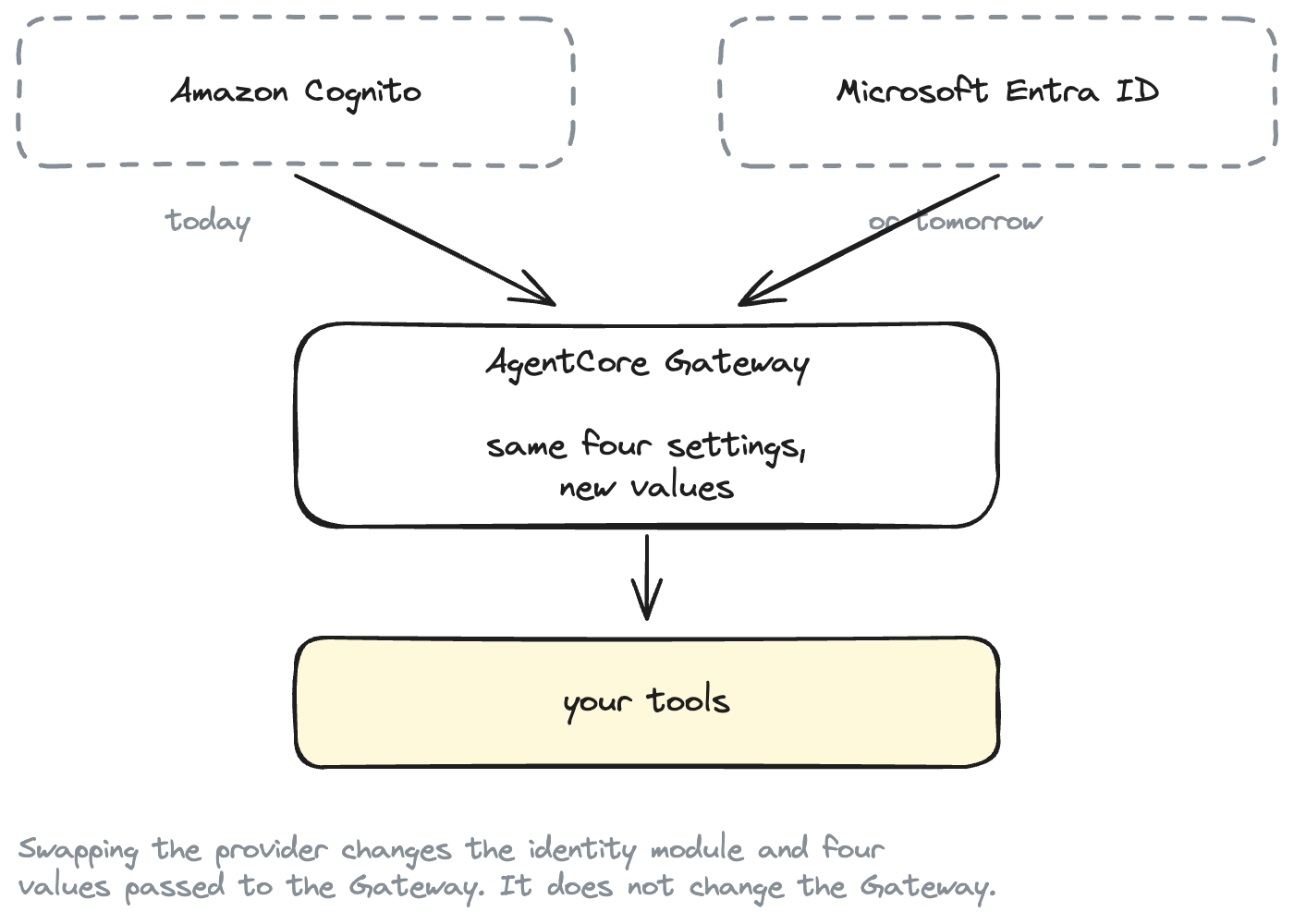
The reusable Gateway module does not change. Neither does GatewayClient. Neither does the Lambda tool.
What changes:
| Thing | Changes? |
|---|---|
| OIDC discovery URL | Yes — new provider, new URL |
| Issuer | Yes — follows from the discovery URL |
| Allowed client / application ids | Yes — new provider, new ids |
| Allowed audiences | Usually — most providers set aud; Cognito M2M can't |
| Required scopes | Yes — scope naming differs per provider |
| Token endpoint | Yes |
| Token-request parameters | Sometimes — see below |
| AgentCore Gateway module | No |
GatewayClient |
No |
| Tool code | No |
Everything in the "yes" column is a value, not code. It's what you pass to the module, not what's inside it.
In Terraform terms, the swap is replacing one module block:
module "identity" {
  source = "../../modules/identity/entra"   # was: identity/cognito
  # ...provider-specific inputs...
}

module "gateway" {
  source = "../../modules/agentcore-gateway"   # unchanged

  oidc_discovery_url = module.identity.oidc_discovery_url
  allowed_clients    = module.identity.allowed_clients
  allowed_audiences  = module.identity.allowed_audiences
  allowed_scopes     = module.identity.required_scopes
  # ...unchanged...
}
Same four lines. Different values.
Replacing Cognito with Entra ID, Okta, or Auth0
Here is the honest version of the portability story:
| IdP | Gateway changes | Token-client changes |
|---|---|---|
| Cognito | JWT/OIDC values | Scope is <resource-server-id>/<scope>; pinned via allowed_clients (no aud) |
| Entra ID | JWT/OIDC values | Scope must be <app-id-uri>/.default; individual scopes are rejected for client credentials |
| Okta | JWT/OIDC values | Scope is the custom scope on the authorization server; token carries aud and cid |
| Auth0 | JWT/OIDC values | Requires a non-standard audience parameter in the token request |
| Keycloak | JWT/OIDC values | Token URL is /realms/<realm>/protocol/openid-connect/token; aud depends on client scope mappers |
The lesson, stated precisely:
AgentCore Gateway consumes standards-based JWT/OIDC configuration. Token acquisition may still contain provider-specific details.
Don't build fake portability
It would be easy to write one giant IdentityProvider abstraction, declare all OAuth providers equivalent, and quietly break the first time someone tries Auth0. The differences in that table are real. Entra genuinely rejects individual scopes for client credentials. Auth0 genuinely requires a parameter that isn't in the spec.
So the boundary sits here:
The boundary in the client code: one module knows the provider, the other never does.
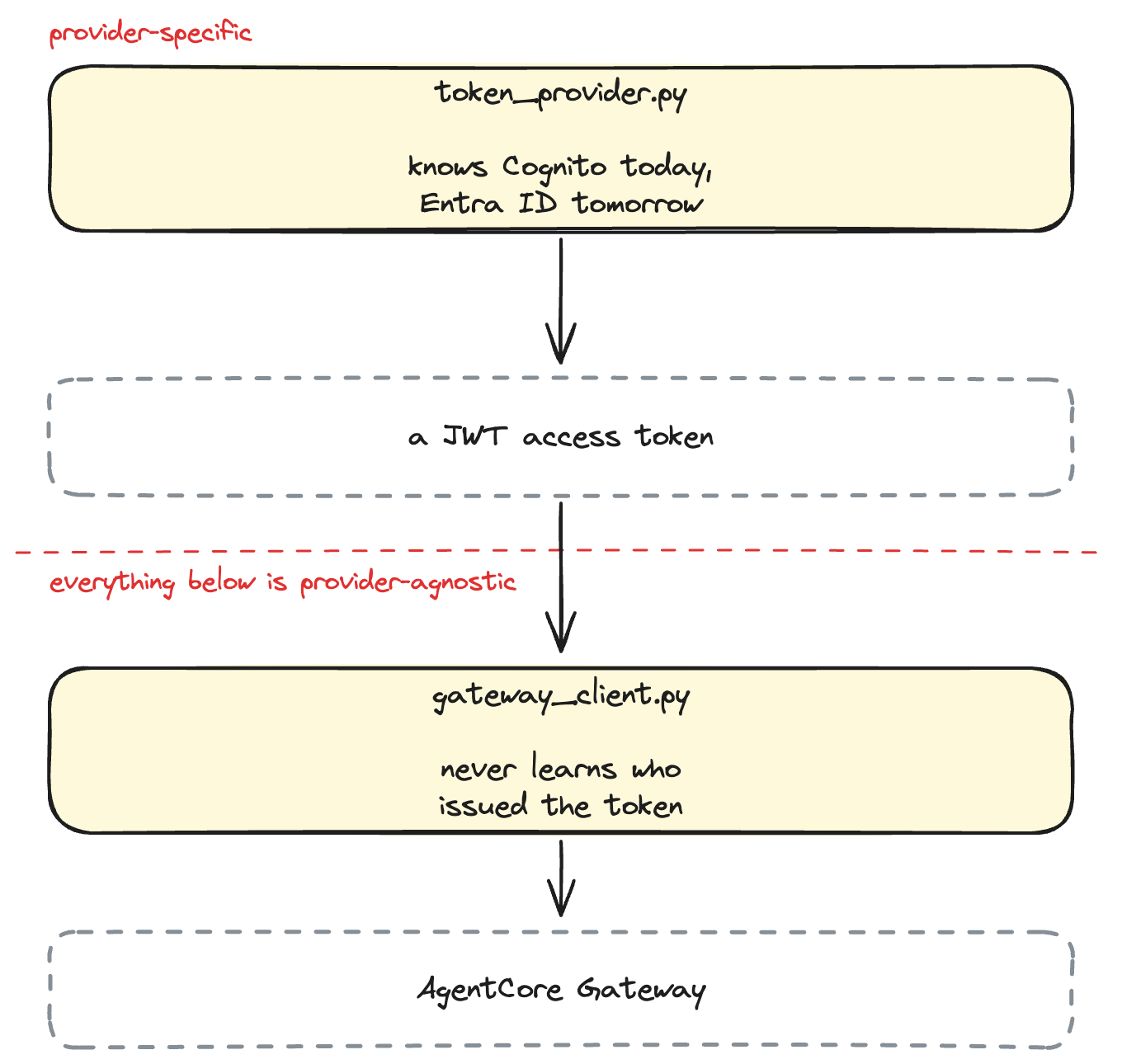
Above the line, we accommodate the differences rather than deny them, with two small hooks instead of five classes:
# Auth0's non-standard audience parameter
ClientCredentialsTokenProvider(
    token_url=...,
    client_id=...,
    client_secret=...,
    extra_params={"audience": "https://api.example.com"},
)

# Providers that only accept client_secret_post
ClientCredentialsTokenProvider(..., auth_style="post")
Below the line, everything is genuinely identical, because a bearer token is a bearer token. GatewayClient needs one thing from any provider:
class TokenProvider(Protocol):
    def get_token(self) -> str: ...
An EntraTokenProvider or OktaTokenProvider satisfying that protocol drops in with no change to the Gateway client. That is a real seam, not a pretend one.
Testing
The tests run without AWS credentials and without a deployment — httpx2.MockTransport intercepts every request:
uv run pytest
50 passed
They cover the things that would quietly hurt:
- Configuration validation — every missing variable is named in the error; non-HTTPS URLs are refused, because client credentials puts a secret in the request body
- Token request construction —
client_secret_basickeeps the secret out of the body;auth_style="post"moves it in;extra_paramsreaches the wire; the scope's slash is percent-encoded - Caching — a cached token doesn't re-hit the endpoint, and a token expiring inside the leeway does
- Authorization header handling — the header reaches the wire, and is genuinely absent for the no-token case
- No accidental token logging —
repr(),str()and error messages never contain the secret or the token, even when the server reflects the token back in an error body - 401 vs 403 — the status code and
WWW-Authenticateheader survive into the exception, and a 500 is not misreported as an auth failure
That last group exists because the easiest way to leak a credential is a helpful debug print.
Production considerations
The client secret is in Terraform state. terraform apply creates a Cognito app client with a secret, and it lands in state in plaintext. Use an encrypted S3 backend with restricted access for anything beyond a demo, not the local state file this project defaults to. We deliberately don't expose the secret as an ordinary named output, to keep it out of casual terraform output runs and CI logs — there's a single dotenv output, marked sensitive, that writes .env for you.
Long-lived client secrets are the weak link. A workload holding a static secret in a file is the part of this design that ages worst. In rough order of preference: workload identity federation so no secret exists at all; a secret in Secrets Manager with rotation; or private-key JWT client authentication where the provider supports it.
Scope your scopes. One invoke scope for a whole Gateway is a tutorial simplification. Real deployments want scopes that mean something — orders/read vs orders/write — so a compromised client can't do everything.
Shorten token lifetimes. We use Cognito's default hour. Cognito allows as low as 5 minutes. A leaked token is valid until it expires, and there is no revocation for client-credentials access tokens.
Watch the CloudTrail note. AWS documents that JWT inbound auth logs some token claims — including sub — to CloudTrail. Keep personally identifiable information out of that claim.
Don't reach for the offloaded modes casually. AgentCore also offers AUTHENTICATE_ONLY and NONE inbound types, where the Gateway makes no authorization decision at all. They exist for onboarding existing services and for gateways fronted by a policy engine or interceptor Lambda. With NONE, any caller reaches your target.
This is inbound auth only. How the Gateway authenticates to downstream APIs — outbound auth, credential providers, on-behalf-of token exchange — is a separate subject, and a separate article.
Clean up
terraform -chdir=terraform/environments/demo destroy
rm .env
The Cognito user pool, both app clients, the Gateway, the target and the Lambda all go. Delete .env too — it holds client secrets.
What did we learn?
- AgentCore Gateway supports OAuth 2.0 / JWT inbound auth via
authorizer_type = "CUSTOM_JWT", which is how you let callers in without giving them AWS credentials. - Client credentials is the right grant for agents, because we are authenticating a workload, not a person.
- The Gateway needs one URL to establish trust — the OIDC discovery document — plus an allow-list of clients or audiences.
- 401 and 403 mean different things. Bad token vs. valid token without the required scope. Authentication vs authorization, visible in the status code.
- Cognito M2M tokens have no
audclaim, so pin callers withallowed_clients. Other providers differ, and the Gateway accepts either. - "Optional" fields still reject empty lists — pass
null, not[]. - A Gateway module that knows about Cognito is a Gateway module you'll rewrite. Keep the interface in OAuth vocabulary and the swap stays a configuration change.
- Prove the rejections. An auth tutorial that never tries an unauthenticated call hasn't demonstrated anything.