Give Your AI Agent Memory Across Conversations with Amazon Bedrock AgentCore Memory
Our agent can run, use tools, authenticate, and call protected APIs. But start a new conversation and it knows nothing about yesterday. We run one experiment: a user states a preference, the conversation ends, a new conversation begins, and the agent still knows.
Our agent can run, use tools, authenticate, and call OAuth-protected APIs. Five articles of infrastructure and security, and it still has one embarrassing property:
Start a new conversation and it knows nothing about the one we had yesterday.
We could reload every old chat into the prompt. That works until it doesn't — the prompt grows, the cost grows, and most of what's in there is irrelevant to the current question.
AgentCore Memory offers a different shape: keep the useful information, and retrieve only what a later conversation actually needs.
The experiment
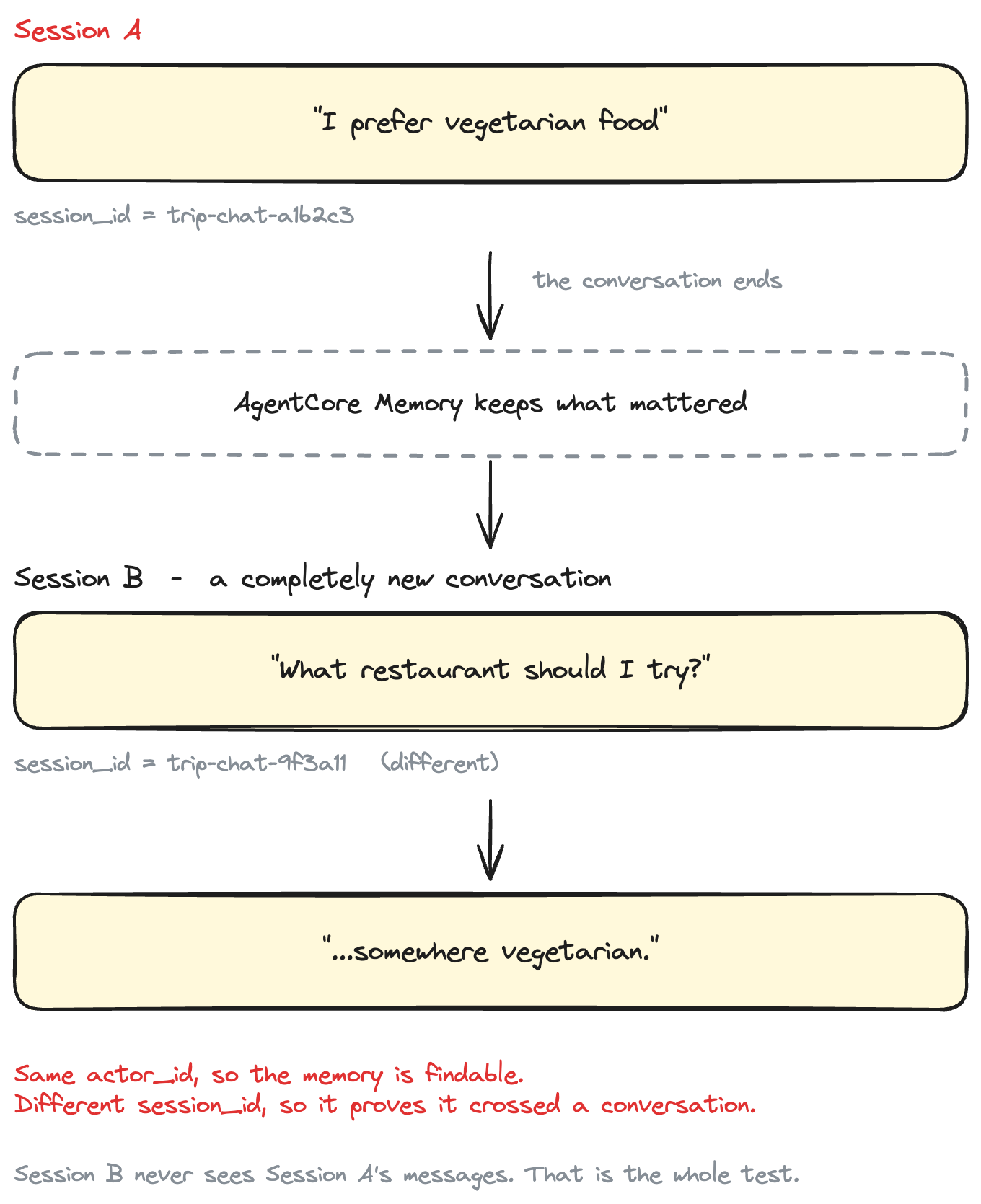
The entire article is one experiment. Two conversations, one user.
Conversation 1:
User: My name is Sam. I'm travelling to Japan next month.
      I prefer vegetarian food.
Then the conversation ends.
Conversation 2 — a completely new session:
User: Can you suggest what kind of restaurant I should look for on my trip?
Notice what that question does not contain. No "Japan". No "vegetarian". No "Sam". If the agent answers usefully, it's because something survived the gap between the two conversations.
The proof structure:
Same actor, different session. Session B never sees Session A's messages.
Short-term vs long-term memory
This distinction does the heavy lifting, so let's be precise.
Short-term memory is the conversation itself — the events you write as the user talks. Useful within a session, and within a context window.
Long-term memory is information derived from those events by a strategy. It outlives the conversation that produced it, and a later session can retrieve it.
| Concept | Purpose |
|---|---|
| Event / short-term memory | Records interaction history |
| Long-term memory | Retained information derived from interactions |
| Actor ID | Whose memory |
| Session ID | Which conversation |
| Namespace | Logical organisation and retrieval boundary |
One thing worth saying plainly, because the industry is sloppy about it: pasting yesterday's chat messages into today's prompt is not long-term memory. It's history replay. It works, it's sometimes the right call, and it's a different thing. The test in this article is specifically that Session B never sees Session A's messages.
What AgentCore Memory actually does
Being precise about the division of labour, because "gives your LLM memory" is not what happens:
You are in the loop at both ends. AgentCore does the middle.
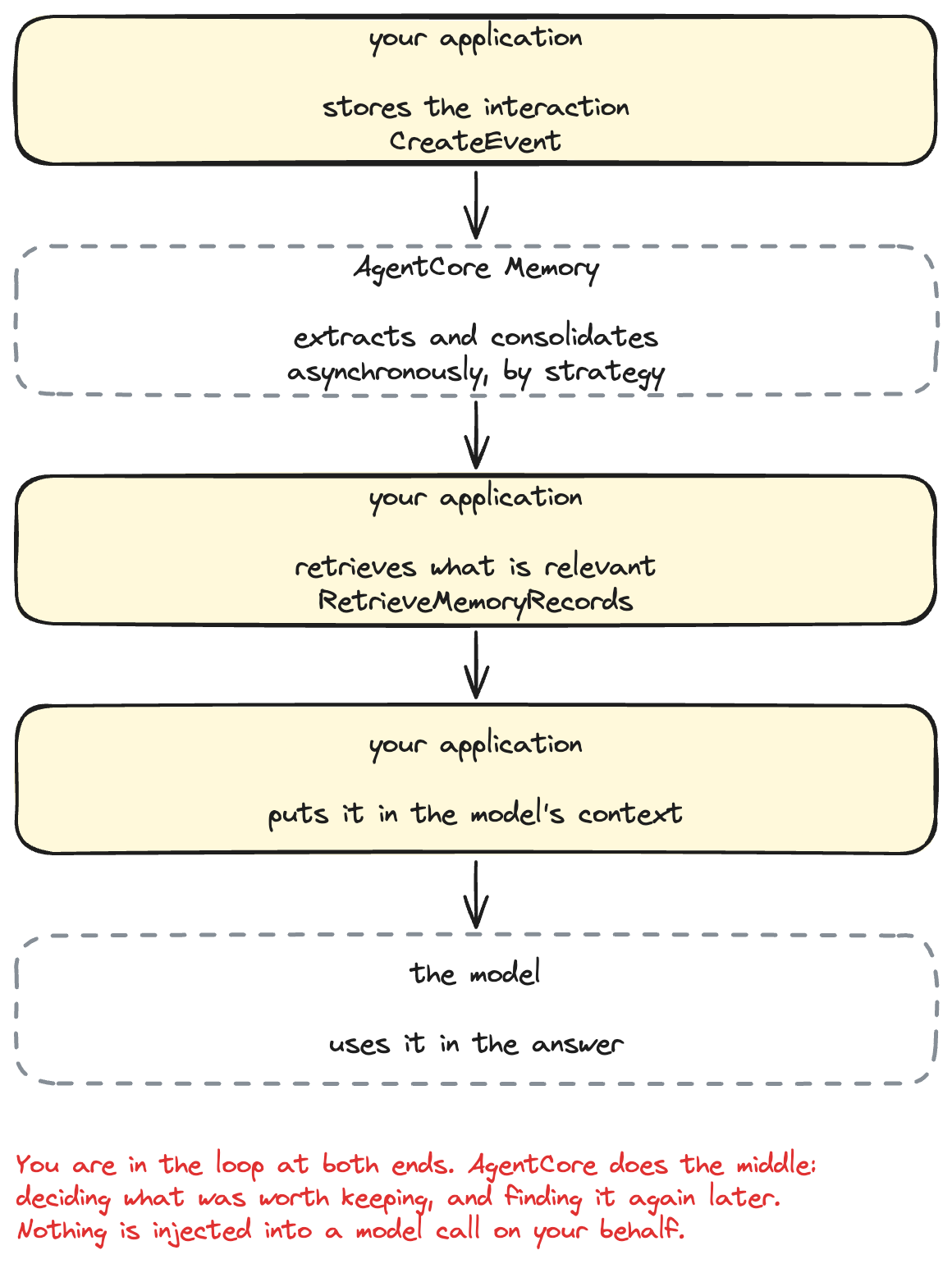
The application is in the loop at both ends. AgentCore does the part in the middle — deciding what was worth keeping, and finding it again later. Nothing is automatically injected into a model call on your behalf.
Actor IDs, session IDs, and namespaces
Three identifiers, and mixing them up is how this goes wrong.
actor_id    = "sam"                     whose memory this is
session_id  = "trip-chat-...-a1b2c3"    which conversation
Session A and Session B use:
same actor_id       ← so the memory is findable
different session_id ← so it proves it crossed a conversation boundary
If both sessions shared a session id, we'd have demonstrated nothing more interesting than a chat log.
The namespace decides whether any of this works
A namespace is where extracted memories are filed. Ours:
/preferences/{actorId} → /preferences/sam
Only three variables are allowed in a namespace template — {actorId}, {sessionId} and {memoryStrategyId} — and this is where the trap is.
Put {sessionId} in the namespace and every memory is filed under the conversation that produced it. Session B looks in /preferences/sam/<its own session>, finds nothing, and carries on cheerfully. No error, no warning, just an agent that never remembers anything.
So this is worth a guard rather than a comment. In the demo's config:
if "{sessionId}" in self.memory_namespace:
    raise ConfigError(
        f"MEMORY_NAMESPACE {self.memory_namespace!r} contains {{sessionId}}. "
        "That files each memory under the conversation that produced it, so a "
        "new session can never retrieve it - which is exactly what this demo "
        "is trying to show working."
    )
Namespaces exist to give long-term memories a logical place to live and make retrieval targeted. In this demo they're also the isolation boundary between users: sam and alex resolve to different namespaces, and retrieval never crosses one.
Prerequisites
- An AWS account with credentials configured
- Terraform >= 1.9, AWS provider >= 6.58
- uv
- A Region where AgentCore Memory is available, with Bedrock model access enabled (
us-east-1by default)
Project structure
agentcore-memory-demo/
├── src/agentcore_memory_demo/
│   ├── config.py     settings + the namespace guard rails
│   ├── memory.py     store events, retrieve memories, poll for extraction
│   ├── agent.py      a deliberately boring agent
│   └── session.py    session ids, kept honest
│
├── scripts/
│   ├── session_one.py       conversation 1
│   ├── inspect_memories.py  what did AgentCore keep?
│   ├── session_two.py       conversation 2 (new session id)
│   └── verify_memory.py     the whole experiment, checked
│
└── terraform/
    ├── modules/agentcore-memory/
    └── environments/demo/
No agent framework. No MCP, no Gateway, no tools, no vector database. Memory is the subject; anything else would obscure it.
Step 1 — Create AgentCore Memory with Terraform
Two resources, and the split is the lesson:
resource "aws_bedrockagentcore_memory" "this" {
  name        = var.name
  description = var.description

  # How long raw conversation events live, in days (3-365).
  event_expiry_duration = var.event_expiry_days
}
That gives you event storage — short-term memory. On its own it extracts nothing. From the docs:
If no strategies are specified, long-term memory records will not be extracted for that memory.
One naming trap worth knowing before terraform apply tells you: the API pattern for a memory name is [a-zA-Z][a-zA-Z0-9_]{0,47}. Letters, digits and underscores only. Hyphens are rejected, which catches most people once — every other resource in this series uses hyphens.
Step 2 — Configure a long-term memory strategy
resource "aws_bedrockagentcore_memory_strategy" "user_preference" {
  memory_id   = aws_bedrockagentcore_memory.this.id
  name        = var.strategy_name
  type        = "USER_PREFERENCE"

  namespace_templates = [var.namespace_template]   # "/preferences/{actorId}"
}
USER_PREFERENCE runs two steps: extraction (find the insight in the conversation) and consolidation (decide whether to write a new record or update an existing one). It reads only USER and ASSISTANT messages.
The other built-ins are SEMANTIC (facts), SUMMARIZATION (session summaries), EPISODIC, and CUSTOM. We use exactly one:
We're using one strategy because the goal is to understand the memory lifecycle, not catalogue every AgentCore feature.
Why this one: the thing we assert on is a dietary preference, which is precisely what USER_PREFERENCE is built to capture.
Being honest about the edge: "travelling to Japan next month" is arguably a fact, and SEMANTIC is the strategy designed for facts. USER_PREFERENCE returns context alongside each preference, so the trip may well come through too — but the deterministic check later is on the vegetarian preference, not the trip. In production you'd likely enable both.
One more Terraform note: namespaces on this resource is deprecated in favour of namespace_templates. Use the latter.
Step 3 — Store our first conversation
uv run python scripts/session_one.py
SESSION 1

Actor:    sam
Session:  trip-chat-20260811-093000-a1b2c3

User:
  My name is Sam. I'm travelling to Japan next month. I prefer vegetarian food.

Agent:
  Noted — I'll keep that in mind for your trip.

Interaction stored in AgentCore Memory ✓  (event 0000001755...)
The storing is one API call:
self._client.create_event(
    memoryId=self.memory_id,
    actorId=actor_id,
    sessionId=session_id,
    eventTimestamp=datetime.now(UTC),
    payload=[
        {"conversational": {"role": "USER", "content": {"text": user_message}}},
        {"conversational": {"role": "ASSISTANT", "content": {"text": reply}}},
    ],
)
Roles are an enum — USER, ASSISTANT, TOOL, OTHER — and they're uppercase. That's what we wrote; nothing has been extracted yet.
Step 4 — See what AgentCore remembered
Extraction happens after create_event returns, asynchronously. AWS publishes no latency figure for it, so the demo does not sleep for a made-up duration and hope. It polls:
uv run python scripts/inspect_memories.py --wait
Long-term memories for actor: sam
Namespace: /preferences/sam

Waiting for long-term memory extraction...
  attempt 1 → not available yet
  attempt 2 → not available yet
  attempt 3 → 2 record(s) ✓

- User prefers vegetarian food.
- User is travelling to Japan next month.
The polling helper is bounded, reports progress, and returns empty rather than hanging:
def wait_for_memories(self, *, namespace, timeout_seconds=180.0,
                      interval_seconds=10.0, on_attempt=None):
    deadline = time.monotonic() + timeout_seconds
    attempt = 0
    while True:
        attempt += 1
        records = self.list_records(namespace=namespace)
        if on_attempt is not None:
            on_attempt(attempt, records)
        if records:
            return records
        if time.monotonic() + interval_seconds >= deadline:
            return []
        time.sleep(interval_seconds)
This step is the interesting one to actually watch, because it's where the transformation happens:
raw conversation
       ↓
memory strategy
       ↓
useful retained information
The stored event was a sentence Sam typed. What comes back is a small set of statements about Sam. Nobody wrote a parser for that — a strategy decided what mattered.
Step 5 — Start a completely new session
uv run python scripts/session_two.py
SESSION 2

Actor:    sam
Session:  trip-chat-20260811-094500-d4e5f6
Previous: trip-chat-20260811-093000-a1b2c3
          same actor: True   different session: True

Retrieved memory:
  - User prefers vegetarian food.  (score 0.871)
  - User is travelling to Japan next month.  (score 0.804)

User:
  Can you suggest what kind of restaurant I should look for on my trip?

Agent:
  Since you're heading to Japan and prefer vegetarian food, look for shojin
  ryori restaurants — traditional Buddhist temple cuisine, entirely plant-based.
  Many temples in Kyoto serve it, and larger cities have dedicated vegetarian
  spots too.
The previous session id is printed from a small local file that holds identifiers only — session id, actor id, timestamp. There's no conversation content in it, and nothing reads one from it. There's even a test asserting the function that writes it never touches message content, because that file is exactly where a shortcut would sneak in.
Step 6 — Retrieve the previous memory
The retrieval is one call, and the namespace is doing the work:
self._client.retrieve_memory_records(
    memoryId=self.memory_id,
    namespace=namespace,                 # "/preferences/sam"
    searchCriteria={"searchQuery": query, "topK": 5},
)
searchQuery is the current user message. So the agent isn't fetching everything it knows about Sam — it's asking which of Sam's memories are relevant to this question.
Step 7 — Give the memory to the model
def build_memory_context(memories):
    if not memories:
        return NO_MEMORY_NOTE
    lines = [MEMORY_HEADER]
    lines.extend(f"- {m.text}" for m in memories if m.text)
    return "\n".join(lines)
That block goes into the system prompt alongside the base instructions. That's the whole integration. The model receives:
You are a concise, friendly travel assistant. ...

What you already know about this user:
- User prefers vegetarian food.
- User is travelling to Japan next month.
Note the empty case is handled deliberately. Extraction may still be running, or there may genuinely be nothing relevant, and neither should crash the agent:
Retrieved memory:
  No relevant long-term memory found.
The agent answers anyway — it just answers like an agent meeting you for the first time.
Step 8 — Prove the agent remembered across sessions
uv run python scripts/verify_memory.py
AgentCore Memory verification

1. Starting Session A...                          verify-a-...-9f3a11 ✓
2. Storing the user's preference...               STORED ✓
3. Waiting for long-term memory extraction...
     attempt 1 → not available yet
     attempt 2 → 2 record(s) available            AVAILABLE ✓
4. Ending Session A.
5. Starting Session B...                          verify-b-...-c07e42 ✓
6. Confirming the session ids differ...           DIFFERENT ✓
7. Retrieving long-term memories...               FOUND 2 record(s) ✓
     - User prefers vegetarian food.
     - User is travelling to Japan next month.
8. Confirming the vegetarian preference...        FOUND in 1 record(s) ✓
9. Confirming the memory is scoped to this actor... EMPTY for /preferences/sam-not-a-real-user ✓
10. Asking the model a new question...
11. Confirming the model received the memory...   present in prompt context ✓
12. Confirming Session A was NOT replayed...      extracted memories, not the old conversation ✓

Cross-session memory verification PASSED
The discipline in that script matters more than the tick marks. It separates two questions that are easy to conflate:
Did AgentCore retrieve the memory?     ← deterministic, asserted
Did the LLM use it nicely?             ← reported, never asserted
A test that passes because a language model happened to emit the word "vegetarian" is not a test. So the assertions run against the retrieved memory records and the prompt the model was given:
matching = [r for r in retrieved if contains_preference(r.text)]
and:
if MEMORY_HEADER in reply.prompt_context and contains_preference(reply.prompt_context):
    report.ok("the preference was present in the prompt context")
Whether the model's prose mentions it is printed as an observation, not a check.
Two checks are worth calling out.
Check 9 — actor isolation. Retrieving from a different actor's namespace must return nothing. This proves the memory belongs to Sam specifically, not to the memory resource at large.
Check 12 — no replay. Session A's raw message must not appear in Session B's context:
if SESSION_A_MESSAGE.lower() in reply_b.prompt_context.lower():
    report.bad("Session A's raw message appears in the context - that is replay, not memory")
That's the check that stops this article quietly cheating.
Why not just save the whole chat transcript?
You can, and for a short-lived assistant you probably should. But the two approaches scale differently.
Replay every conversation:
History replay is not memory. One grows without limit; the other stays small.
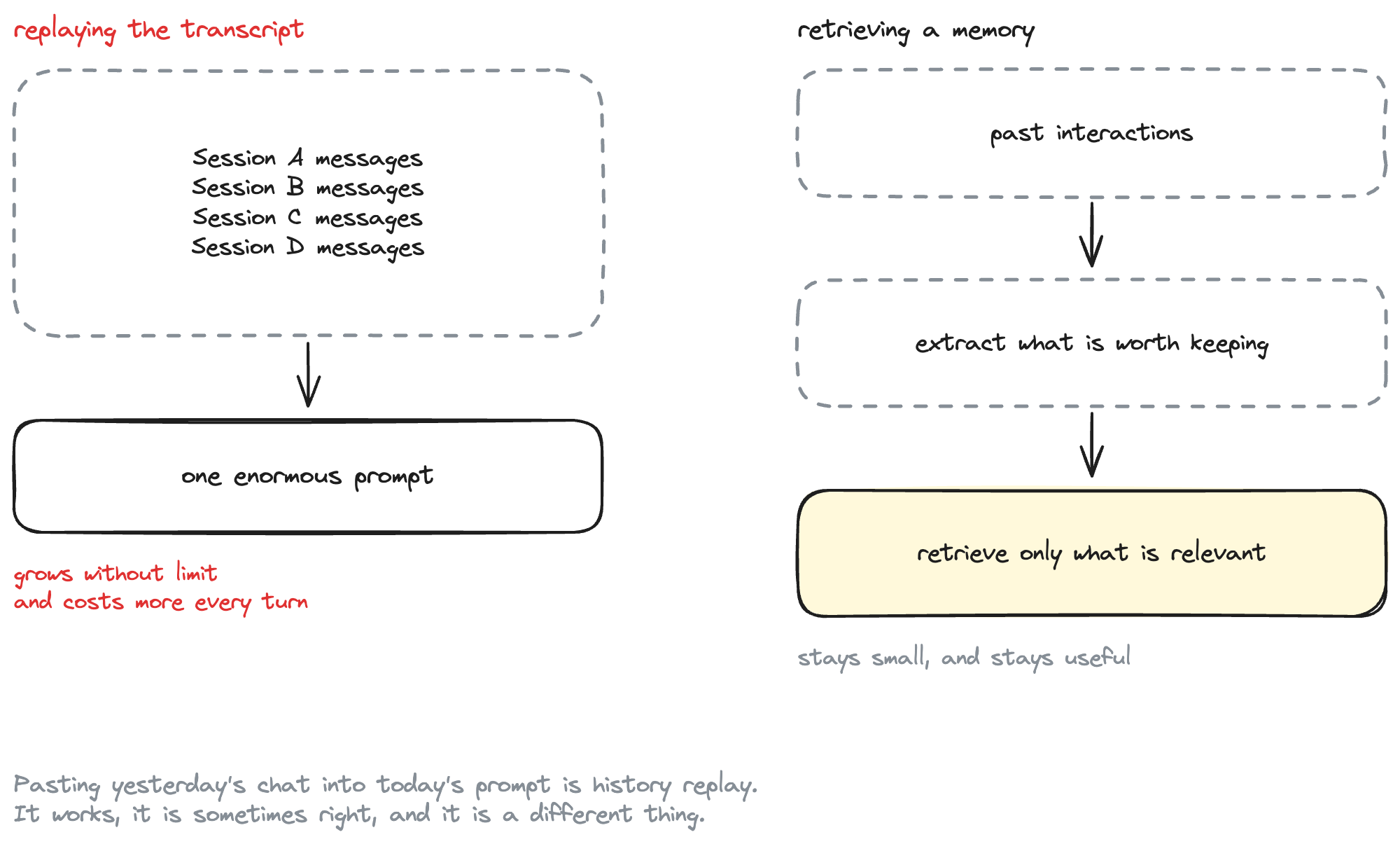
Be clear about what this does and doesn't solve. AgentCore Memory does not automatically fix context management. It gives you two specific things: a managed extraction step that decides what was worth keeping, and a retrieval step scoped by namespace and query. You still choose what to retrieve, how much, and what to do with it.
And extraction is a model making a judgement call. It can keep something wrong, or miss something important. A memory record is not a verified fact.
What happened behind the scenes?
The full lifecycle, in order:
create_eventwrote the conversation to short-term memory.- AgentCore ran the
USER_PREFERENCEstrategy over that event — asynchronously. - Extraction identified the durable insights.
- Consolidation decided whether to write new records or update existing ones.
- The records were filed under
/preferences/sam. - Session A ended. The client kept nothing.
- Session B called
retrieve_memory_recordson/preferences/samwith the new question as the search query. - The returned records went into the system prompt.
- The model answered with information it was never told in that conversation.
The only step our code didn't perform is steps 2–5 — which is the part worth paying someone else for.
Production considerations
- Actor ids.
samis fine for a demo. Prefer an opaque internal id over an email address — it ends up in namespaces and API calls. - Isolate users. The namespace is the boundary. Test it, as check 9 does.
- Design namespaces deliberately. Actor-scoped for anything durable. Adding
{sessionId}is a silent failure, not an error. - Retrieve narrowly. A real query and a sensible
topK, not everything. - Extraction is asynchronous. Don't build a UI that assumes a preference is usable the instant a user states it.
- Retention.
event_expiry_duration(3–365 days) governs raw events. Extracted records outlive them — that's a data-retention decision. - Deletion.
terraform destroyremoves the resource. For "forget me", the data plane hasDeleteMemoryRecord,BatchDeleteMemoryRecordsandDeleteEvent. Infrastructure teardown and user memory lifecycle are different problems. - Evaluate memory quality. Don't blindly trust every extracted memory.
- Least privilege IAM, scoped to the memory ARN.
- Don't log remembered information. It is by definition what a user told you about themselves.
Clean up
terraform -chdir=terraform/environments/demo destroy
rm .env .last_session.json
What did we learn?
- Short-term and long-term memory are different things. Events are the conversation; long-term memory is what a strategy derived from it.
- The strategy does the interesting work. Without one, you get event storage and nothing else.
- Namespaces decide what is retrievable. Actor-scoped for durable memory;
{sessionId}in the namespace breaks cross-session recall silently. - Same actor id, different session id is the whole experiment. Reusing a session id would prove nothing.
- Extraction is asynchronous. Poll with a bound; don't sleep and hope.
- Test the retrieval, not the prose. Assert on the memory records and the prompt, and treat the model's wording as an observation.
- Memory is not replay. If Session A's transcript is in Session B's prompt, you built something else.