Securely Call OAuth-Protected APIs from Amazon Bedrock AgentCore Gateway with AgentCore Identity
Our Gateway exposes tools. But what if the API behind the tool needs an OAuth access token? We could put a client secret in the agent - or we could let AgentCore Identity own the credential and keep token handling out of application code entirely.
Our AgentCore Gateway can expose tools to an AI agent. But many useful APIs aren't anonymous — they expect an OAuth access token.
We could put a client id and secret inside the agent and teach it to request tokens. It works. It also means credential management is now application code: fetching, caching, refreshing before expiry, keeping the secret out of logs, and rotating it later in every place it was copied to.
AgentCore Identity offers another option. The agent calls a normal tool. The credential lives somewhere else.
The problem, concretely
Here is the Orders API we'll protect:
GET /orders/123
→ 401 Unauthorized
GET /orders/123
Authorization: Bearer eyJraW...
→ 200 { "order_id": "123", "status": "shipped" }
Nothing exotic. It's the shape of most internal APIs worth calling.
The question this article answers is what has to change in our agent to make that second request happen. The answer we're going to arrive at is: nothing.
Inbound authentication vs outbound authentication
This distinction is the single most useful thing in this article, so let's get it out of the way first.
Two independent questions. Part 4 answered the first; this post answers the second.
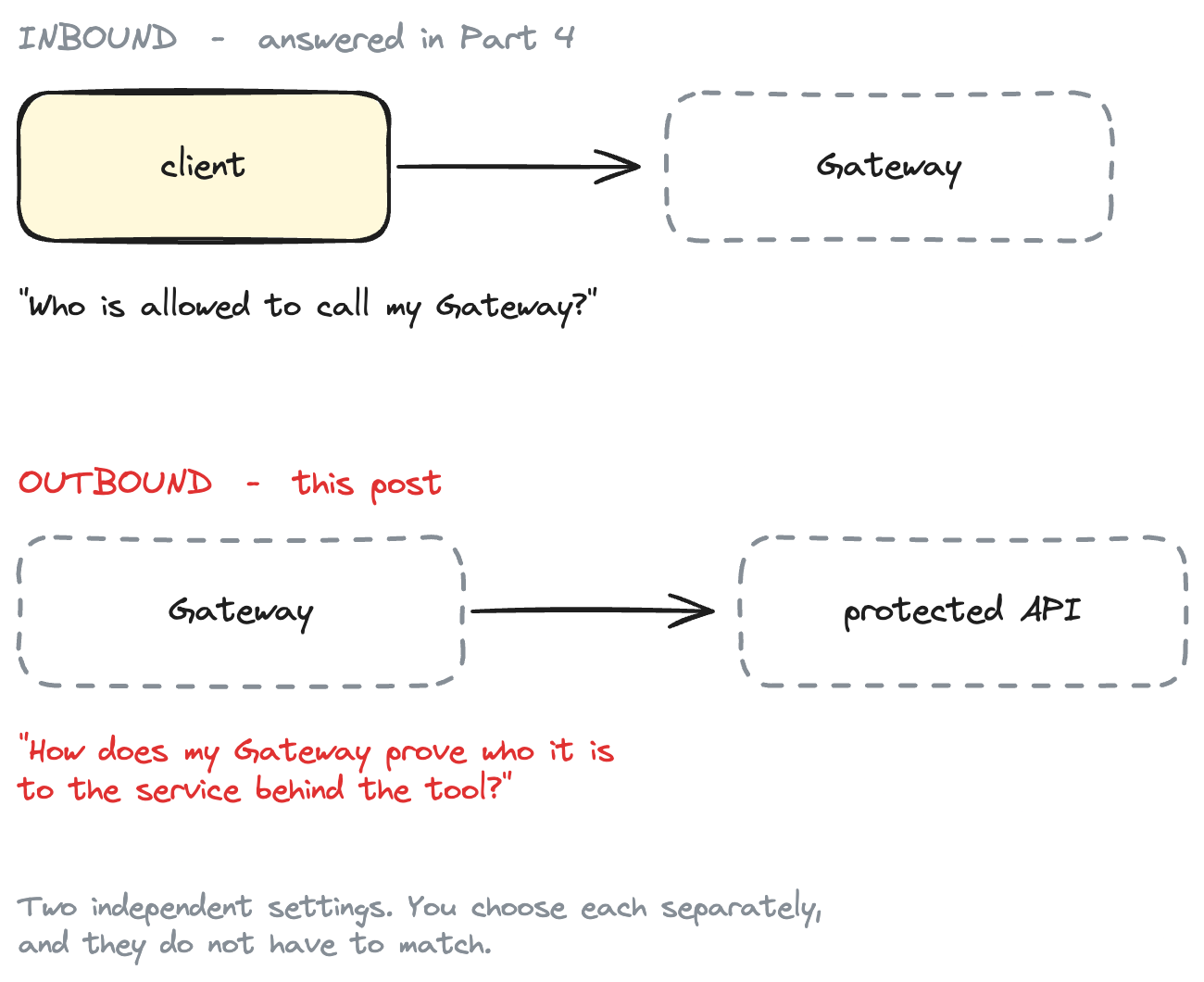
The Part 4 was entirely about the first question — JWT inbound auth, so only authenticated OAuth clients could invoke the Gateway.
This one is entirely about the second. They're independent settings. You choose each separately, and they don't have to match.
To keep the focus, inbound auth here is deliberately boring:
IAM inbound authentication is not the subject of this article. We're using it so we can focus entirely on outbound OAuth.
Our demo client signs requests with SigV4 using ordinary AWS credentials. That's one line of Terraform and no further explanation.
What we're building
The agent never fetches, stores or refreshes the downstream credential.
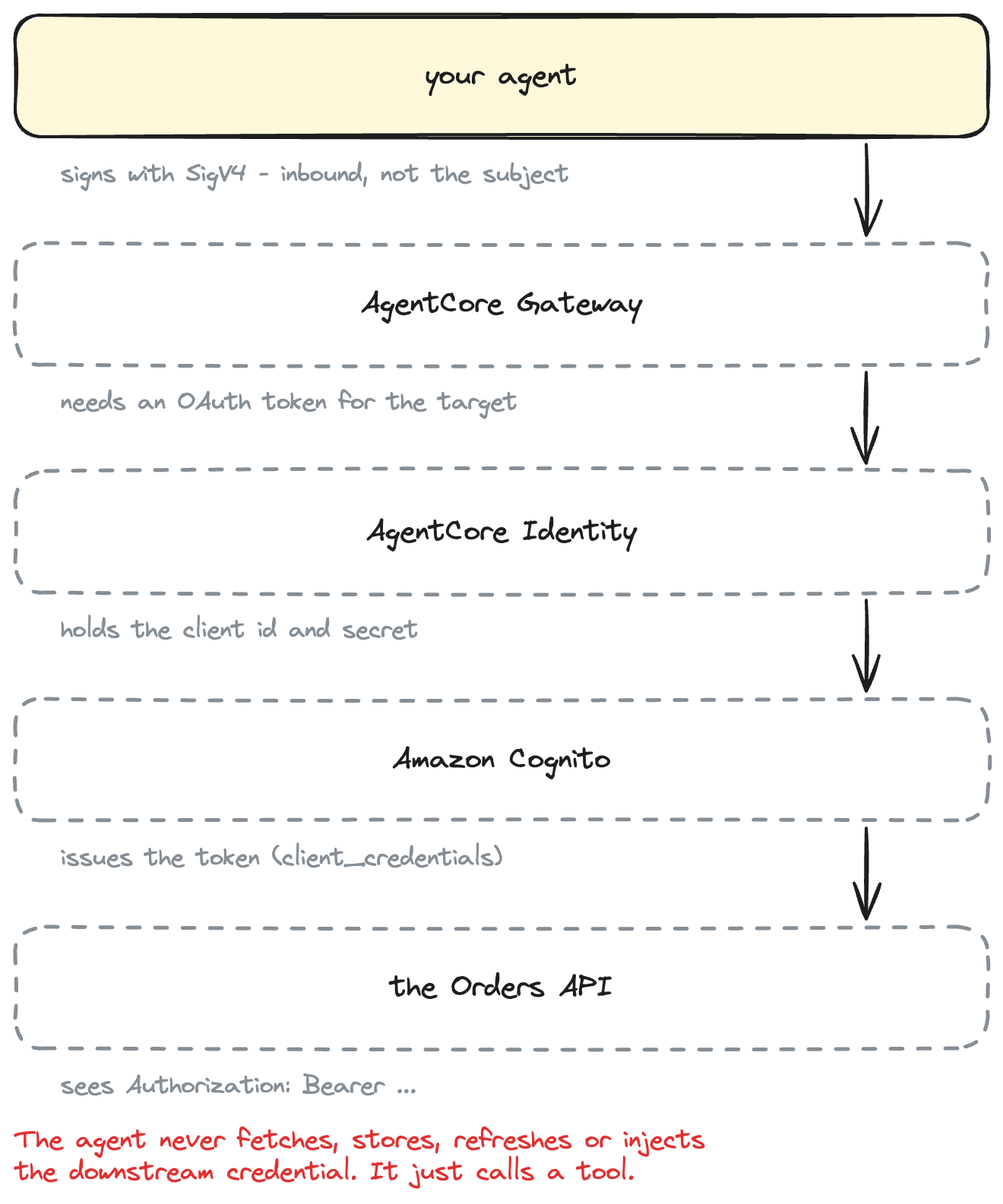
The lesson in one sentence:
The application calling AgentCore Gateway does not fetch, store, refresh, or inject the downstream OAuth credential. AgentCore Identity manages the credential relationship and AgentCore Gateway obtains the appropriate access token when invoking the target.
Terminology, precisely
Loose vocabulary makes OAuth harder than it is. In this article:
| Component | Role |
|---|---|
| Agent / demo client | Invokes AgentCore Gateway |
| AgentCore Gateway | Invokes the downstream API |
| AgentCore Identity | Manages the OAuth credential and token retrieval |
| Amazon Cognito | OAuth authorization server — issues tokens |
| Orders API | OAuth resource server — consumes tokens |
Cognito is not an "IdP" here in the sign-in sense. No human ever authenticates against it. It exists to answer one question: is this workload allowed to read orders?
Where AgentCore Identity fits
Compare the two designs directly.
Without AgentCore Identity
The work did not vanish. It moved somewhere you configure once.
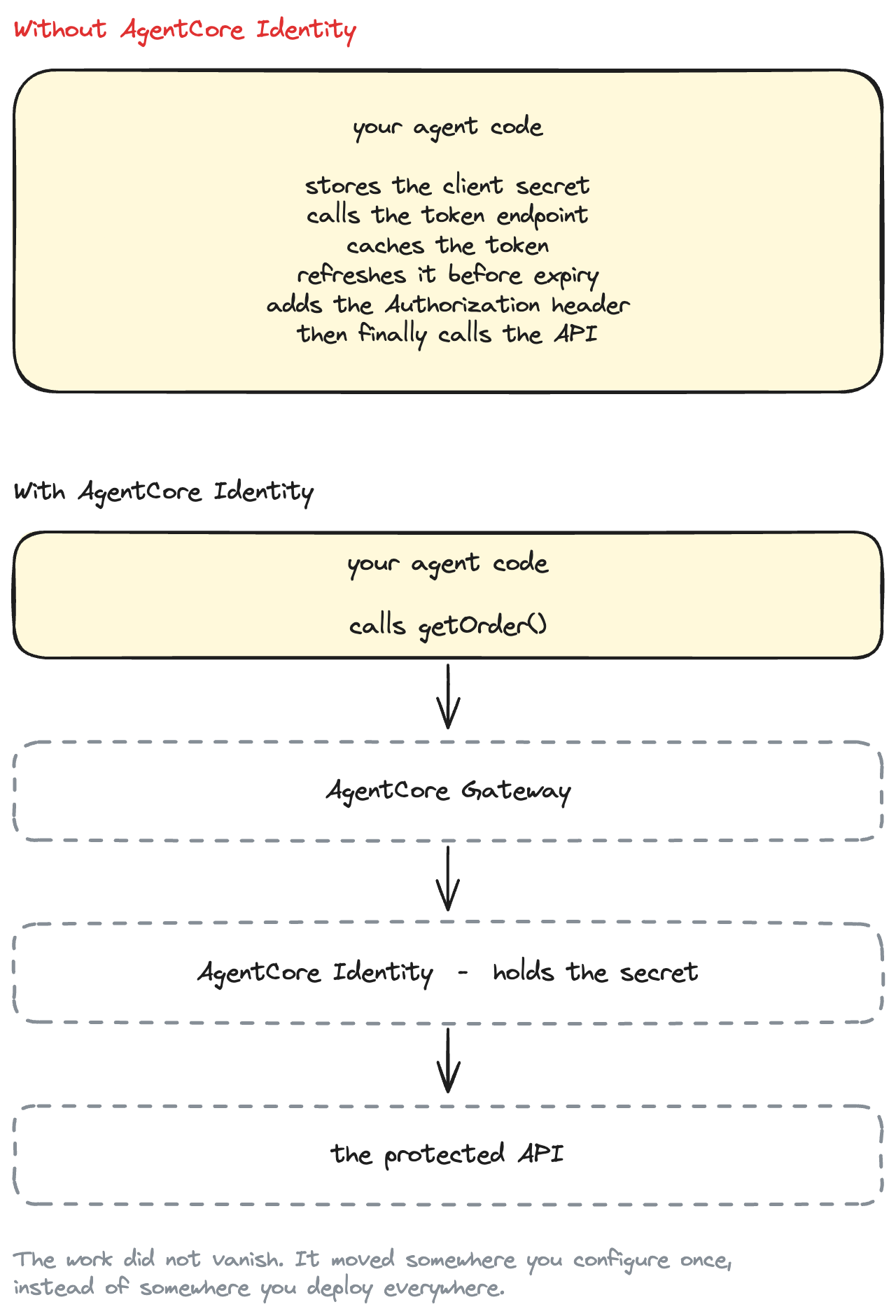
Be precise about what actually moved, though. AgentCore Identity does not make OAuth disappear. Somebody still registers a client, chooses scopes, and rotates a secret one day. What it removes is specifically this:
- the client secret is no longer in application code, config, or the agent's environment
- there is no token-fetching code path to write, test, or get wrong
- there is no token cache, and no expiry bug at 3am
- there is no
Authorizationheader assembled by hand - rotating the secret touches one credential provider, not every deployment of the agent
What it does not remove: choosing correct scopes, understanding what your authorization server puts in a token, and the fact that a downstream API can still say no.
How the Client Credentials flow works
Client credentials is the right grant here because we're authenticating a workload, not a person. There's no user to redirect, no consent screen, no browser.
1. Agent calls an AgentCore Gateway tool.

2. Gateway sees that this target requires OAuth.

3. Gateway asks AgentCore Identity for a resource OAuth token.

4. AgentCore Identity uses the configured OAuth client credentials.

5. Cognito's token endpoint issues a short-lived access token.

6. Gateway adds:  Authorization: Bearer <access_token>

7. Gateway invokes the protected API.

8. API validates the token.

9. API returns the response.

10. Gateway returns the tool result to the agent.
Steps 3 to 6 are the ones we would otherwise have written ourselves.
And the scope answers the authorization question:
Client Credentials answers:

  "What is this workload allowed to do?"

For our demo:

  read orders          (scope: orders/read)
Not "read and write everything". One scope, for one operation.
Prerequisites
- An AWS account with credentials configured
- Terraform >= 1.11 — write-only arguments, which we use for the OAuth secret
- AWS provider >= 6.58 —
aws_bedrockagentcore_oauth2_credential_provider - uv
- A region where AgentCore Gateway and Identity are both available. They must be in the same account and Region; we use
us-east-1.
Project structure
agentcore-identity-outbound-oauth/
├── openapi/orders-api.yaml          the tool definition, effectively
│
├── src/agentcore_outbound_oauth/
│   ├── config.py
│   └── gateway_client.py            SigV4 in, no OAuth anywhere
│
├── scripts/
│   ├── call_gateway.py              the normal path
│   ├── verify_protected_api.py      diagnostic: the API really is protected
│   └── verify_end_to_end.py         the proof
│
└── terraform/
    ├── modules/
    │   ├── oauth-provider/cognito/  authorization server
    │   ├── protected-api/           resource server
    │   └── agentcore-gateway/       Gateway + Identity
    └── environments/demo/
The module boundaries carry the architecture:
module.cognito
    │  discovery URL, token endpoint, client id, secret, scope
    ▼
module.agentcore_gateway ───▶ module.protected_api  (at runtime, with a token)
Note the arrow that isn't there. module.protected_api has no AgentCore inputs at all.
Step 1 — Build a tiny protected API
The Lambda is as small as it can be:
ORDERS = {
    "123": {"order_id": "123", "status": "shipped"},
    "124": {"order_id": "124", "status": "processing"},
}


def lambda_handler(event, context):
    order_id = event.get("pathParameters", {}).get("order_id", "")
    order = ORDERS.get(order_id)
    if order is None:
        return _response(404, {"error": "order_not_found", "order_id": order_id})
    return _response(200, order)
Hard-coded data, no database, no CRUD. The API exists to be protected, not to be impressive.
What makes it genuinely protected is the API Gateway JWT authorizer in front of it:
resource "aws_apigatewayv2_authorizer" "jwt" {
  api_id           = aws_apigatewayv2_api.this.id
  authorizer_type  = "JWT"
  identity_sources = ["$request.header.Authorization"]

  jwt_configuration {
    issuer   = var.jwt_issuer
    audience = var.jwt_audiences
  }
}

resource "aws_apigatewayv2_route" "get_order" {
  route_key = "GET /orders/{order_id}"
  target    = "integrations/${aws_apigatewayv2_integration.orders.id}"

  authorization_type   = "JWT"
  authorizer_id        = aws_apigatewayv2_authorizer.jwt.id
  authorization_scopes = var.required_scopes
}
API Gateway fetches the issuer's JWKS and verifies the signature itself. A request with no token, a forged token, or the wrong issuer never reaches Lambda. And authorization_scopes means a valid token still isn't enough — it has to carry orders/read.
This module takes three inputs — issuer, audiences, required scopes — and knows nothing about AgentCore. It would behave identically if the caller were a cron job or a human with curl.
A Cognito wrinkle worth knowing
Cognito access tokens from a client credentials grant have no aud claim. Resource binding (RFC 8707), the feature that would set one, is explicitly unavailable for client-credentials grants.
That would normally break an audience check. API Gateway handles it explicitly — from the JWT authorizer docs:
audorclient_id– Must match one of theaudienceentries that is configured for the authorizer. API Gateway validatesclient_idonly ifaudis not present.
So for Cognito M2M, the audience list holds the client id:
output "token_audiences" {
  value = [aws_cognito_user_pool_client.machine.id]
}
This is not a weakening. The token is still signature-verified, issuer-checked, expiry-checked and scope-checked. We're just matching the claim Cognito actually issues rather than one it doesn't.
Step 2 — Create the Cognito OAuth resource server
The resource server defines what the token may authorize:
resource "aws_cognito_resource_server" "this" {
  user_pool_id = aws_cognito_user_pool.this.id
  identifier   = "orders"
  name         = "Orders API"

  scope {
    scope_name        = "read"
    scope_description = "Read order details"
  }
}
Cognito builds scopes as <identifier>/<scope-name>, so ours is exactly:
orders/read
Client-credentials grants can only ever carry custom scopes from a resource server — built-in scopes like openid are unavailable to them. No resource server, no scope to request.
Step 3 — Create a machine-to-machine OAuth client
resource "aws_cognito_user_pool_client" "machine" {
  name         = "${var.name}-m2m"
  user_pool_id = aws_cognito_user_pool.this.id

  generate_secret                      = true
  allowed_oauth_flows_user_pool_client = true
  allowed_oauth_flows                  = ["client_credentials"]
  allowed_oauth_scopes                 = local.scopes

  # No interactive login, no authorization code flow, no callback URLs.
  explicit_auth_flows = []

  access_token_validity = 15
  token_validity_units {
    access_token = "minutes"
  }
}
Client credentials needs all three of a client secret, the client_credentials grant, and a user pool domain — miss one and the token endpoint refuses you.
allowed_oauth_scopes is the real ceiling on what a token from this client can ever carry. Cognito silently drops any other scope from a request rather than failing, so this list is doing security work, not documentation.
Fifteen-minute tokens, because there is no revocation for client-credentials access tokens. Short lifetimes are the mitigation. AgentCore Identity handles re-fetching, so short costs us nothing.
Step 4 — Prove the API rejects unauthenticated requests
Before wiring up AgentCore, establish the baseline. Otherwise the success later proves nothing.
uv run python scripts/verify_protected_api.py
1. Calling the API with no Authorization header...
   REJECTED with HTTP 401 ✓

2. Calling the API with an invalid token...
   REJECTED with HTTP 401 ✓

3. Requesting an access token by hand (diagnostic only)...
   TOKEN RECEIVED eyJraW...5g2A (923 chars) ✓
     granted scope: orders/read

4. Calling the API with that token...
   ACCEPTED with HTTP 200: {"order_id": "123", "status": "shipped"} ✓
That script does obtain a token with a client id and secret. It carries this header, in capitals, for a reason:
THIS IS DIAGNOSTIC CODE. Our AgentCore agent does NOT do this.
Requesting a token with a client id and secret is exactly the work that AgentCore Identity performs for us during a normal Gateway invocation. It appears here for one reason: to show that the downstream API really does demand a valid OAuth token, so that the Gateway's success later means something.
Do not copy this into an agent.
Everything from Step 5 on exists to delete that script from your mental model of how the agent works.
Step 5 — Create the AgentCore Identity OAuth credential provider
This is the resource the article is named after:
resource "aws_bedrockagentcore_oauth2_credential_provider" "this" {
  name                       = var.credential_provider_name
  credential_provider_vendor = "CustomOauth2"

  oauth2_provider_config {
    custom_oauth2_provider_config {
      oauth_discovery {
        discovery_url = var.oidc_discovery_url
      }

      client_id_wo                  = var.oauth_client_id
      client_secret_wo              = var.oauth_client_secret
      client_credentials_wo_version = var.oauth_client_credentials_version
    }
  }
}
Four things worth explaining.
CustomOauth2, with a lowercase a. The API enum spells it CustomOauth2; one CLI example in the AWS docs spells it CustomOAuth2. Follow the API reference.
There is a CognitoOauth2 vendor — and we're not using it. The API accepts it, but the Terraform provider ships config blocks only for custom, github, google, microsoft, salesforce and slack. There is no Cognito block to put it in. custom_oauth2_provider_config is the correct choice, and happens to be the more portable one anyway: any OAuth 2.0 server with a discovery document fits.
The discovery URL does the work. AgentCore Identity reads token_endpoint from it. For Cognito that value only exists once a user pool domain does — worth knowing, because without the domain you get a credential provider that looks fine and cannot fetch a token.
_wo means write-only. More on that next.
Step 6 — Keep the OAuth secret out of Terraform state
Long-lived OAuth client secrets in Terraform state are a genuine problem. State is a JSON file that gets copied to laptops, CI runners and S3 buckets, and it records values in plaintext regardless of sensitive = true — which only affects CLI output, not storage.
Terraform 1.11 added write-only arguments for exactly this. The value is sent to the provider and never persisted. You can see it in a plan:
+ resource "aws_bedrockagentcore_oauth2_credential_provider" "this" {
    + credential_provider_vendor = "CustomOauth2"
    + name                       = "agentcore-outbound-orders-oauth"

    + oauth2_provider_config {
        + custom_oauth2_provider_config {
            + client_credentials_wo_version = 1
            + client_id_wo                  = (write-only attribute)
            + client_secret_wo              = (write-only attribute)
(write-only attribute) — no value, in the plan or in state. AgentCore stores the secret in a Secrets Manager secret it manages, readable only by the Gateway service role at invocation time.
The version counter exists because Terraform cannot detect drift on a value it never stored. Bumping client_credentials_wo_version is how you say "send them again" after rotating the secret.
The part most write-ups skip
Write-only arguments do not make this project's secret disappear.
Terraform creates the Cognito app client, so aws_cognito_user_pool_client.machine.client_secret is in state in plaintext. Write-only arguments stop the secret being stored a second time in the AgentCore resource; they cannot un-store the first copy. There's no ephemeral Cognito app-client resource in the AWS provider today that would avoid it.
So the honest guidance is:
- Treat the state file as a secret. Encrypted S3 backend, restricted access. Not the local state file this demo defaults to.
- To remove the secret from Terraform entirely, register the OAuth client outside Terraform (or in a separate, tightly-scoped state) and pass it in via an ephemeral variable.
The demo does the simple thing and tells you what it cost. That seems better than a diagram implying a guarantee it doesn't provide.
Step 7 — Create the Gateway OpenAPI target
Here's a trap worth naming, because the words collide.
AgentCore has a target type literally called API Gateway stage. Our API is hosted on API Gateway. These facts are unrelated, and picking the obvious-looking option leads to a dead end.
From the outbound authorization support matrix:
| Target type | OAuth (client credentials) |
|---|---|
| API Gateway stage | No |
| Lambda function | No |
| OpenAPI schema | Yes |
| MCP server | Yes |
The API Gateway stage target supports IAM, API key, or no authorization. It also only supports REST APIs, not HTTP APIs. So it cannot do what this article is about.
The distinction to hold onto:
Two targets that look the same. Only one can do OAuth.
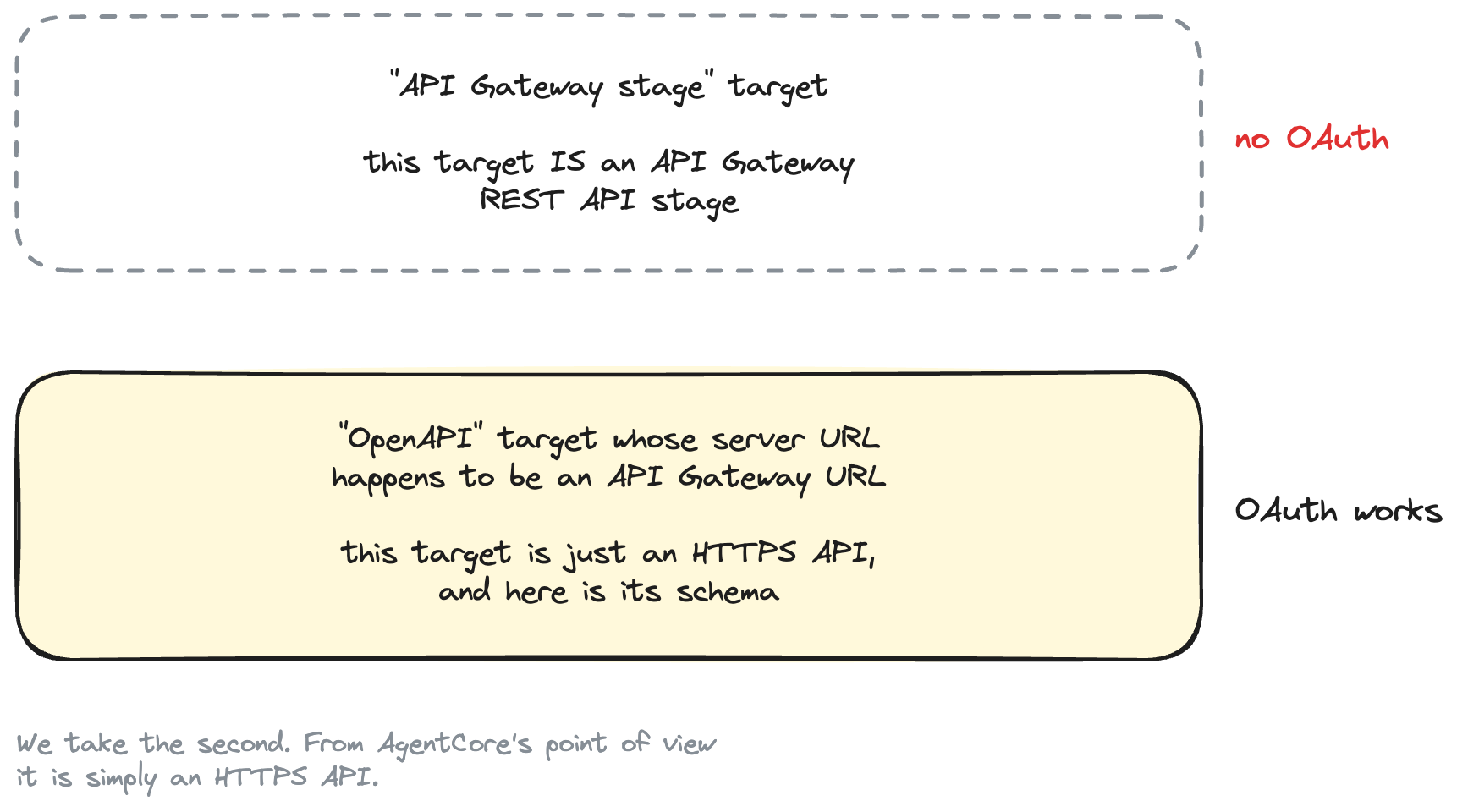
We take the second. From AgentCore's point of view it's just an HTTPS API.
The schema is small:
openapi: 3.0.3
info:
  title: Orders API
  version: "1.0.0"
servers:
  - url: ${api_endpoint}
paths:
  /orders/{order_id}:
    get:
      operationId: getOrder
      summary: Get an order by id
      parameters:
        - name: order_id
          in: path
          required: true
          schema:
            type: string
      responses:
        "200":
          description: The order was found.
          content:
            application/json:
              schema:
                type: object
                properties:
                  order_id: { type: string }
                  status:   { type: string }
operationId becomes the tool name. Gateway prefixes it with the target name, so the agent sees:
ordersapi___getOrder(order_id)
Two constraints that cost real time if you learn them from an error message:
operationIdis required on every operation you want exposed. Without it, target creation fails validation.- No
securitySchemes. AgentCore does not support spec-level security schemes; authentication comes from the target's outbound configuration. Asecurityblock here would imply protection the document doesn't provide.
Also unsupported: oneOf/anyOf/allOf, complex parameter serialisation, and media types beyond the supported list. Our schema stays inside all of that, and tests/test_openapi_schema.py checks each rule so a mistake surfaces in a second rather than mid-apply.
Step 8 — Configure outbound OAuth
The target ties it together:
resource "aws_bedrockagentcore_gateway_target" "api" {
  gateway_identifier = aws_bedrockagentcore_gateway.this.gateway_id
  name               = var.target_name

  target_configuration {
    mcp {
      open_api_schema {
        inline_payload {
          payload = var.openapi_payload
        }
      }
    }
  }

  credential_provider_configuration {
    oauth {
      provider_arn = aws_bedrockagentcore_oauth2_credential_provider.this.credential_provider_arn
      grant_type   = "CLIENT_CREDENTIALS"
      scopes       = var.oauth_scopes
    }
  }
}
That credential_provider_configuration block is the whole outbound story. It says: when you call this target, get a token from that credential provider, using the client credentials grant, for these scopes.
The Gateway service role needs three permissions to make it work:
# Ask AgentCore Identity for a downstream token
actions = ["bedrock-agentcore:GetResourceOauth2Token"]

# The gateway's own workload identity
actions = ["bedrock-agentcore:GetWorkloadAccessToken"]

# Read the secret AgentCore created for the OAuth client
actions = ["secretsmanager:GetSecretValue"]
One oddity: the credentialProviderArn the API returns is in the acps namespace (arn:aws:acps:...:token-vault/...), while the documented IAM policy for GetResourceOauth2Token uses bedrock-agentcore:...:token-vault/.... Our role policy lists both forms, scoped to this one provider, so a first deploy doesn't fail on an AccessDenied you'd struggle to explain.
Step 9 — Invoke the tool through AgentCore Gateway
uv run python scripts/call_gateway.py 123
Gateway: https://orders-gateway-abc123.gateway.bedrock-agentcore.us-east-1.amazonaws.com/mcp
Inbound auth: SigV4 with your AWS credentials
Outbound auth: OAuth, handled by AgentCore Identity - not by this script

Gateway advertises 1 tool(s):
  - ordersapi___getOrder: Returns the current status of a single order.

Calling ordersapi___getOrder(order_id='123') ...
{
  "order_id": "123",
  "status": "shipped"
}
And here is the entire client-side implementation of "call an OAuth-protected API":
with GatewayClient(settings.gateway_url, settings.aws_region) as gateway:
    gateway.connect()
    result = gateway.call_tool(settings.tool_name, {"order_id": args.order_id})
No token. No client secret. No Authorization: Bearer. No cache. No expiry check.
The only Authorization header this code ever produces is SigV4, and botocore writes that:
request = AWSRequest(method="POST", url=self.gateway_url, data=body, headers=headers)
SigV4Auth(credentials.get_frozen_credentials(), "bedrock-agentcore", self.region).add_auth(request)
Compare that with the .env file. The normal path needs:
AWS_REGION=us-east-1
GATEWAY_URL=https://...
TOOL_NAME=ordersapi___getOrder
That's it. The DIAGNOSTIC_* entries alongside them exist only for the Step 4 script. Delete them and call_gateway.py still works — which is the clearest demonstration of the whole idea, and worth thirty seconds of your time.
Step 10 — Prove AgentCore Identity handled the credential
A tool call succeeding is suggestive, not conclusive. Let's actually prove it.
uv run python scripts/verify_end_to_end.py
AgentCore outbound OAuth verification

1. Calling protected API directly, without an OAuth token...
   REJECTED with HTTP 401 ✓

2. Calling protected API directly, with an invalid token...
   REJECTED with HTTP 401 ✓

3. Invoking getOrder through AgentCore Gateway (SigV4 inbound, no token)...
   Gateway accepted the request ✓
     tools: ordersapi___getOrder

4. Gateway calling the protected API via AgentCore Identity...
   OAuth path succeeded - the API returned a result ✓

5. Checking what the protected API logged about its caller...
   AUTHENTICATED - the API saw a verified OAuth token ✓
     client_id: 4j0or3amr4j1lur7uh9vfng3bu
     scope:     orders/read
     Neither value came from this script. AgentCore Identity
     obtained that token and the Gateway presented it.

6. Tool response:
{
  "order_id": "123",
  "status": "shipped"
}

Outbound OAuth verification PASSED

  Same API, two callers:
    this script, directly      -> 401
    this script, via Gateway   -> 200
  The difference is AgentCore Identity.
Step 5 is the evidence, and it's worth understanding why it counts. The Orders Lambda logs the claims API Gateway extracted from the verified token:
claims = event["requestContext"]["authorizer"]["jwt"]["claims"]
print(json.dumps({
    "message": "authorized request",
    "client_id": claims.get("client_id"),
    "scope": claims.get("scope"),
}))
The verification script reads that log line back from CloudWatch. If a client_id appears there, a real, signed, unexpired, in-scope OAuth token reached the API — and the script never created one. It has no client secret in scope and no token-fetching code; a test enforces both.
The before/after contrast is the argument:
Same API, same script, same minute. Only the credential differs.
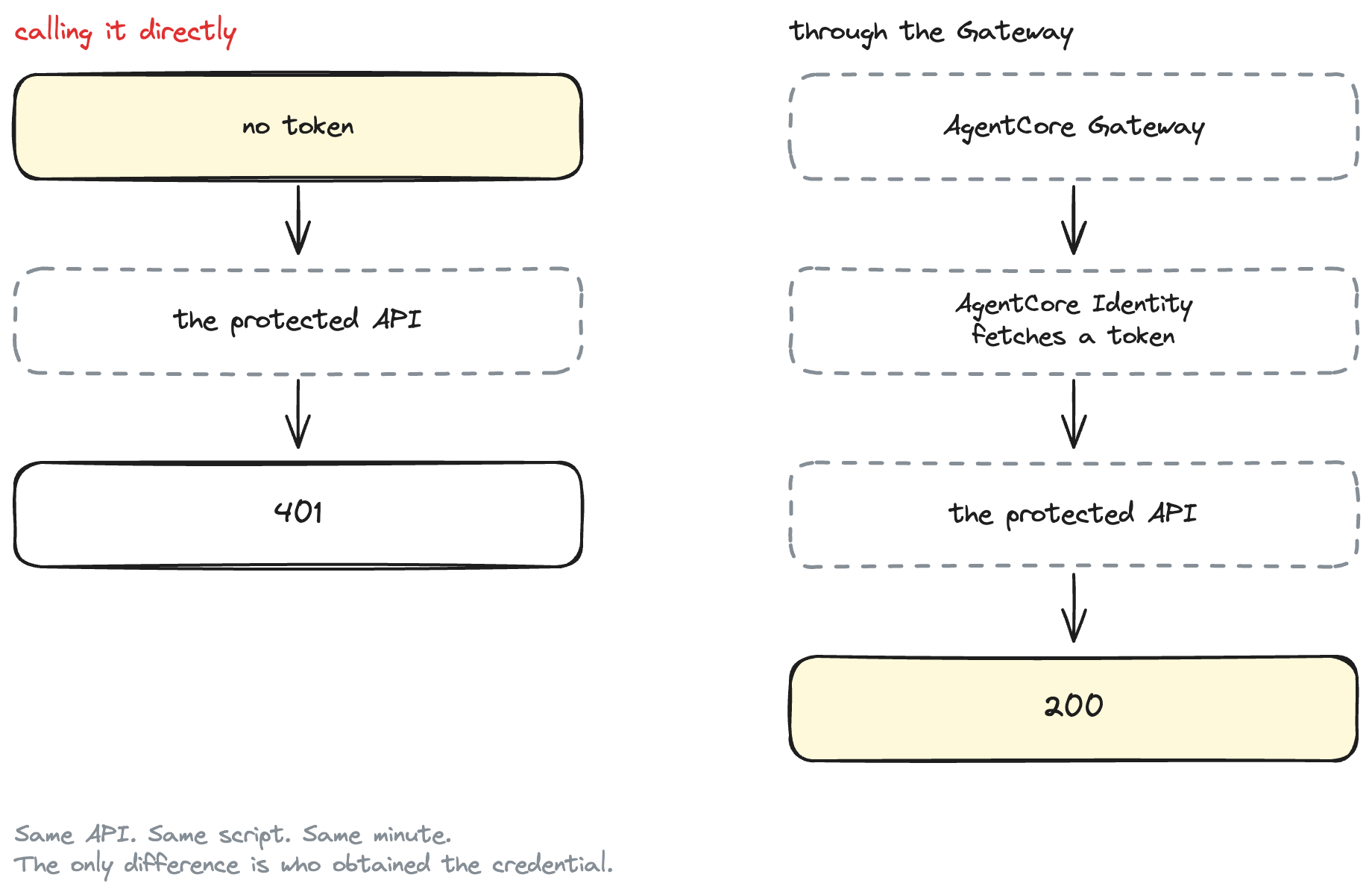
Same API. Same script. Same minute. The only difference is who obtained the credential.
Why not just fetch the token in the agent?
You can. Sometimes you should — a single small service that calls one API is not obviously better off with more moving parts.
The trade is worth naming honestly.
Fetching it yourself costs you: a client secret in the agent's environment (and in every environment it's deployed to), token-caching code, an expiry edge case, a rotation procedure that touches every deployment, and a new way to accidentally log a bearer token.
AgentCore Identity costs you: another AWS resource to understand, a service role with three specific permissions, and a failure mode — a broken outbound hop — that surfaces as an MCP tool error rather than an HTTP status you recognise.
The case for moving it gets stronger as the number of agents grows. Ten agents calling the same API means ten copies of a secret if the agent owns it, and one credential provider if it doesn't.
There's also a boundary argument. When the agent never holds the credential, a prompt injection that convinces the agent to misbehave still can't exfiltrate a client secret the process never had.
Replacing Cognito with your enterprise OAuth provider
We used Cognito because it's reproducible in one terraform apply. AgentCore Identity is the abstraction boundary:
Today:                        Enterprise:

AgentCore Identity            AgentCore Identity
      │                             │
      ▼                             ├── Entra ID
   Cognito                          ├── Okta
      │                             ├── Auth0
      ▼                             └── another OAuth provider
 OAuth access token
What changes when you swap: the discovery URL, how the client is registered, possibly the token endpoint's behaviour, the scope names, the audience or resource parameter, the client authentication method, and any custom OAuth parameters the provider requires. Some providers need extras — that's what the target's customParameters field is for.
What doesn't change: ordersapi___getOrder(order_id). The tool the agent calls is unaffected, and so is every line of gateway_client.py.
That's a real seam, not a pretend one. But don't oversell it either — providers genuinely differ, and "swap the discovery URL" understates the work of getting a client registered in a corporate IdP.
Production considerations
Short and practical.
- Never commit OAuth client secrets.
.envand*.tfvarsare gitignored here. - Use write-only arguments where the resource supports them, and treat Terraform state as a secret regardless — see Step 6 for why both are true.
- Least-privilege scopes.
orders/read, notorders/*. The scope is the answer to "what may this workload do". - Short access token lifetimes. Fifteen minutes here. There's no revocation for client-credentials tokens, so expiry is the mitigation, and AgentCore Identity re-fetches for you.
- Validate issuer, audience and scope at the resource server. All three, not just the signature. Our route does all three.
- Never log bearer tokens. The diagnostic script fingerprints them (
eyJraW...5g2A) and never prints one whole. - Least-privilege Gateway role. The service role is shared across all targets on a gateway — its permissions are the ceiling for every caller. Separate gateways for separate trust boundaries.
- Watch the shared-gateway blast radius. Any caller authorised inbound can invoke any target, and therefore use any credential the gateway holds. That's an argument for splitting gateways, or for a policy engine.
Clean up
terraform -chdir=terraform/environments/demo destroy
rm .env
What did we learn?
- Inbound and outbound authorization are separate settings. "Who can call my Gateway" and "how does my Gateway authenticate downstream" are different questions with different answers.
- AgentCore Identity holds the OAuth client, and the Gateway asks it for a token at invocation time. The agent's code contains no OAuth at all.
- Target type determines what outbound auth you can use. OpenAPI targets support OAuth client credentials; API Gateway stage targets don't. Don't pick by the name that sounds closest to your infrastructure.
- Cognito M2M tokens have no
audclaim, and API Gateway's JWT authorizer falls back toclient_id— so the audience list holds a client id. - Write-only Terraform arguments keep the secret out of state, but only for the resource that uses them. Know where every copy lives.
- Prove the downstream rejection. Without the 401 baseline, a 200 through the Gateway proves nothing at all.